Microsoft is rolling out a new update in the Copilot app on Windows. This upgrade brings an improvement that makes finding your files easier, also to access recent apps and documents quickly. These features are only available to the Windows Insider users for now.
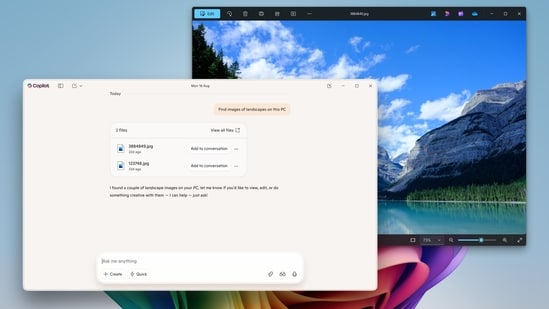
The biggest new feature is the semantic file search which will be available on Copilot PCs. Unlike regular search, this feature lets you search for the files using a natural language. You can now type commands like “find images of my pet on my PC” or “find my CV” to locate the relevant files without needing to remember the exact name of the file or the location.
The search understands the file content and descriptions, making it convenient to find the documents or image files just by describing the content of them. Users can control what Copilot can see or cannot see on the PC from the permission settings.
The update also brings a new Coliot home screen experience that displays your recent apps, files and conversation right there when you open the Copilot app. It is also easier to get help, clicking the recent app starters a guided Vision session and clicking the recent file uploads it to the Copilot automatically and it can quickly summarize or analyse the content for you.
Copilot only shows files from your Windows “Recent” folder, the files that you have recently accessed using apps like Word or Photos. It does not automatically scan your entire PC or upload any files automatically. Files will only appear on the home screen if they are compatible with the Copilot and recently used. You need to give permission if you want to share a file with Copilot for processing.
Users can use vision to get live help based on what's on the screen currently. Files can be uploaded to the chat for quick summaries, insights or assistance. This makes Copilot a versatile assistant for planning and catching up on work. If you want to try these new Copilot features right now then you need to signup for the Windows Insider and install the latest Insider build.