Our special edition Neural Dispatch conversation this week, will be particularly interesting for anyone who is fed up with their Google TV being frustratingly sluggish, serving ads on the Home Screen and carrying a bunch of apps that you don’t need. Not just older Android TVs, but even the 2026 generation Google TVs. Last week has been an exercise in two very clear learnings.
First, Google TV and Android TV smart TVs needn’t be slow, and secondly, just how much bloatware are TV makers loading on the televisions that we buy. If not on day one, the symptoms become clear soon enough—even the newest generation TVs take a lot of time to boot up, load the home screen, general responsiveness lags and apps take their own sweet time to open. If not on day one, soon enough.
TVs running the newest chips and having more memory as well as storage than their predecessors, don’t exactly feel much faster. It is a routine with every TV that I review, to manually disable many of the preloaded apps, to reduce at least some load on the resources for generally better app responsiveness elsewhere. However, there is only so much manual cleaning that Google TV and Android TV platforms allow.
Previously, on Neural Dispatch: Sonos and Plaud define AI utility, Adobe’s report, and Microsoft sells a solution
{{/usCountry}}Previously, on Neural Dispatch: Sonos and Plaud define AI utility, Adobe’s report, and Microsoft sells a solution
{{/usCountry}}It has to be clearly said: Google is equally responsible for the performance mess the smart TV ecosystem is, as much as the TV makers. I mean, who sanctions video ads on the Google TV Home Screen?
Following through with something I saw on X recently, I deployed Claude Code on a 5-year-old Android TV by OnePlus, a 2026 edition flagship Google TV by Xiaomi and a mid-range Google TV by Blaupunkt, to get a fair assessment of what changes are most visible and who benefits more. These are just a broad based sample of the before-and-after scenario, and even the most premium Sony Bravia TVs have their share of unoptimised apps and preloaded content that cannot otherwise be disabled or removed.
Here’s what you need to do…Step 1:
- Sign up for Anthropic’s Claude Pro plan, which costs ₹2,399 per month. The recommendation for Claude Pro is because this includes Claude Code, that has a superior multi-step autonomous agent reasoning, safe logging, and reliable interactive execution compared to OpenAI’s Codex or Google Gemini CLI. It is also better at creating a homepage skin later, as you would see.
- Download the Claude desktop app, and don’t rely on the cloud version on the web. Once that is done, sign in and in parallel, prepare your Google TV or Android TV for the process. Open Settings on the TV > About > tap ‘Build’ section seven times till you see ‘you’re now a developer’ popup > back > scroll to Developer Options > Enable > scroll down to Debugging and enable > if you see an option for Wireless Debugging, enable that too.
- Here’s a basic piece to double-check: The desktop and TV should be connected to the same Wi-Fi and turn off any additional elements such as VPNs during this process.
Here’s the prompt that I used:
I want to debloat my Android TV: remove bloatware and ads, keep only the apps I use. I have seen you help others debloat their TV and want you to do mine. This is a TV I own.
Developer mode and USB debugging are on. TV IP: XX.XX.XX.XX. Same Wi-Fi as this laptop.
Apps I use:
Install ADB if needed and connect. Then list every installed app grouped by category, and mark which ones are bloat, which are safe to keep, and which must never be removed (Live TV, remote/Bluetooth, picture and sound settings, system services).
Ask me before removing anything. Hide apps instead of deleting them so they can be restored, and write a debloat script and a restore script so I can redo or undo this later.
Claude Code will automatically download any tools required (that’s also why I recommend the desktop app) before it connects to the TV. On the TV, you may see a pop-up at some stage—select ‘always allow on this network’ and allow.
Give Claude Code a minute or so to connect with the TV and detect what is installed. It will then flag packages that can be disabled or in other words, ‘debloat’. Equally important, it seems to have a fair idea of what to not remove, such as Live TV or important chip services. What Claude Code does is it disables the bloat instead of removing them completely (which means they can be manually restored later if need be).
You don’t have to worry about those specifics, because Claude will generate the “./debloat.sh
” which can restore any individual app in case you need to re-enable an app.
Now on to the next chapter…Step 2:
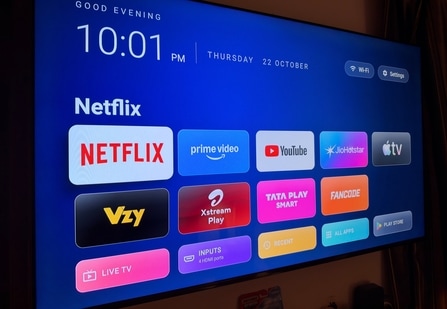
It is now time to build a new launcher to replace Android TV and Google TV home screen interfaces. You should, because the default ones are heavy. In my experience, Google TV uses around 300MB of memory in the more streamlined apps-only mode, while a curated launcher that Claude Code will create will use less than 50MB. You can be creative here with the prompt (think of this as a fresh canvas).
Here’s the prompt that I used:
Build a custom home screen for this TV that replaces Google TV. Make it look like the Apple TV’s tvOS interface with minimal aesthetics, an All Apps screen that integrates Search and Play Store, and a little bit of the glass effect. Before finalising, ask me what rows and buttons I want before you start. Keep two rows on the Home Screen with 5 app tiles each.
When the interface is ready:
Test it by taking screenshots over ADB, and fix anything that looks off.
Before sending any remote key presses, check what's on screen so you don't interrupt me.
Only set it as the default home screen after it works.
Disable the stock launcher if Android won’t change the default, and map the Home key on the remote to the new launcher.
Claude will ask you specific questions in terms of app tile placement, icon treatment, how to treat HDMI sources and Live TV, and what sort of background you’d like. Like I said, think of this as a fresh canvas and be expressive in terms of what you’d like.
The latest, on Wired Wisdom: Baffling Tata Play Smart, Vi prepaid family & gauging Mijia Smart Air Purifier 6
Key takeaways from this experience.
- Smart TVs were never really short on horsepower or memory, they’ve just been extremely badly optimised and implemented over time.
- Before blaming TV makers for unlocked revenue streams, I’ll point to Google first. Android TV, all those years ago, wasn’t exactly fast or smooth (and became worse as time passed with those TVs). The transition to Google TV made things worse with forced discovery of content on the Home Screen interface, all of which took up memory, deployed background processes and slowed everything down from the outset.
- This process has given a new lease of life to my 5-year-old OnePlus Q1 Pro TV. The port debloating experience has had the most profound positive trajectory on this TV. It is clear that the MediaTek MT5670 quad-core chipset with Mali-G51 GPU, 2.6GB memory and 16GB internal storage were more than adequate then, as they are now.
- The newer 2026 edition Xiaomi S Mini LED series which is powered by a quad-core chip with 2GB RAM and 32GB storage, wasn’t exactly a beacon of performance either, with interface stutters galore. Replacing Google’s own unoptimised Google TV interface paired with removing a lot of the OEM apps and unnecessary Google apps on the TV, makes a world of difference. Going by how the OnePlus has discovered renewed performance, the Xiaomi TV too should now have much more future-proofing.
- I was most surprised by how a mid-range Blaupunkt Google TV responded to the debloating using Claude Code. I was surprised because of the amount of preloaded apps even this TV had, and secondly, equally surprised by how fast this hardware combination actually is after the unnecessary apps and services were cleared out.
Three TVs, one pushing age and the other two figuring in different price bands and with differential positioning, have proved that the Claude Code based debloating of Android TVs and Google TVs is worth its weight in gold. Proverbially. The fallout of this awareness, and as more people experiment, is that TV makers will soon start to realise that people see through the game.
I close out with a word of caution. While I have referenced my experience with Claude Code here, you may use pretty much any AI coding tool depending on your proficiency and comfort level to get similar results. Do not hurry through the process and carefully double-check any changes you are making. Be ready to reset and restore to a previous state if you end up with a blank screen or an interface that simply refuses to load—do not force reboot the TV, otherwise the wireless connection between the AI coding tool and the TV may be crucially lost.
Is it a matter of time before Claude and other AI models restrict this reverse-engineering (in a way) of smart TVs?