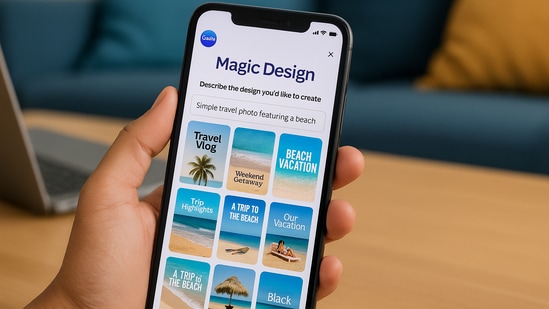
Canva has launched its Magic Design AI feature on mobile devices, allowing users to create visual content directly from their smartphones. The feature, which was earlier available on desktop, is now part of Canva’s mobile app on both Android and iOS.
You may be interested in
47% OFF
TCL 101 cms (40 inches) V5C Series Full HD Smart QLED TV Google TV 40V5C
₹18,990
₹35,990Get This
70% OFF
KUHL Brise E4 1320mm Stylish Power Saving BLDC Ceiling Fan with Remote |30 W | 5 Star | Low Noise | IoT- operates via Mobile & Alexa | Reverse Mode |5 Yrs Warranty on Motor | Free Installation |Black
₹4,299
₹14,500Get This
The tool allows users to enter a short prompt or upload an image. The app then generates a set of design options. Users can select from those options and make changes as needed. The goal is to help people create ready-to-use graphics without needing design experience or access to a computer or a laptop.
How does it work?
Magic Design AI is simple to use. After opening the app, users can type a few words such as "sale poster" or "event invitation" or upload a photo. Based on that input, the tool shows several layout options. These can be edited, saved, and shared within the app.
The tool handles choices like font pairing and layout spacing so users can focus on their message. The process takes only a few seconds from start to finish.
Made for everyday users
This update is aimed at people who need to create designs quickly and are often working from a phone. For example, someone managing a small shop or a student preparing a class project can now use Magic Design AI directly from their mobile device.
Melanie Perkins, co founder and chief executive of Canva, said the company wants to make the design process easier for everyone. Making advanced tools available on mobile supports this goal by giving users access without extra steps.
Free access with extra tools for pro subscribers
The mobile version of Magic Design AI is included in Canva’s free plan. App users can create designs with standard features. Those who subscribe to Canva Pro can use extra templates, brand settings, and editing tools. However, the main feature of Magic Design AI is available to all Canva members at no cost.
This approach allows a wide range of people to try the tool without needing to pay or go through a long setup.
Part of Canva's growing AI toolkit
{{/usCountry}}This approach allows a wide range of people to try the tool without needing to pay or go through a long setup.
Part of Canva's growing AI toolkit
{{/usCountry}}Magic Design is one of several AI features Canva has added over the past year. Other tools include Magic Write, which helps users create written content, and Magic Edit, which lets users adjust images using simple inputs. These tools are built to support different tasks within the design process.
As more people create content for work, school, or personal use, Canva is building tools that match those needs. By launching Magic Design AI on mobile, the company is helping users create designs wherever they are and whenever they need them.
The feature is now available and can be accessed by updating the Canva app on the App Store or Google Play.