Key specifications:
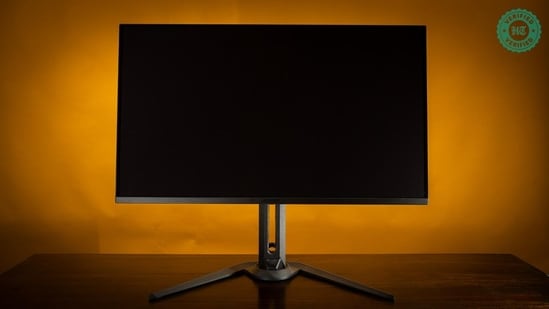
| Spec | Value |
|---|---|
| Panel | 31.5" QD-OLED |
| Resolution | 3840 × 2160 |
| Refresh | 240 Hz |
| Response | 0.03 ms GtG |
| Video In | DP 2.1 · HDMI 2.1 |
| MSRP | ₹87,000 |
Most monitors take around a fortnight to review. It probably takes as long as a month to really understand them from a performance standpoint. This particular review has taken me two years to put together. There’s a distinct difference between using a review unit and actually living with a device — spending hours in front of it whether to play games, edit videos or compile the most mundane spreadsheets.
Back in 2024, and before I picked up the Gigabyte FO32U2P, I was using two setups. The first, a Mac-based setup, was permanently in my studio hooked up to a calibrated 4K monitor for video and photo editing, and the other was a gaming PC in my bedroom hooked up to a fast 2K monitor.
I'd always wanted to combine the two setups but I hadn't found an appropriate solution for two very simple reasons: The first was simply that I hadn't yet found a 4K monitor that was both fast enough for gaming and accurate enough for video production. The second was that I couldn't find a KVM switch – a device for switching video and USB inputs between multiple PCs and a single monitor – that could handle a fast 4K monitor.
As luck would have it, a new batch of 4K OLED monitors had just dropped and Gigabyte offered me an FO32U2P for review.
{{/usCountry}}As luck would have it, a new batch of 4K OLED monitors had just dropped and Gigabyte offered me an FO32U2P for review.
{{/usCountry}}The U2P was a pricey option at the time — retailing at around ₹1.3 lakh at launch — but it was the answer to all of my setup woes. It was fast (4K @ 240 Hz), colour accurate(ΔE<2), and fully compatible with Mac (97% DCI-P3 once calibrated). Best of all, it had a built-in KVM switch and USB hub that would let me seamlessly switch peripherals and display output between both my MacBook and my gaming PC without compromising on refresh rate or image quality.
I tested the monitor, fell in love with it, and ordered one the moment I'd saved up enough. Today, two whole years and a significant price drop later, the monitor remains just as impressive as it was in 2024, and I'm here, with hard data, to tell you exactly why. I'll also be taking a closer look at burn-in (spoiler alert: there's none) after two years of continuous use.
Design befitting a premium panel
The Gigabyte FO32U2P — henceforth shortened to U2P — is a 3rd-generation QD-OLED display with a 32-inch panel, 4K resolution, and a 240 Hz refresh rate. While I bought it for ₹1,26,000 in 2024, the monitor currently retails at ₹87,000.
The build, as befitting a premium panel, is of excellent quality. The stand offers all the flexibility one would need – tilt, swivel, and height adjustment – and has a wide footprint that keeps the display stable. That footprint is perhaps a bit too wide, however, as the gap between the legs measures nearly two feet. On that front, both Dell's Alienware and ASUS's ROG monitor lineups offer a more compact stand. Height adjustment is stiffer than I'd like, but given that height is not something I adjust very often, I'm not too fussed about it.
Viewed from the side, the panel is thinner than an iPhone. This isn't unusual for an OLED display which lacks the backlight, Fresnel lens and other paraphernalia for light management, but it can still catch you off guard if you haven't used an OLED before. The rear frame is all metal, though, which I believe serves the dual purpose of added rigidity as well as heat dissipation, which is needed to maintain the long-term health of an OLED display.
| Spec | Value |
|---|---|
| Panel Size | 31.5" |
| Panel Type | OLED |
| Resolution | 3840 × 2160 (UHD) |
| Display Viewing Area (H × V) | 699.48 × 394.73 mm |
| Pixel Pitch | 0.181 (H) × 0.181 (V) mm |
| Display Surface | Anti-Reflection |
| Display Colours | 10-bit (1.07B) |
| Colour Saturation | 99% DCI-P3 |
| Brightness | 250 cd/m² (Typ, SDR APL 100%) 1000 nits (Typ, HDR APL 3%) |
| Contrast Ratio (Typ.) | 1.5M:1 |
| Viewing Angle | 178° (H) / 178° (V) |
| Refresh Rate (Max) | 240 Hz |
| Response Time | 0.03 ms GtG |
| HDR Support | VESA DisplayHDR True Black 400 |
| VESA Certified ClearMR | ClearMR 13000 |
| Flicker-free | Yes |
| Factory Calibration | Yes, ΔE < 2 |
Excellent connectivity
The U2P has an impressive selection of inputs. You'll find an integrated USB hub rated for USB 3.0 speed – for data transfer – as well as a USB-C input capable of 65W power delivery. This last, and the KVM switch, is why the U2P works so well for 2-in-1 setups. In effect, I was able to connect and power a MacBook or similar class of Ultrabook to the monitor via a single cable. This method gives power for the Mac, display output, as well as a USB hub for sharing peripherals and storage media.
Note that 65W is not sufficient for powerful workstations and gaming laptops, but it's more than sufficient for a MacBook Air, 14" Pro, and most other work laptops.
You also get two HDMI 2.1 ports (required for 4K 240 Hz operation) as well as two DisplayPort 2.1 inputs. The DP2.1 ports are nice to have but in my opinion superfluous as the feature is more relevant for today's 4K 480 Hz and faster panels than this 240 Hz one. Still, DP2.1 does enable higher quality and uncompressed video transmission which certain professionals may prefer. What I can tell you is that for the average gamer and editor, it's not going to make a difference.
Those with multi-monitor setups will be interested to learn that the U2P lets you daisy chain up to three additional displays. The U2P features an additional DP 1.4 port as an output to which you can connect an additional monitor, and if you have three more U2Ps (and very deep pockets no doubt), all of them can link with each other. Not having such deep pockets, this is one feature I couldn't test for myself.
A class-leading display, with some caveats
Officially, the U2P is rated as having a max brightness of 250 nits — half that of a MacBook Air display — which on a regular LCD display I would consider too low. Owing to the U2P's near infinite contrast ratio, it's almost too bright and I rarely set brightness above 50% (about 120 nits)
Coming to colour accuracy (which I measured with DisplayCal paired with the X-Rite i1Display Pro Plus colorimeter), out of the box performance was impressive. While a variety of colour modes are available, I'd recommend sticking to just two: Standard and sRGB.
I found the default or 'Standard' mode to be a touch oversaturated but more enjoyable when playing games and watching movies much in the same way that one would prefer punchy bass to clinical accuracy when watching The Avengers for the umpteenth time.
The included sRGB mode was my go-to for photo and video work, but I found it to be a touch washed out for colour critical work. Thankfully, the monitor is very amenable to calibration and it only took half an hour with a colorimeter to get everything dialed in to near clinical accuracy (ΔE<0.3).
| Spec | Value |
|---|---|
| HDMI | 2 × HDMI 2.1 |
| DisplayPort | 1 × DisplayPort 2.1 (UHBR 20) in 1 × DisplayPort 1.4 (HBR3) out |
| Mini DisplayPort | 1 × mini DP 2.1 (UHBR 20) |
| USB Type-C | 1 × USB Type-C (Alternate Mode, Upstream port, Power Delivery up to 65 W) |
| USB | 2 × USB 3.2 Downstream 1 × USB 3.2 Upstream (5 Gbps) |
| Earphone Jack | Yes |
| Microphone Jack | Yes |
| Speakers | 5 W × 2 |
Speaking of colour, I'd also recommend using this monitor in a dimly lit room or without a strong backlight. It's a highly reflective panel and worse, shows a strong magenta tint under bright light. That magenta tint is expected from OLEDs of course so it's not a knock against the U2P per se.
HDR is where I had complaints. Gigabyte's spec sheet claims that the monitor is capable of 1000 nits HDR – the gold standard that only a handful of very expensive displays can manage today. What the sheet doesn't tell you is that this is only possible in a specific mode (HDR Vivid), or that this mode ruins image quality by every other metric except brightness. Another thing to note is only 3% of the display can hit 1000 nits at any given time. Full-field brightness – when the display is completely white – is still only 250 nits.
Realistically, the monitor only gets to 400 nits in HDR mode while maintaining some semblance of colour accuracy. 400 nits, for reference, is still less bright than the max brightness of a MacBook Air display (500 nits), which, by the way, doesn't even have HDR support.
In movies and in gaming this limited HDR support often presents as excessively bright spot lights and high contrast, but this is usually more distracting than pleasant. In Gears of War E-Day, for example, I found that the lights on Marcus' armour shine like blinding beacons in the dark and moody in-game lighting. Movies and games set in brighter, more open areas fare better as individual elements won't get as bright.
Whatever the case, I feel HDR on the U2P is more of a fun gimmick than something that adds real value.
| Spec | Value |
|---|---|
| Power Type | Power Adapter |
| Voltage | AC 100–240 V ~ 50/60 Hz |
| Power Consumption | 78 W* |
| Power Saving Mode | < 0.5 W |
| Power Off Mode | < 0.3 W |
A superb gaming monitor
I've been gaming on U2P for two years and now that I'm used to it, returning to an LCD is jarring. Contrast and colour accuracy aside, it's the virtually non-existent ghosting and motion blur (measured with Testufo) that have me hooked.
Most LCD monitors suffer from a phenomenon called ghosting where a "ghost" of the previous frame is visible while a new one is being rendered. This happens because the individual pixels take time to transition from one colour to another, and ends up being problematic in fast-paced games like Counter-Strike or Valorant where any movement can appear slightly blurry. It's in this department that OLED shines.
It's hard to describe just how much of an upgrade OLED is for gaming and is something that can only be experienced in person. The best analogy I can give is that it's like a film is being peeled away from a camera lens. Everything is suddenly clearer and sharper and you'll notice movements and details that were once hidden.
To be clear, this phenomenon is not unique to the U2P as OLEDs in general are 10-15x faster than the average LCD. Every other 3rd-gen QD-OLED monitor I've tried delivered a similarly revelatory experience when gaming. Where the U2P does have a clear edge, though, at least in my experience, is...
... text clarity
LCD displays use what is called a stripe RGB layout, where the red, green, and blue sub-pixels (refer to the image above) are placed side-by-side in a vertical orientation. The U2P and similar OLEDs use a layout where red and blue subpixels sit on top of a row of green subpixels.
In effect, when rendering text, all three subpixels (red, green and blue) are used in the case of an LCD display, but on the edges only the red and blue, or only the green subpixel is used in the case of an OLED. As seen below, the result is purple (mixing red and blue makes purple) and green fringing on the top and bottom of text elements.
This is a problem for all OLED displays, but the U2P handles this colour fringing really well, even compared to other 3rd gen OLED panels in the same class. Purple fringing is apparent if you go looking for it, but text is clear enough that I didn't miss my LCD monitors once these past two years.
Burn-in, or lack thereof
All OLED monitors will inevitably suffer from a phenomenon called burn-in. The individual pixels on an OLED monitor degrade over time, losing their ability to maintain brightness and colour the more they're used. This damage, visible as dim and discoloured patches on the monitor, is permanent and cannot be fixed.
Think of a candle flame, which slowly burns and dims over time before eventually dying. This is what is happening inside an OLED panel as you use it. Areas of the screen that are brighter will "burn up" more of each pixel much like how a larger wick will make a candle burn faster but deliver more light.
To mitigate this, it's recommended to set your OLED panel to a lower brightness (I set the U2P to 50%) and to use the suite of built-in burn-in mitigation features that all OLEDs come with. In the case of the U2P, these are clubbed under 'OLED Care'.
I used this monitor for about 8 hours a day for two years. I followed Gigabyte's recommendations and left all OLED care features on and set to run automatically, and I set brightness to 50% of the max value.
As can be seen from the image below, there's not even a hint of burn-in on the U2P. If there was, I could just contact Gigabyte and get the monitor replaced under warranty (3 years).
Verdict: The ultimate 2-in-1, even in 2026
Till I tried the Gigabyte FO32U2P, I wasn't sure I'd find a monitor that could be just as effective for gaming as it would be for video editing, and yet here we are. With near flawless colour accuracy, exceptional motion clarity for gaming, not to mention a KVM switch, USB hub, and 65W power delivery for MacBooks and the like, the U2P offers a rare combination of premium quality and features that few in the industry have topped.
The monitor was impressive in 2024 and remains impressive in 2026. Newer panels have fixed a lot of the issues I had with the U2P, this includes a film for reducing the magenta tint under bright light, tandem OLED tech for true 1000-nit HDR, and even better text clarity thanks to better tech, but these upgrades are also quite expensive and, in my opinion, not enough to justify ditching the U2P.
At today's MRP of ₹87,000, the U2P still manages to hold its own in a sea of superlative displays, even on the value front.
| Pros | Cons |
|---|---|
|
|
Review unit purchased from Vedant Computers for ₹1,26,190 in October 2024.
| Test Area | Rating (/10) |
|---|---|
| Best-in-class connectivity and I/O thanks to USB 3.2 and DP2.1 support | 9.5 |
| Sturdy stand with good flexibility. Height adjustment is stiff, however. | 8.5 |
| Colour gamut includes DCI-P3 support | 9.5 |
| Factory calibration is near perfect, requiring minor calibration only | 9.5 |
| Excellent near-black performance | 9.5 |
| Excellent screen uniformity with no visible variation | 10 |
| Minimal to no quality loss at extreme viewing angles | 9.5 |
| Limited HDR support with low max HDR brightness and coverage | 6.5 |
| Highly reflective glossy panel with strong magenta tint | 6.5 |
| Excellent motion response | 9 |
| Superb text clarity for an OLED panel | 8.5 |
| Excellent value-for-money at current MSRP | 9 |
| Overall rating | 8.8 |
Glossary
HDR: High Dynamic Range, a technology that widens the gap between the darkest and brightest parts of an image so highlights sparkle without crushing shadows. It’s only as good as the screen displaying it, and a dim panel with an HDR sticker is often little more than marketing.
KVM switch: A device (or monitor feature) that lets you control multiple computers with a single keyboard, mouse and display. Handy for anyone juggling a work laptop and a personal PC.
Nits: The unit used to measure display brightness, equal to one candela per square metre. Phones above 1,500 nits stay readable in direct sunlight, while HDR TVs often aim for 1,000 or more.
OLED: Organic Light-Emitting Diode, a display type in which each pixel makes its own light, allowing perfect blacks and superb contrast. The trade-offs are cost, lower sustained brightness than the best LCDs, and the risk of burn-in.
OLED burn-in: The permanent ghosting of static elements such as logos, taskbars or news tickers, which happens when some pixels age faster than their neighbours. It’s rare with varied use today, though not impossible, and manufacturers fight it with pixel shifting and refresh routines.
You may be interested in
68% OFF
GIGABYTE GS27QA 27" SS IPS Display, 180Hz, 2560 x 1440 (QHD), 1ms (MPRT) Response Time, 100% sRGB, HDR Ready, Flicker-Free, Black
GIGABYTE GS27QA 27" SS IPS Display 180Hz 2560 x 1440 (QHD)
₹14,199
₹45,000Get This
74% OFF
GIGABYTE G25F2A 24.5-Inch FHD IPS Gaming Monitor, 240Hz, 1ms, AMD FreeSync Premium, HDR Ready, Ergonomic Stand, Eye-Safe Gaming Display
GIGABYTE G25F2A 24.5-Inch FHD IPS Gaming Monitor 240Hz 1ms
₹11,999
₹45,999Get This
GIGABYTE GS22F12I 21.5" FHD VA 120Hz Monitor with 1ms MPRT, 4000:1 Contrast, 109% sRGB, 95% DCI-P3, HDMI & VGA
GIGABYTE GS22F12I 21.5" FHD VA 120Hz Monitor with 1ms MPRT 4000:1 Contrast 109% sRGB
₹15,000
Get This
26% OFF
Acer SA272U P1 27 Inch WQHD (2560x1440) IPS Ultra Slim Monitor | 144Hz Refresh Rate | 1ms VRB | HDR10 | AMD FreeSync | HDMI 2.0 + DisplayPort 1.4 | Built-in Dual Speakers | VisionCare | Black
Acer SA272U P1 27 Inch WQHD (2560x1440) IPS Ultra Slim Monitor | 144Hz Refresh Rate | 1ms VRB | HDR10 | AMD FreeSync | HDMI 2.0 + DisplayPort 1.4 | Built-in Dual Speakers | VisionCare | Black
₹11,888
₹15,999Get This
21% OFF
BenQ MA320UP (Smartchoice) 32” (81.28 cm) 4K IPS Nano Gloss Monitor for Mac®, 3840x2160, 60Hz, 97% P3, Dual USB-C 90W/15W PD, Mac Colors,550 nits, Mac Controls, Ergonomics,3W x2 Speakers (Gray)
BenQ MA320UP (Smartchoice) 32” (81.28 cm) 4K IPS Nano Gloss Monitor for Mac® 3840x2160 60Hz
₹56,999
₹72,500Get This
38% OFF
ASUS ProArt PA32QCV 32 Inch 6K DCI-P3 Thunderbolt 4 Monitor for Mac | Calman Verified, 98% DCI-P3, Delta E<2, LuxPixel AGLR, MacBook Color Match, Auto KVM, DisplayHDR 600, Ergonomic Stand
ASUS ProArt PA32QCV 32 Inch 6K DCI-P3 Thunderbolt 4 Monitor for Mac | Calman Verified 98% DCI-P3 Delta E<2
₹1,55,990
₹2,50,000Get This
19% OFF
BenQ MA320U, 32Inch (68.58 cm), 4K IPS 3840x2160, 60Hz, Monitor for Mac®,97% P3 Color Gamut,99% sRGB, HDMI, Dual USB-C(90W PD),HAS Stand,Display Pilot2.0, 3WX2 Speakers,Integrated Mac® Controls(Gray)
BenQ MA320U 32Inch (68.58 cm) 4K IPS 3840x2160
₹52,490
₹65,000Get This
44% OFF
LG 32U631A-B 32-inch QHD (2560 x 1440) IPS Computer Monitor, 100Hz, 5ms, HDR10, Reader Mode, Flicker Safe, HDMI, USB Type-C 15W PD, Black
LG 32U631A-B 32-inch QHD (2560 x 1440) IPS Computer Monitor 100Hz 5ms
₹22,590
₹39,999Get This
40% OFF
Samsung 32" (80cm) 2K ViewFinity S6 Monitor|QHD 2560 X 1440|IPS|Type-C 90W|SRGB 99%|LAN Port|KVM Switch|350nits|Daisy Chain|PIP|PBP|HDR10|Easy Setup Stand|HAS Pivot Adjustable|LS32D604UAWXXL|Black
Samsung 32" (80cm) 2K ViewFinity S6 Monitor|QHD 2560 X 1440|IPS|Type-C 90W|SRGB 99%|LAN Port|KVM Switch|350nits|Daisy Chain|PIP|PBP|HDR10|Easy Setup Stand|HAS Pivot Adjustable|LS32D604UAWXXL|Black
₹29,899
₹50,000Get This
36% OFF
Acer KA270 P6 27 Inch IPS Full HD Backlit LED Monitor I 144Hz Refresh Rate, 1MS VRB, AMD FreeSync I 99% sRGB I 1 x VGA 1 x HDMI with Inbox HDMI Cable I Zero Frame Design I Eye Care I Stereo Speakers
Acer KA270 P6 27 Inch IPS Full HD Backlit LED Monitor I 144Hz Refresh Rate 1MS VRB AMD FreeSync I 99% sRGB I 1 x VGA 1 x HDMI with Inbox HDMI Cable I Zero Frame Design I Eye Care I Stereo Speakers
₹10,800
₹16,999Get This
80% OFF
Zebronics Full HD LED Monitor, 21.5 Anti-Glare Screen, 100Hz Refresh Rate, Ultra Slim, Bezel-Less Display, 250nits Brightness, HDMI & VGA, Wall Mountable (A122)
Zebronics Full HD LED Monitor 21.5 Anti-Glare Screen 100Hz Refresh Rate
₹4,699
₹22,999Get This
54% OFF
Dell SE2725HG 27" FHD IPS Gaming Monitor, 200Hz Refresh, 3side narrow bezels, 1ms GtG, AMD FreeSync Premium, HDR 10, 300nits, 1000:1 Contrast, 99% Srgb, Tilt, 2*HDMI 2.1 TDMS(supports HDMI VRR),DP 1.4
Dell SE2725HG 27" FHD IPS Gaming Monitor 200Hz Refresh 3side narrow bezels
₹9,999
₹21,729Get This
68% OFF
FRONTECH 20-inch (50.8 cm), LED, HD 1600x900, 60Hz, Black, Wall Mountable Slim & Stylish Design, 16.7M Colors, HDMI & VGA Ports, Built-in Power Supply Monitor, 1 Year Warranty (MON-0054)
FRONTECH 20-inch (50.8 cm) LED HD 1600x900
₹2,574
₹8,000Get This
27% OFF
Samsung 27" Odyssey QD-OLED G6 Gaming Monitor(Smartchoice) | QHD 2560 x 1440| 240 Hz| 0.03ms | Ergonomic Stand | Pantone Validated| Glarefree | TrueBright 300| G-Sync| Free Sync| LS27HG612SWXXL| Black
Samsung 27" Odyssey QD-OLED G6 Gaming Monitor(Smartchoice) | QHD 2560 x 1440| 240 Hz| 0.03ms | Ergonomic Stand | Pantone Validated| Glarefree | TrueBright 300| G-Sync| Free Sync| LS27HG612SWXXL| Black
₹46,899
₹63,900Get This
28% OFF
Acer SmartChoice SA242Y E 23.8 Inch Full HD IPS Monitor I 100Hz Refresh Rate I 1ms VRB I AMD FreeSync I Ultra Slim ZeroFrame Design I VisionCare I HDMI & VGA Inbox HDMI Cable I VESA Mount I Black
Acer SmartChoice SA242Y E 23.8 Inch Full HD IPS Monitor I 100Hz Refresh Rate I 1ms VRB I AMD FreeSync I Ultra Slim ZeroFrame Design I VisionCare I HDMI & VGA Inbox HDMI Cable I VESA Mount I Black
₹6,088
₹8,499Get This
23% OFF
Lenovo Legion 27Q-10 | 27" (68.58cm) QHD IPS 240Hz Gaming Monitor | 0.5ms, AMD FreeSync, NVIDIA G-Sync 99% sRGB, 2xHDMI 2.1 TMDS, 1xDP 1.4| Tilt, Swivel, Pivot, Height Adjust | Black | 68C6GAC4IN
Lenovo Legion 27Q-10 | 27" (68.58cm) QHD IPS 240Hz Gaming Monitor | 0.5ms AMD FreeSync NVIDIA G-Sync 99% sRGB
₹18,299
₹23,790Get This
25% OFF
LG 32UN880K 32" (81.28cm) 3840x2160 Pixels Ultrafine Display Ergo UHD 4K IPS Display with HDR 10 Compatibility and USB Type-C Connectivity, Tilt/Height/Swivel/Pivot/Extend/Retract, Black
LG 32UN880K 32" (81.28cm) 3840x2160 Pixels Ultrafine Display Ergo UHD 4K IPS Display with HDR 10 Compatibility and USB Type-C Connectivity Tilt/Height/Swivel/Pivot/Extend/Retract Black
₹44,900
₹59,999Get This
20% OFF
BenQ GW2486TC 24inch (60.45cm) IPS 100Hz Full HD Coding Monitor |USB-C(65W PD)| Daisy Chain| 99% sRGB| Height Adjust|HDMI| DP| USB Hub| 2Wx2 Speakers| Eye Care| Noise Cancelling Microphone (White)
BenQ GW2486TC 24inch (60.45cm) IPS 100Hz Full HD Coding Monitor |USB-C(65W PD)| Daisy Chain| 99% sRGB| Height Adjust|HDMI| DP| USB Hub| 2Wx2 Speakers| Eye Care| Noise Cancelling Microphone (White)
₹15,990
₹19,990Get This
64% OFF
ZEBRONICS Zeb-V19Hd 18.5 Inch (46.99 Cm) Led Monitor with Supporting Hdmi, Vga Input, Hd 1366 X 768 Pixels, 16.7M Colors, Glossy Panel, Slim Design & Wall Mountable, Black
ZEBRONICS Zeb-V19Hd 18.5 Inch (46.99 Cm) Led Monitor with Supporting Hdmi Vga Input Hd 1366 X 768 Pixels
₹2,499
₹6,999Get This