Motorola Razr Fold Review: With foldable phones now 8 years old, interest among mainstream consumers appears to be rising rapidly, with global foldable shipments projected to grow by 21% YoY. Yet only a handful of brands, especially Samsung, have emerged as the first choice. Consequently, this has made them complacent, providing little incentive to overhaul this absurd category.
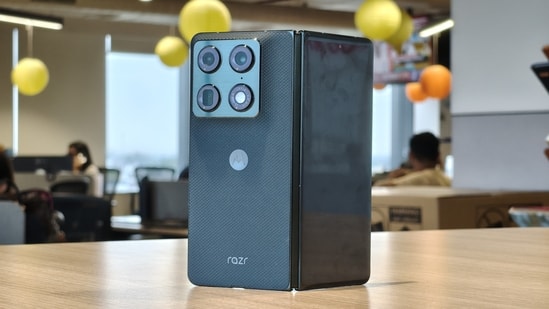
Considering all this, it is truly refreshing to see Motorola enter the book-style foldable segment with its first folding smartphone, the Razr Fold. Despite being the first in its lineup, the Razr Fold has all the hallmarks of a challenger to the established players. The phone is closer in thickness to an average glass slab, packs a full-fledged 50MP triple-camera setup, and runs on capable hardware. But that’s not it; it even sports a 6,000mAh battery, something the Samsung Galaxy Z Fold series has yet to achieve.
The feature-packed spec sheet sets the tone, suggesting that Motorola has done its assignment well enough to start disrupting the status quo. But one must wonder whether it has fully committed to developing a polished product, or merely created an illusion of excellence. So I spent a month testing the Razr Fold, and here’s what I found:
Motorola Razr Fold Specifications:
Specification | Details |
|---|---|
Price | 1,49,999 rupees (12GB + 256GB) |
Cover Display | 6.56-inch LTPO pOLED display, 165Hz |
Internal Display | 8.1-inch LTPO pOLED, 165Hz |
Cover Display Resolution | 2520 x 1080 pixels |
Internal Display Resolution | 2484 x 2232 pixels (2K) |
Processor | Snapdragon 8 Gen 5 |
RAM & Storage | 12GB RAM, 256GB storage and 16GB RAM, 512GB storage |
RAM & Storage Type | LPDDR5X and UFS 4.1 |
Build Quality | 243 grams, IP46, IP48 & IP49 ratings, and Corning Glass Ceramic 3 on front |
Primary Camera | 50MP Sony Lytia 828 with f/1.6 and OIS; up to 4K 60fps video recording |
Ultra-wide Camera | 50MP with f/2.0; ; up to 4K 60fps video recording |
Telephoto Camera | 50MP periscope with f/2.4, 3.5x Optical Zoom, and OIS; up to 4K 60fps video recording |
Front Camera (Cover display) | 20MP; up to Full HD 60fps video recording |
Connectivity | Wi-Fi 7, Bluetooth v6.0, eSIM and NFC |
Battery | 6000mAh, 80W fast charging, 50W wireless charging |
Motorola Razr Fold Display: A screen worth unfolding
Let’s address the elephant in the room first: the display, particularly the crease on the internal screen. The inside panel definitely includes the crease, but Motorola has managed to make it shallow. It only appears when the light falls on the surface at a specific angle; otherwise, it remains hidden from our view.
Even when the crease emerges, it doesn’t break the immersion because Motorola has done such a phenomenal job of tuning the 8.1-inch internal display that it keeps us thoroughly entertained. Particularly during gaming in landscape mode, I could feel the crease as my thumb glided over the virtual joystick, but it never disrupted my flow or pulled me out of the experience.
{{/usCountry}}Even when the crease emerges, it doesn’t break the immersion because Motorola has done such a phenomenal job of tuning the 8.1-inch internal display that it keeps us thoroughly entertained. Particularly during gaming in landscape mode, I could feel the crease as my thumb glided over the virtual joystick, but it never disrupted my flow or pulled me out of the experience.
{{/usCountry}}That gave me enough confidence to ditch my MacBook and rely on the Razr Fold's internal display for all my shows and movies for a month. During those sessions, I was always impressed by how expertly it handled a rich mix of colours, giving every shade a chance to stand out without overpowering the others. This was particularly evident when I binge-watched Tensura and Daemon of the Shadow Realm. Even while catching up with the live-action series, particularly India’s Got Latent, I noted that every scene appeared crisp and clear.
And given the unusual aspect ratio of 8:7.2, black bars do appear above and below nearly all videos on the internal display. That said, the content leaves less space for them than on the Galaxy Z Fold7. To me, they lend the videos a more cinematic look (but, of course, this is subjective).
In contrast, the cover display, with its 21:9 aspect ratio, presents content in a much more familiar way, as it closely matches that of a standard smartphone. This also gives both thumbs enough breathing space to type a long message comfortably.
During my use, I also noticed that games like Wuthering Waves and Genshin Impact showed more of the game world on the cover screen rather than cropping the HUD to match the internal display’s aspect ratio. However, picture quality remains consistent across both displays, with the cover display delivering rich colours, deep blacks, and sharp visuals as the larger panel.
The other common aspect both displays share is the 165Hz refresh rate, which genuinely makes the overall interface smooth and responsive. Moreover, the inner and cover screens remain legible in bright outdoor settings, as they often boost their brightness to over 1800 nits.
Motorola Razr Fold Software: Brilliant ideas, unfinished execution
Beyond acing the large folding display, it’s the software aspect that primarily determines whether it is productive to go for a foldable smartphone or rather invest in a regular variant. And here, Motorola has mostly got the fundamentals right. Like any foldable in the market, the Razr Fold also offers a dock at the bottom of the internal display, allowing users to drag and open multiple apps simultaneously. That said, apps on the home screen cannot be opened with a drag gesture; instead, they require a tap, which I find pretty inconvenient.
Aside from this minor quirk, Motorola has implemented an otherwise intuitive drag feature to utilise the multi-window layout on the main display. Sliding three fingers across the screen, whether vertically or horizontally, lets users open another app.
Performing the same gesture horizontally on the existing pair of apps invokes the option to add a third app to the screen, if someone wants to use three apps together. It’s worth noting that all three apps occupy vertical space on the display at a 16:9 aspect ratio.
The Hello UI on the Razr Fold also lets more apps open in resizable floating windows.
On a similar subject, I have a bone to pick with Motorola. Converting the active full-screen app into a floating window is quite cumbersome on the Hello UI. Instead of dragging from any top corner to access this layout, as Samsung One UI offers, one must tap the freeform window handle in the upper middle of the screen to achieve the desired result.
In addition, Motorola offers several features that take full advantage of the foldable form factor. One of them is Laptop mode. It transforms the bottom half of the internal display into a touchpad. The bottom screen also offers quick controls for screenshots, multitasking, brightness, and more. It even brings up the keyboard automatically whenever a text field is selected on the top screen.
Motorola has also integrated Desk Display. It shows the clock, weather, notifications, and more when the Razr Fold is locked in tent or stand mode. That said, I primarily use foldables for entertainment rather than productivity. As a result, I rarely found myself returning to either feature after the initial few days.
While Motorola has laid a solid foundation for multitasking, the overall software experience does not feel as polished. Hello UI packs plenty of features, but their execution remains inconsistent. For instance, Moto AI still struggles to understand Indian accents, resulting in transcripts and summaries riddled with errors. The Update Me feature also tends to miss notifications, undermining its usefulness. Even beyond AI, the interface lacks the fluidity of rivals, with occasional clunky animations interrupting an otherwise smooth experience.
Though Motorola has incorporated some quality-of-life features into the Razr Fold, people often commend the Hello UI for them. The list includes widely known gestures, such as chop-chop to activate the flashlight or twist to open the camera. But the brand has gone a step further by making it easier for users with small hands to access notifications via a swipe gesture on the power button.
With all things considered, these thoughtful additions still don’t offset the inconsistent Moto AI execution and the interface's rough animations. The Razr Fold's asking price will draw more attention to these flaws as they do not align with a smartphone of this stature.
Motorola Razr Fold Audio and Haptics: Entertainment, amplified
Aside from the display, the Razr Fold’s stereo speakers have also been prioritised, and it shows in the audio quality. They command the mids and highs with confidence and even handle the low end of the spectrum pretty well. That’s not it; they can effortlessly deliver room-filling audio at 80% volume. Even when pushed to 100% volume, they hardly distort the music. Rather than having one speaker do the heavy lifting, both the upper and lower speakers deliver audio at similar volumes, creating a convincing stereo effect. Considering all this, over a month of using the Razr Fold, the stereo speakers kept my ears free of earbuds and rocked my body with richer, fuller sound.
Let’s now switch to the haptic feedback, which Motorola didn’t just overlook when developing its first book-style foldable. Whether adjusting the volume, typing on the keyboard, or swiping back to the home screen, the vibration felt strong and satisfying. It has a punch to the feedback that people expect from a smartphone worth ₹1.5 lakh.
Motorola Razr Fold Battery and Charging: Freedom without compromise
Considering the Razr Fold is Motorola’s first attempt at a book-style foldable, I am pretty impressed by how its battery life held up over my month of use. First, let’s see how its 6,000mAh battery performs against a regular smartphone in our PCMark battery test:
| Motorola Razr Fold (when closed) | Motorola Razr Fold (when open) | Motorola Edge 70 Pro Plus | |
|---|---|---|---|
| Runtime in PCMark Battery test | 16:12:00 | 11:17:00 | 14:07:00 |
With the Edge 70 Pro Plus packing a 6,500mAh battery, the table underscores that Motorola has nailed the Razr Fold’s battery optimisation. When we factor in that the internal display consumes a huge amount of power to stay active, it is mind-blowing that the phone still delivers an acceptable runtime in its open state.
By the way, it’s worth noting that the PCMark battery test was left running on both phones with Wi-Fi enabled and brightness set to 70%.
The Razr Fold’s battery lived up to its benchmark performance even in everyday use, and I often ended the day with 45% to 50% remaining for the next day. This figure reflects moderate use, with the internal display accounting for the majority of my screen time.
Rounding off the excellent battery package is the Razr Fold's 80W fast charging. It took just 55 minutes to go from 0% to 100% in my testing, which feels reassuring for a foldable with such a large battery.
Motorola Razr Fold Design and Build Quality: Beauty with an identity crisis
Motorola’s obsession with its signature camera layout and faux-leather back truly eclipses the Razr Fold’s otherwise premium, robust build. I say this because a glance at the brand’s entire lineup reveals that smartphones, from the affordable series to the flagships, share nearly the same distinct styling.
This strategy does give its phones a recognisable identity and sometimes makes them look exquisite despite their budget pricing. But this can’t be excused for the Razr Fold, given its asking price of ₹1.5 lakhs. It goes without saying that people form their first impression of any product just by glancing at its design. Having the ultra-premium smartphone share the same design language as its budget counterparts is bound to severely hurt its image, which the Razr Fold is already suffering from. I witnessed this firsthand when I showed the Razr Fold to my colleagues and friends.
Having said that, Motorola somewhat redeems itself with the Razr Fold’s thoughtful, robust chassis. First off, it has slightly curved the two ends of the foldable inwards to reduce the effort required to open the folding screen. However, applying the bundled bumper case on the Razr Fold somewhat nullifies this effect. Beyond this, Motorola has also curved the cover display on all four sides, seamlessly blending it into the rounded exterior. This eliminates any protruding edges that would otherwise dig into your palm, making the Razr Fold more comfortable to hold.
Motorola’s attention to detail also shows up in the hinge of its book-style foldable. For starters, the edges above and below the mechanism have been rounded off, preventing them from digging into the base of the thumb when holding the phone in our left hand. The brand has built the hinge such that the top screen stays open at approximately 100° even when someone abruptly shakes the Razr Fold. When folded shut, the hinge and the raised bumper surrounding the internal display leave very little room for dust to enter between the two halves of the screen.
Regarding build quality, despite its delicate folding mechanism, the Razr Fold never once made me anxious about its durability. It’s embarrassing to admit, but I accidentally dropped the phone from waist height. At that moment, I was almost at the last stage of grief. Fortunately, it survived the fall with no damage in sight. Honestly, the metal frame and the Corning Gorilla Glass Ceramic 3 coating on the cover display truly came in clutch at that moment. Motorola has also paid similar attention to the Razr Fold's water ingress protection, equipping it with IP46, IP48, and IP49 ratings to guard against accidental water exposure.
The design aspect of the Razr Fold that truly impressed me was its thickness. Coming from the OPPO Reno 14 Pro, I barely noticed any difference in thickness when I picked up the phone when it was folded shut. It also feels slightly heavy in this form. But unfolding the internal display evenly distributes the weight across the entire space, making the phone noticeably more comfortable to hold.
Motorola Razr Fold Performance: Speed without the spotlight
The performance aspect is where Motorola has cut corners on the Razr Fold, but it is done so well that I don’t have any issues with it. The brand has picked the Snapdragon 8 Gen 5 SoC as the processor of choice for its book-style foldable. For those uninitiated, this chipset is essentially the Snapdragon 8 Elite SoC, Qualcomm’s flagship processor from last year, with slightly underclocked CPU and GPU cores. Moreover, it has been built for phones priced between ₹55,000 and ₹70,000.
While most other brands use the latest flagship chipsets in their foldables, they often throttle them to prevent overheating. As a result, these processors end up matching the performance of their tier-below variants.
In contrast, Motorola has essentially given the Snapdragon 8 Gen 5 free rein in the Razr Fold, allowing it to handle any intensive workload without any issue. And this shows in our benchmarks.
| Benchmark | Motorola Razr Fold |
|---|---|
| Antutu Benchmark | 3005895 |
| Geekbench Single-core | 2681 |
| Geekbench Multi-core | 9209 |
| CPU Throttling | 61.00% |
| 3DMark Wildlife Extreme | 5123 |
| 3DMark Wildlife Extreme Stress Test | 58.70% |
| 3DMark Solar Bay Extreme | 793.00 |
| 3DMark Solar Bay Extreme Stress Test | 75.90% |
In regular use, all my tasks, whether it be social media browsing, web surfing for research, or casual gaming, felt consistently smooth and responsive, with no noticeable hiccups. This level of refinement also carries over to more demanding games.
| Motorola Razr Fold | |
|---|---|
| Avg FPS (High Graphics at 60fps) in Genshin Impact | 60.9 |
| 5% Low FPS (High Graphics at 60fps) in Genshin Impact | 43.7 |
| Avg FPS (High Graphics at 60fps) in Wuthering Waves | 36.8 |
| 5% Low FPS (High Graphics at 60fps) in Wuthering Waves | 24.3 |
To put things into perspective, I played Genshin Impact and Wuthering Waves for 20 minutes each on the Motorola Razr Fold. As a rule of thumb, the smaller the gap between the average FPS and the 5% low FPS, the smoother the gameplay feels. The phone handled Genshin Impact well, delivering a smoother, more consistent experience, while Wuthering Waves pushed the hardware harder. Even then, it never became excessively stuttery and remained playable throughout.
Motorola Razr Fold Camera: Every walk became a photo walk
Motorola has clearly put a lot of thought into the Razr Fold's cameras, and it shows. Aside from one minor gripe, I unexpectedly found myself enjoying photography with this phone. To put the cameras through their paces, I spent an afternoon walking through Lodhi Art District before ending the photo walk at Lodhi Garden.
The primary camera consistently delivered pleasing daylight shots with excellent detail and subtle colours that closely resembled the original scene. More importantly, the telephoto and ultra-wide cameras maintain the primary camera's natural colour science. HDR processing is equally impressive, retaining excellent detail in both the shadows and highlights across all three lenses.
The telephoto camera was the biggest surprise. Even at 65x zoom, it managed to freeze a constantly hopping bird with enough detail to leave me genuinely impressed. Even when AI enhancement kicks in beyond the telephoto camera's native zoom range, Motorola avoids the heavily oversharpened look seen on many smartphones, producing images that appear far more natural. As unbelievable as it sounds, the Razr Fold is a surprisingly competent tool for casual birdwatching.
The ultra-wide camera also impresses, capturing expansive scenes with plenty of detail. Its only caveat is that subjects and backgrounds near the edges lose some detail and occasionally exhibit minor artefacts compared to the centre of the frame. Indoors, all three cameras continue to reproduce natural colours while preserving fine textures despite the trickier lighting.
The only aspect that did not sit well with me was portrait mode. While edge detection is generally reliable, the ISP introduces an overly aggressive background blur, giving portraits a hazier and more artificial appearance than I would have liked.
Motorola Razr Fold review: Verdict
After spending a month with the Razr Fold, I came away convinced that Motorola has taken its first step into the book-style foldable segment with remarkable confidence. The display quickly became my go-to screen for entertainment. The cameras made every photo walk enjoyable. The battery life rarely gave me cause for concern, while the performance remained consistently smooth from day one. But it does have flaws one can’t overlook. Hello UI still needs refinement, and the familiar design language feels underwhelming for a smartphone that costs ₹1.5 lakh. Yet those shortcomings never overshadow the overall experience. More than anything, the Razr Fold proves that Motorola is no longer content with simply joining the foldable race. It has arrived to challenge the brands that have dominated it for years.