Your Apple iPhone will soon unlock even if you are wearing a mask. Soon, if you wish to wait for the final release of the iOS 15.4 software sometime in the next couple of weeks. But right now, if you feel brave enough to try the public beta version of iOS 15, which is now available. Yet, iOS 15.4 will be bringing a lot of new features and functionality, to the extent that you wouldn’t normally associate with periodical updates.
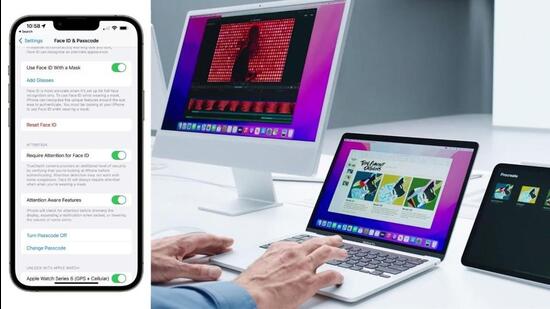
This is what is on the menu. Universal control if you have an iPad, all third-party apps taking advantage of the 120Hz ProMotion display, custom email domains in iCloud, the Emoji 14 bundle, adding notes to iCloud Keychain passwords, updates to Shortcuts app automations, scan text in notes and reminders app, in addition to the Face ID upgrade that now works well with face masks.
The way Face ID, the facial recognition feature in iPhones, works is that it uses the TrueDepth camera that’s looking at you to match your face against the face that you saved when setting up facial recognition on your new iPhone. It’ll deploy infrared project thousands of invisible dots on the face of the person trying to unlock the iPhone to analyze and match the facial features as well as depth. Till now, anything blocking the sight of your full face, would mean Face ID wouldn’t complete the authentication.
The update with iOS 15.4 will be that if you are wearing a face mask, Face ID would understand that and instead of relying on mapping your entire face, it will instead rely on the new periocular method to focus on your eyes and the area around it. The only limitation here would be that this option is expected to work on the iPhone 12 series and newer iPhones – that is Apple A14 Bionic and newer processors. Incidentally, the iPad Pro will not get this versatility, just yet.
{{/usCountry}}The update with iOS 15.4 will be that if you are wearing a face mask, Face ID would understand that and instead of relying on mapping your entire face, it will instead rely on the new periocular method to focus on your eyes and the area around it. The only limitation here would be that this option is expected to work on the iPhone 12 series and newer iPhones – that is Apple A14 Bionic and newer processors. Incidentally, the iPad Pro will not get this versatility, just yet.
{{/usCountry}}Apple has always claimed that the error rate for Face ID accidentally unlocking the iPhone to an incorrect match is 1 in 1,000,000. We do not know yet if this will change once the Face ID with a mask feature is finally rolled out. That said, the feature itself is still in the testing stage (albeit close to the final stages) and there may be tweaks and improvements in the upcoming iOS 15.4 beta versions, before the final software is made available.
Third party apps on your iPhone 13 Pro models will start to look a lot better if the support for 120Hz refresh rate is rolled out as expected. Tasks such as scrolling, viewing media and transitions will look a lot smoother.
The Universal Control feature, which is part of the iPad OS 15.4 beta for the iPad family, will introduce the much-awaited multitasking upgrade. You’ll be able to keep your Mac (any Mac, be it a MacBook or iMac, as long as it is running macOS Monterey 12.3 beta) and an iPad next to each other and use the two as extensions of each other. The Mac keyboard and mouse, for instance, can control the interface of the iPad too. Moving apps will be simpler and faster, while file transfers will be instant.
Universal Control has been delayed for a while now, and considering how this is a rather unique solution, it isn’t a surprise that Apple took its time in polishing the performance. Once it is available, it’ll be the immediate answer to a question posed by many – how do I use multiple devices such as my iMac, MacBook and iPad together for my workflow? Keeping them side by side and using them simultaneously, is the answer, rolling out sometime in the next few weeks