
 E-Paper



7 best Gigabyte motherboards for high-performance PCs
Here is a curated list of the seven of the best Gigabyte motherboards offering great features, speed and performance. They are also budget-friendly!

 Prefer HTon Google


The motherboard is your computer’s central communication focal point, where all the modules and plugins communicate. Hence, choosing a worthy motherboard is important as it influences which CPUs are supported, the capacity and type of RAM your system can use, the sort of video adapters that can be installed, communication port speed, along with major additional important system protocols.
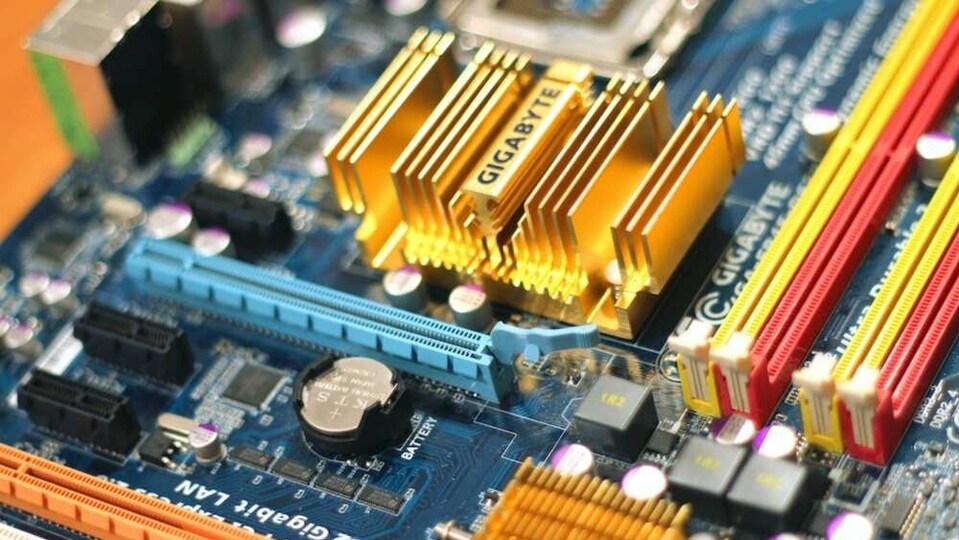
To choose the best motherboard for your usage, you need to consider allocating a notable percentage of your budget to it, and Gigabyte will suit your fit in multiple ways. This is one of the renowned PC component manufacturers in the industry that offers several Gigabyte gaming motherboards, some Gigabyte 10th-gen motherboards, and exceptional Gigabyte h61 motherboards with ample varieties.
This brand name is counted under the umbrella of the big four motherboard manufacturers. The associated company offers a wide variety of variant boards from the lowest of the low-end to the top-notch models despite focusing only on the selective segment. As PC is at the crossroads that hangs between the last and the current generation, you have plenty of Gigabyte motherboards to choose from.
Before diving into the recommendations, you should understand that the processor, graphics card, and system memory, in combination, contribute to the working of a PC. Moreover, it is the motherboard that manipulates everything as the backbone. So, if you are a non-tech-savvy user, make a wise decision to bring home the best Gigabyte motherboards as per your budget and requirements. So, without wasting any time further, please scroll through our experts’ exhaustive guide to the best gigabyte motherboards for high-performance PC in India after thoroughly considering many aspects.
Product list
1. Gigabyte Z790 Aorus Master
This product is referred to as the best Z790 motherboard. Featuring a busy colour scheme, the motherboard design is quite premium and gamer-by look. It is an EATX board, which appears to have a larger form factor than ATX with a chassis EATX support.
Moreover, Gigabyte utilized all the additional space; where the Aorus Master motherboard has a 20+1+2 stage VRM, a total of five M.2 slots, reliable support for DDR5-7600, and ample features like an error code display and headers for fans & input/output. The rear I/O consists of USB 3.2 ports and a 10-gigabit Intel Ethernet port, which is quite scarce to see on a consumer-grade board.
Specifications:
- Compatible Processors: 12th Generation Intel Core
- RAM Memory Technology: DDR5
- CPU Socket: LGA 1700
- Item Dimensions: 34.49 x 29.39 x 7.98 cm
- Item Weight: 3 kg 210 g
Pros | Cons |
Fast Networking and DDR5 Compatible | Lacks Thunderbolt 4 or USB 4 |
Loads of USB ports |
2. Gigabyte Z690 Aorus Ultra
Z690 motherboards have been going on sale due to their functionality being identical to Z790. Gigabyte Z690 Aorus Ultra seems a great choice for the user looking to build an upper mid to high-range PC within a budget. It uses a two-tone design with a small RGB display fused into the I/O housing.
Overall, the model has a premium appearance featuring a 16+1+2 phase VRM, a total of four M.2 slots, and reliable support for fast DDR5-6200 memory. The rear I/O consists of 13 USB ports along with a 2.5 gigabit Intel Ethernet port. While comparing the Aorus Ultra motherboard to the Aorus Master model; the Aorus Ultra has the upper hand due to its impressive facets.
Specifications:
- Compatible Processors: 12th Gen Intel Core
- RAM Memory Technology: DDR5
- CPU Socket: LGA 1700
- Item Dimensions: 33.48 x 26.97 x 7.98 cm
- Item Weight: 3 kg 210 g
Pros | Cons |
12 total rear USB ports | No PCIe 5.0 M.2 socket |
Four M.2 sockets |
3. Gigabyte B660 Aorus Master DDR4
A typical mid-segment B660 motherboard costs quite less than high-end Z690 motherboards, however, referring to the baseline differences, B660 boards are designed with fewer VRM stages, and fewer I/O and PCIe slots. This model presents a few trade-offs like a total of three PCIe 4.0 M.2 slots and reliable support for DDR4 memory. The most noteworthy thing about thisGigabyte motherboard is it uses a 16+1+1 stage VRM which is sufficient to support a Core i9-13900K. It doesn’t have enough USB 3.2 ports on the rear I/O, and still offers a 2.5 gigabit Intel Ethernet.
Specifications:
- Compatible Processors: 12th Gen Intel Core
- RAM Memory Technology: DDR4
- Item Dimensions: 26.97 x 26.8 x 6.78 cm
- Item Weight: 453.6 grams
Pros | Cons |
Palatable price point | Contrasting heatsink colours |
Capable 16-phase, 60A VRMs |
4. Gigabyte Z590 Aorus Elite
This model is referred to as the best Z590Gigabyte 10th gen motherboard as well as 11th Gen Intel. It is a reliable option to build an overclockable PC consuming Intel's 10th or 11th Gen CPUs excluding costly cutting-edge memory or storage. Visually, this model is the same as other motherboards with a 12+1 stage VRM and reliable support for fast DDR4-5400 memory.
The Gigabyte Z590 Aorus Elite gives high-end CPUs like the Core i9-10900K & 11900K the horsepower to perform ideally. It has a total of three M.2 slots for NVMe SSDs, and rear I/O comprising the Achilles' heel. Moreover, the model is designed with only six USB 3.2 ports and a 2.5 gigabit Ethernet from Realtek.
Specifications:
- Compatible Processors: 10th Generation Intel Core
- RAM Memory Technology: DDR4
- CPU Socket: LGA 1200
- Item Weight: 1 kg 810 g
Pros | Cons |
RGB LED under the chipset | Only 2x PCIe x16 |
Up to 5400 Mhz Memory OC |
5. Gigabyte Z690 Aorus Pro
This model is a mid-range class motherboard covering all the bases. You have plenty of storage options with a total of four M.2 sockets, well-updated audio, and a new appearance. In case you don’t require integrated RGBs and Wi-Fi 6E, this option seems a solid product to build your system. Gigabyte Z690 Aorus Pro provides good value for money featuring plain Wi-Fi 6, 4x M.2 slots, and loads of USB ports are what make it complete.
Specifications:
- Compatible Processors: 12th Gen Intel Core
- RAM Memory Technology: DDR5
- CPU Socket: LGA 1700
- Item Dimensions: 33.48 x 26.97 x 7.98 cm
Pros | Cons |
Reasonable price | Wi-Fi 6 only |
90A VRMs and 13 rear USB ports |
6. Gigabyte X570S Aorus Master
This model is integrated with exceptional Wi-Fi 6E, quite capable VRMs, a total of four M.2 sockets, with an enhanced appearance. Here, S stands for silence, hence, unlike other first-generation X570 motherboards, X570S Aorus model doesn't require active cooling for its operation.
The rear I/O is featured considering USB connectivity designed with 12 ports consisting of four USB 2.0, five USB 3.2 Gen 2, two USB 3.1 Gen 1, and a single Type-C USB 3.2 Gen 2x2 port.
Specifications:
- Compatible Processors: AMD 3rd and 2nd Generation Ryzen
- RAM Memory Technology: DDR4
- Item Dimensions: 30.5 x 24.4 x 4 cm
- Item Weight: 1.5 kg
Pros | Cons |
Ten 4-pin Fan/pump headers | Single Ethernet port |
Wi-Fi 6E included |
7. Gigabyte B550M DS3H Ultra Durable Motherboard
TheGigabyte motherboard B550M DS3H is one of a handful of micro-ATX-sized models you can choose from. This product is integrated with an incredible dual M.2 slot, reliable support for DDR4-4733 memory, and a high-end Realtek Ethernet enabling audio codec pairing. It has a total of four memory slots supporting up to DDR4-4733 with a maximum capacity of 128 GB across memory slots.
Specifications:
- Compatible Processors: AMD 3rd Generation Ryzen
- RAM Memory Technology: DDR4
- Item Dimensions: 24.4 x 24.4 x 4 cm
- Item Weight: 0.63 kg
Pros | Cons |
Rear HDMI & DVI Support | Lack of M.2 heat spreaders |
Ultra Durable PCIe 4.0 Ready x16 Slot |
Three best features for consumers:
| Product | Feature 1 | Feature 2 | Feature 3 |
| Gigabyte Z790 Aorus Master | Fast Networking and DDR5 Compatible | Loads of USB ports | Excellent cooling |
| Gigabyte Z690 Aorus Ultra | 12 total rear USB ports | Four M.2 sockets | Overbuilt 105A power delivery |
| Gigabyte B660 Aorus Master DDR4 | Palatable price point | Capable 16-phase, 60A VRMs | 10 Rear I/O USB ports |
| Gigabyte Z590 Aorus Elite | RGB LED under the chipset | Up to 5400 Mhz Memory OC | RAM slots with steel protection |
| Gigabyte Z690 Aorus Pro | Reasonable price | 90A VRMs and 13 rear USB ports | Four M.2 sockets |
| Gigabyte X570S Aorus Master | Ten 4-pin Fan/pump headers | Wi-Fi 6E included | Fanless chipset |
| Gigabyte B550M DS3H Ultra Durable Motherboard | Rear HDMI & DVI Support | Ultra Durable PCIe 4.0 Ready x16 Slot | Dual Channel ECC/ Non-ECC Unbuffered DDR4 |
Best overall product
Our top pick for the best overall product in the Gigabyte motherboards is the mighty Z790 Aorus Master model. This product offers a solid balance between specifications, price, features, and performance like a few top AMD board recommendations. Designed with a booster of LGA 1700 socket, this motherboard is worthy to handle 12th and 13th Gen processors like the incredible Intel Core i9-13900K.
Best value for money
Gigabyte Z690 Aorus Pro comes at a reasonable price with an exceptional feature set all-in-one package. We recommend this motherboard looking at the overall aesthetic and it provides a few ways to hook up your favourite choice factors like plain Wi-Fi 6, 4x M.2 slots, and loads of USB ports.
How to find a perfect Gigabyte Motherboard for a high-performance PC?
We all know that motherboards are a core part of any computer system. Here are some key factors to consider while choosing Gigabyte motherboards for high-performance PCs.
1. Chipset
It is an administrative assistant of the processor, handling the input and output of the ancillary functions needed for a processor to compute. This module decides on supported types of CPUs and memory, visual adapter standards and checks the availability of embedded features. Chipsets differ widely in terms of performance, features, compatibility, and stability.
2. Processor
Not every motherboard supports all types of processors, hence, ensure the model you choose should support the simultaneous processor you are using.
3. Flexible Host Bus Speed
Choose a motherboard that has the power to sustain the bare minimum of settings required for the duration of the board's life. The product is designed with a wide range of host bus speeds, primarily in tiny increments that offer the most flexibility in case you plan to change the processor later.
4. RAM
Support for 2 GB of RAM is more than enough for a system, so ensure that the motherboard supports a minimum of 4 GB of RAM to be used for memory-intensive applications including database management, professional graphics, or complex scientific computations.
5. Video Type Support
Different motherboards come with various video facilities, whereas few models have an integrated video adapter and might not permit the installation of a distinct video adapter card. While other models offer inbuilt video and provide a dedicated expansion slot allowing a standalone AGP or PCI Express video adapter card to connect.
6. Documentation, Support, & Updates
While choosing a motherboard, check out the documentation thoroughly and the support that is available for the product including the BIOS and driver updates.
7. Manufacturer
The quality of motherboards deployed by different manufacturers differs substantially where few companies like Gigabyte apart from others solely make high-quality motherboards.
8. Number & Type of Expansion Slots
Check out for an expansion slot in terms of number and its types such as PCI slots, Video slots, and PCI Express slots.
9. Ports and connectors
Any motherboard needs to offer at least four USB 2.0 ports, preferably eight, along with a twin ATA/100 or speedy hard disc interface. Talking about the very least, the model needs to offer two Serial ATA connectors.
10. Warranty
We have gone through almost all sorts of Gigabyte graphics card warranty checks, hence you need to go through the possible warranty notes, as the return policy of the vendor is highly important than the warranty policy of the manufacturer.
11. Price Budget
User budget is a crucial aspect while buying any motherboard. You get a few good options in the segment of Gigabyte h61 motherboard price and might cover in your budget to buy a good gadget.
Best Gigabyte motherboard for a high-performance pc


