iOS 26 out ahead of iPhone 17 store launch: Top customisations you must try
iOS 26 is a big update with major customisation features. Here are the top ones you must try.
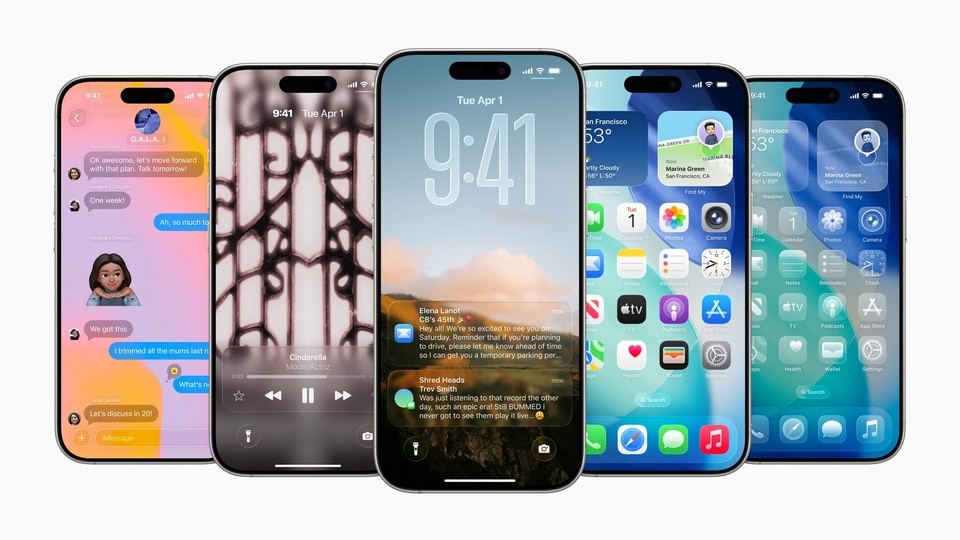
iOS 26 is finally out. It launched last night at 10:30 PM Indian Standard Time. All iPhones from the iPhone 11 series onwards will receive the update (iPhone 17 models to ship with it). The OS brings a major visual overhaul, including Apple’s brand-new Liquid Design Language, redesigned icons, and much more. There are also multiple customisation options with iOS 26. If you are wondering what they are, here are the top customisation tricks you can try on iOS 26. Read on.
Shaurya Sharma is the Technology Editor at Hindustan Times Digital Streams, where he oversees technology coverage across digital and social platforms. With over eight years of experience across editorial, video production, and digital media, his work focuses on smartphones, AI, consumer gadgets, and shaping audience-first content strategies for modern tech consumers.
He began his career in 2018 as a fashion cinematographer before turning his lifelong passion for technology into a profession. From spending his childhood immersed in tech magazines, video games, and the latest gadgets to covering the global consumer tech industry today, technology has remained a constant throughout his journey.
Over the years, Shaurya has worked with some of India’s leading media organisations, including CNN-News18, Sportskeeda, and Guiding Tech, where he led video initiatives that combined strong editorial storytelling with engaging visual and social-first execution.
A graduate in Journalism and Mass Communication from Manipal University, Shaurya has reviewed hundreds of products across categories including smartphones, laptops, gaming consoles, cameras, and wearables. Beyond work, he is passionate about animal welfare, environmental causes, and automobiles, particularly turbo-petrol cars
Read moreRead less
He began his career in 2018 as a fashion cinematographer before turning his lifelong passion for technology into a profession. From spending his childhood immersed in tech magazines, video games, and the latest gadgets to covering the global consumer tech industry today, technology has remained a constant throughout his journey.
Over the years, Shaurya has worked with some of India’s leading media organisations, including CNN-News18, Sportskeeda, and Guiding Tech, where he led video initiatives that combined strong editorial storytelling with engaging visual and social-first execution.
A graduate in Journalism and Mass Communication from Manipal University, Shaurya has reviewed hundreds of products across categories including smartphones, laptops, gaming consoles, cameras, and wearables. Beyond work, he is passionate about animal welfare, environmental causes, and automobiles, particularly turbo-petrol cars
Transparent Icons. What?
You can now make the icons transparent, and if you had told me this was possible on iOS 6 or 7 years ago, I would have said the phone was jailbroken. Now, if you long-press on the Home Screen, tap Edit, then tap Customise, you can choose a clear icon pack, which makes all icons transparent, yes even those that do not natively support it. If you are using a light background, it may be hard to see the icons, but using a dark background solves this problem.
Lock Screen customisation has also improved
While on the Lock Screen, long-press and tap Customise. You can now resize the clock: it can be very small, mid-size, or even very large. You can also add dynamic-style wallpapers, including iOS 26’s new ones, which move, too.
3D Lockscreen Effect
You can also create a Spatial Scene on the Lock Screen. When you choose a wallpaper, you will see a tiny icon that enables the Spatial Scene feature. It gives the impression that the wallpaper is moving and that you are peering through something. It is a really cool effect and definitely worth trying.
'Little Bird' is here
Of course, customisation is not limited to visuals. You can also change the audio experience. This is where iOS 26 gets really interesting. There are brand-new ringtones, which you can find by going to Settings > Sound & Haptics > Ringtone. The “Little Bird” ringtone, in particular, is something I really like, and I can see it getting popular soon.
ABOUT THE AUTHORShaurya SharmaShaurya Sharma is the Technology Editor at Hindustan Times Digital Streams, where he oversees technology coverage across digital and social platforms. With over eight years of experience across editorial, video production, and digital media, his work focuses on smartphones, AI, consumer gadgets, and shaping audience-first content strategies for modern tech consumers. He began his career in 2018 as a fashion cinematographer before turning his lifelong passion for technology into a profession. From spending his childhood immersed in tech magazines, video games, and the latest gadgets to covering the global consumer tech industry today, technology has remained a constant throughout his journey. Over the years, Shaurya has worked with some of India’s leading media organisations, including CNN-News18, Sportskeeda, and Guiding Tech, where he led video initiatives that combined strong editorial storytelling with engaging visual and social-first execution. A graduate in Journalism and Mass Communication from Manipal University, Shaurya has reviewed hundreds of products across categories including smartphones, laptops, gaming consoles, cameras, and wearables. Beyond work, he is passionate about animal welfare, environmental causes, and automobiles, particularly turbo-petrol carsRead More

E-Paper


Black