There is a continued conversation to be had about Android tablets which have increasingly become relevant as convertible workplace computing devices. Google may have played little role in that, but tablet makers are putting in the effort to cobble together a collective with keyboard accessories and integrating desktop-like modes within Android to bring them as close as possible to a typical Windows desktop that most are familiar with. A sign of that evolving relevance is HP launching its Android tablet in India, a return to tablets after almost a decade, during which time HP has dominated PC market share statistics. The OmniPad 12 series is that tablet plus detachable collective, which spans days of time and usage scenarios.
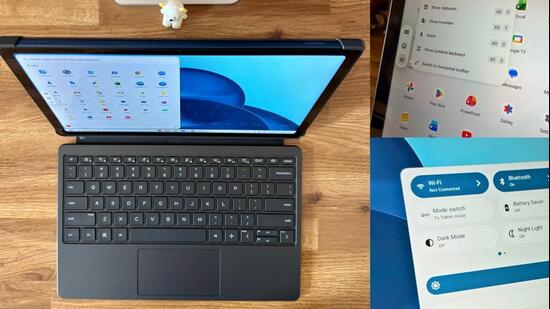
I genuinely feel the HP OmniPad 12 puts tablet makers including Samsung, OnePlus, Xiaomi and Lenovo on notice, for two simple reasons. First, consumers will inevitably compare OmniPad 12’s the price points of ₹48,999 and ₹54,999 (only difference is 128GB and 256GB storage respectively) bring this at par with the likes of the OnePlus Pad 4 which still awaits a keyboard accessory (and already carries a sticker price of ₹59,999), or the older OnePlus Pad 3 (that’s ₹49,999 onwards) with a keyboard that will cost you another ₹9,999. In the HP OmniPad 12’s sights is also the Xiaomi Pad 8 (albeit with a slightly smaller display size) that’s priced at ₹35,999 and offers two keyboard options—a Xiaomi Pad 8 Focus Keyboard with a touchpad for ₹8,999 or the simpler Xiaomi Pad 8 Keyboard for ₹4,499. In either case, the OmniPad 12 delivers better collective value.
Secondly, with HP comes a gravitas that spans productivity, workplace, powerful computing machines and the sort of wherewithal which one expects from a serious computing device manufacturer. In Q1 2026, HP continued what has been a long run at the very top of India’s PC market share, with a 26.5% share according to IDC’s numbers, followed in some distance by Acer India that has jumped into second spot ahead of Lenovo and Dell. Simply, you know HP is serious when it comes to this line of technology, and that’s particularly important for Android in the years ahead. HP confirms that the OmniPad will get one Android update, that is to Android 17, with two years of software and security updates starting July 2026.
{{/usCountry}}Secondly, with HP comes a gravitas that spans productivity, workplace, powerful computing machines and the sort of wherewithal which one expects from a serious computing device manufacturer. In Q1 2026, HP continued what has been a long run at the very top of India’s PC market share, with a 26.5% share according to IDC’s numbers, followed in some distance by Acer India that has jumped into second spot ahead of Lenovo and Dell. Simply, you know HP is serious when it comes to this line of technology, and that’s particularly important for Android in the years ahead. HP confirms that the OmniPad will get one Android update, that is to Android 17, with two years of software and security updates starting July 2026.
{{/usCountry}}Another place, another time, I would have stood with you and possibly argued this silicon choice. The Qualcomm Snapdragon 6 Gen 3 was launched in late 2024, and you’d have expected something newer. HP’s re-entry into the tablet market after almost a decade unfortunately coincides with a geopolitical scenario that’s impacted supply chains not just in terms of bulk availability of components and chips, but also spiking bill of materials. HP clearly wanted to position this around the ₹50,000 price point, and this chip selection allows that to happen. Snapdragon 8s or higher spec chips wouldn’t.
HP has standardised 8GB LPDDR5 memory on both variants, and that in my usage of this as a secondary computing device as well as a primary tablet, never proved to be a performance bottleneck. By far. This works well both as a tablet, and when things become a bit more serious with the keyboard attached. Efficient as a tablet, and as a convertible. The fact that HP bundles the keyboard as part of the standard package, add tremendous value. You can get started without either having to buy add-ons, or waiting for an accessory to get delivered.
The only foible is the fold over mechanism of a part of the back cover of this case to double up as the kickstand. I don’t think it’s intuitive, because the hand will almost by habit reach for the lower part of the back case to pull out the support, not the top. Also, the depth the OmniPad 12 as a result becomes quite a bit, and that makes it unusable if placed on a lap. Or even most aircraft tray tables, unless you’re flying Emirates business class. You’ll be mostly using this on a desk, which shouldn’t be a problem for most users.
The OmniPad 12 is very well designed as a tablet. While you likely wouldn’t miss the bezels framing the screen, it is 7.3mm thick and weighs around 600 grams—both impressive for a tab that has a 12-inch display and a large battery. The denim blue colour is certainly different in the way many HP laptops tend to stand out amidst a sea of otherwise black or grey laptops. I like that HP has given the volume and power keys a pronounced design, which is ergonomically more sound than the recessed designs many devices are trying to integrate. Overall, the OmniPad 12 feels well built, sophisticated and very clearly dressed for the job.
This tab misses out on fingerprint authentication or facial recognition as methods to authenticate unlock, and you must rely on punching in a pin instead. The 8-megapixel front facing camera for video calls should have been used for 2d face detection capability at the very least—I’m not sure if that can be added in a future firmware update. While not exactly a hardship, buyers would have expected either.
In terms of performance, this holds up very well to a barrage of Word documents, a fairly tab heavy Chrome web browser, a couple of Excel sheets and regularly opening or closing a bunch of other apps including emails, music streaming and the file manager. There is barely any sluggishness to speak of, and apps respond with the sort of smoothness that you’d otherwise expect from what we typically classify as alternate-flagship Android smartphones.
Having 8GB RAM as standard also helps with keeping a stable and unwavering performance baseline. I couldn’t find an option to extend memory using the virtual method from the storage (as many phones and tablets do), and adding that down the road will slightly raise the roof of future-proofing. That possibility however also depends on the OS architecture that HP has put together—but even without, you have a powerful tablet to work with anyway.
The Desk Mode is nicely implemented particularly, with a window-ed look to apps, with those familiar navigation cues (such as how to close an app) and complete integration with the HP Imagepad. If you are working on two apps side by side, this is prime interface optimisation. That said, this needs an option to open two iterations of the same app if needed. Google Chrome or My Files, for instance, which will add a lot more versatility.
HP confirms to HT that the OmniPad 12 comes preloaded in customer devices with the 3 apps for education and skilling. iPrep and Brands.Live subscriptions will be available free for 6 months, while another app named Lexillion will offer 200 free credits.
There is something to be said about the 12-inch LED display, with the 2000x1200 resolution and up to 90Hz refresh rate. This is bright, this is vivid and also takes care of reflections rather well. Basically, a computing device spec screen which balances comfort within the scheme of things. The 16:10 aspect ratio adds to that perspective, with the squarer canvas compared with to a 16:9 widescreen tablet, making this a better fit for handling documents and web pages. The wider screens are more optimised for media consumption.
A resounding way to make its presence felt in the burgeoning convertible computing device space, and HP has walked the path of restraint with the OmniPad 12. Steady performance that gets the job done, battery life that’s fantastic returning around 9 hours of screen usage time on a single charge, minimal tweaks to a clean Android experience and the keyboard accessory as part of the package, locks in the value proposition resoundingly. The HP generational evolution that has defined a successful seriousness with laptops for decades, is quite clearly visible with tablets as well. And that’s really the perfect foundation for what I believe will be a multi-chapter OmniPad journey. Though HP for now insists they have the Wi-Fi only tabs in perspective, one would really hope they widen the portfolio with SIM/eSIM versions too.