A physical Aadhaar card is not the only way to access your Aadhaar details. The Unique Identification Authority of India (UIDAI) allows residents to download an electronic version, known as e-Aadhaar, through its official website. The document is digitally signed and password-protected. It can be downloaded as a PDF, stored electronically or printed when required. The process involves entering your Aadhaar details and completing an authentication step. Here is how to download e-Aadhaar, what you need before starting and how to open the downloaded file.
Where can you download e-Aadhaar?
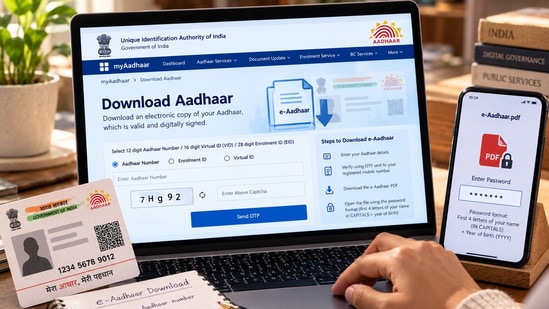
You can download your e-Aadhaar through the official website of the Unique Identification Authority of India. Visit the UIDAI website and navigate to the Aadhaar download service. You can also access the download facility through the official myAadhaar portal.
Keep your 12-digit Aadhaar number, Enrolment ID or other accepted identification details ready, depending on the option you choose. You will generally need access to the mobile number registered with your Aadhaar to complete OTP-based authentication.
Deep Dive
Can I update my Aadhaar address through the same myAadhaar portal used to download e-Aadhaar?
What do I need to update my Aadhaar address online?
How can I update my Aadhaar address if I cannot receive an OTP?
How to download your e-Aadhaar
1. Visit the official myAadhaar portal
2. Select the option to download Aadhaar
3. Choose the appropriate identification method, such as your Aadhaar number or Enrolment ID
4. Enter the requested details and complete the security verification displayed on the screen
5. Request an OTP and enter the code sent to your registered mobile number
{{/usCountry}}5. Request an OTP and enter the code sent to your registered mobile number
{{/usCountry}}6. Submit the details after verifying that the information is correct
7. Download the resulting e-Aadhaar PDF to your device
The precise options displayed may vary depending on the service and authentication method available. The UIDAI also documents the use of a time-based one-time password, or T-OTP, generated through the application for supported services.
What authentication is required?
OTP verification is a key security measure when downloading e-Aadhaar through the online portal. The code is sent to the mobile number registered with your Aadhaar and is used to verify access. If you no longer have access to that number, you may be unable to complete the usual OTP-based process. Check UIDAI's official guidance for available alternatives rather than relying on unofficial websites or third-party services.
Never share your OTP with another person. Use only official UIDAI services when entering your Aadhaar details.
What is the password for e-Aadhar pdf?
The downloaded e-Aadhaar PDF is password-protected. According to UIDAI's guidance, the password combines the first four letters of your name in capital letters and your year of birth in YYYY format.
For example, if your name is RAHUL KUMAR and your year of birth is 1998, the password would be RAHU1998.
If the file does not open, check the spelling of your name as recorded in Aadhaar, use capital letters for the first four characters and enter the full four-digit year of birth.
Is e-Aadhar valid?
Yes. UIDAI states that e-Aadhaar is a digitally signed electronic document and is legally valid for use in the same way as the Aadhaar letter. Its digital signature and QR code can help verify its authenticity. Keep the PDF secure, particularly if it contains personal information. If you need to share Aadhaar details, consider whether the receiving organisation requires the complete document or whether an alternative, such as masked Aadhaar, is appropriate.
Sources
https://myaadhaar.uidai.gov.in
https://www.uidai.gov.in/16-english-uk/aapka-aadhaar/40-e-aadhaar-service.html