Tablets have become considerably more capable over the years, and adding a keyboard can make them feel closer to a traditional laptop. From writing documents and replying to emails to browsing the web and attending video calls, there is a lot you can accomplish without carrying a full-sized laptop. For students and people with relatively light workloads, this combination can be particularly appealing.
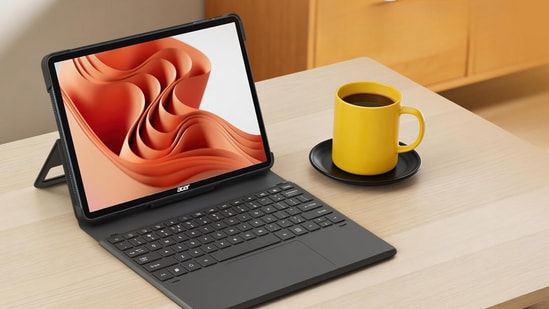
However, using a tablet as a laptop replacement is not always straightforward. App limitations, multitasking, file management and accessory costs can affect the overall experience. I would look at how well a tablet handles everyday work before making the switch, especially if it is going to be my primary computing device.
What can a tablet with a keyboard handle?
| Everyday task | How well a tablet handles it |
|---|---|
| Writing and documents | Good for emails, reports and basic document editing |
| Browsing and research | Handles multiple tabs, although multitasking varies by model |
| Video calls | Works well with supported meeting apps and accessories |
| Spreadsheets | Suitable for basic editing, but complex spreadsheets can be limiting |
| Photo and video editing | Good for supported creative apps, but desktop software alternatives may be limited |
Choose better. Buy smarter.
NEHA by HT Tech generates recommendations using proprietary AI analysis built on years of editorial expertise.{{#product}}{{/product}}
The Acer Iconia Tab 11 is designed for users who want a tablet that can handle entertainment, online classes and basic productivity. Its 11.45-inch 2.2K IPS display offers a 90Hz refresh rate and 450 nits brightness, while the MediaTek Helio G99 processor handles everyday tasks. It comes with 8GB RAM and 128GB expandable storage, along with a stylus and keyboard for note-taking and document work. A fingerprint reader, quad speakers and 4G calling support add to its everyday convenience.
What are buyers saying on Amazon?
Check recent Amazon feedback for comments on display quality, stylus responsiveness, keyboard usability and battery life. These aspects will help establish how well the bundled accessories work in everyday use.
Why choose this product?
Choose the Acer Iconia Tab 11 if you want an affordable tablet with a high-resolution display, cellular calling, expandable storage and bundled productivity accessories for studying and everyday work.
{{#product}}{{/product}}
Our Principles
Full Transparency
Every product review clearly lists the Pros and Cons, giving you a balanced view.
Brand Confidence
We focus on products from brands with a proven reputation and long-standing market trust.
The Lenovo Idea Tab is a versatile tablet aimed at students and users who want a portable device for entertainment, note-taking and everyday productivity. Its 11-inch 2.5K IPS display supports a 90Hz refresh rate, while the MediaTek Dimensity 6300 processor handles regular applications and multitasking. With 8GB RAM and 256GB storage, it offers a practical configuration for everyday use. The bundled folio keyboard and Tab Pen add flexibility, while 5G connectivity and a 7,040mAh battery make it suitable for working away from Wi-Fi networks.
What are buyers saying on Amazon?
Look for buyer feedback on the display, stylus accuracy, keyboard experience and battery backup. These are particularly important for students planning to use the tablet as a laptop alternative.
Why choose this product?
Choose the Lenovo Idea Tab if you want a tablet with 5G connectivity, a sharp 2.5K display and bundled accessories for note-taking, online classes and everyday productivity.
{{#product}}{{/product}}
The HP OmniPad 12 is designed for users who want a larger-screen tablet that can double as a lightweight productivity device. It features a 12-inch 2K touchscreen with a 90Hz refresh rate and 400 nits brightness, paired with a Snapdragon 6-series processor, 8GB RAM and 256GB UFS storage. Its detachable keyboard makes typing and document work more convenient, while Wi-Fi 6E, DTS:X Ultra quad speakers and Android 16 add to its everyday appeal.
What are buyers saying on Amazon?
Check buyer feedback on display quality, keyboard comfort, battery performance and app responsiveness. These aspects are particularly relevant when assessing its suitability as a tablet and laptop alternative.
Why choose this product?
Choose the HP OmniPad 12 if you want a larger-screen Android tablet with a detachable keyboard, 2K display and quad speakers for productivity, entertainment and everyday multitasking.
{{#product}}{{/product}}
The Lenovo Idea Tab Pro is built for users who want a larger tablet for entertainment, studying and productivity. Its 12.7-inch 3K display with a 144Hz refresh rate offers a spacious and smooth viewing experience, while the MediaTek Dimensity 8300 processor provides plenty of performance for multitasking and demanding applications. It comes with 12GB RAM and 256GB storage, alongside four JBL speakers with Dolby Atmos support. The bundled Pen Plus and keyboard make it more versatile for note-taking, document work and creative tasks.
What are buyers saying on Amazon?
Look for feedback on display smoothness, gaming performance, speaker quality and stylus accuracy. These are useful indicators of how well the tablet handles entertainment and productivity.
Why choose this product?
Choose the Lenovo Idea Tab Pro if you want a large, high-refresh-rate tablet with strong processing performance, generous memory and bundled accessories for studying, entertainment and creative work.
{{#product}}{{/product}}
The Lenovo Yoga Tab Plus is a premium Android tablet designed for users who want flagship performance, a high-quality display and a complete productivity setup. It is powered by the Snapdragon 8 Gen 3 processor, paired with 16GB RAM and 512GB storage. Its 12.7-inch 3K display supports a 144Hz refresh rate, while the six-speaker Harman Kardon audio system enhances entertainment. The bundled keyboard and pen, 10,200mAh battery and USB-C DisplayPort output make it a versatile option for work and entertainment.
What are buyers saying on Amazon?
Buyers should look at feedback on its display quality, audio performance, multitasking and battery life. These are important aspects when evaluating a premium tablet intended for productivity and entertainment.
Why choose this product?
Choose the Lenovo Yoga Tab Plus if you want flagship tablet performance, a high-refresh-rate 3K display, premium speakers and bundled accessories for productivity, entertainment and creative work.
Factors to consider when buying a tablet with keyboard
- Keyboard and trackpad: Check key travel, layout, trackpad support and overall comfort for extended typing.
- Processor performance: Choose a capable chipset that can handle multiple apps, browser tabs and productivity tasks.
- Multitasking support: Look for split-screen functionality, floating windows and desktop-style modes.
- App compatibility: Check if your frequently used desktop applications have capable tablet versions.
- Battery and accessories: Consider battery life with the keyboard attached, along with the additional cost of a keyboard, stylus and protective case.
Top 3 features of best tablets
| Tablet | Processor | Display | Battery | Accessories |
|---|---|---|---|---|
| Acer Iconia Tab 11 | Helio G99 | 11.45-inch 2.2K, 90Hz | 7,400mAh | Stylus and keyboard |
| Lenovo Idea Tab | Dimensity 6300 | 11-inch 2.5K, 90Hz | 7,040mAh | Folio keyboard and pen |
| HP OmniPad 12 | Snapdragon SM6475Q | 12-inch 2K, 90Hz | 31Wh | Detachable keyboard |
| Lenovo Idea Tab Pro | Dimensity 8300 | 12.7-inch 3K, 144Hz | 10,200mAh | Pen Plus and keyboard |
| Lenovo Yoga Tab Plus | Snapdragon 8 Gen 3 | 12.7-inch 3K, 144Hz | 10,200mAh | Pen and keyboard |
Similar articles for you
Can a tablet replace your laptop? Features to consider before making the switch
- Can I use Microsoft Word and Excel on a tablet with a keyboard?
Yes, both are available on popular tablet platforms. They handle everyday document and spreadsheet editing, although some advanced desktop features may be unavailable.
- Can I connect a tablet to an external monitor and use it like a laptop?
Some tablets support external displays and desktop-style interfaces, but capabilities vary by model and operating system. Check monitor support before buying.
- Is Samsung DeX good enough to replace a laptop?
Samsung DeX offers a desktop-style interface with resizable windows and keyboard support, making everyday productivity easier. However, it cannot run every Windows application.
- Can I use a tablet with a keyboard for video editing?
Yes, tablets support several video editing apps, but complex timelines, advanced effects and professional desktop workflows may still work better on a laptop.
- Is buying a tablet with a separate keyboard more expensive than buying a laptop?
It can be. Premium keyboard accessories and styluses add to the tablet's cost, so compare the price of the complete setup with a laptop before deciding.
Disclaimer: At Hindustan Times, we help you stay up-to-date with the latest trends and products. Hindustan Times has an affiliate partnership, so we may get a part of the revenue when you make a purchase. We shall not be liable for any claim under applicable laws, including but not limited to the Consumer Protection Act, 2019, with respect to the products. The products listed in this article are in no particular order of priority.