Google has announced a new feature for its popular email service, Gmail, that will leverage artificial intelligence (AI) to assist users in writing emails. The announcement was made during Google's I/O event 2023 on Wednesday. The new feature will work on user's prompt to automate the writing process making it more efficient.
ALSO READ| Google I/O 2023: ChatGPT rival Bard now in India. How to use it for free
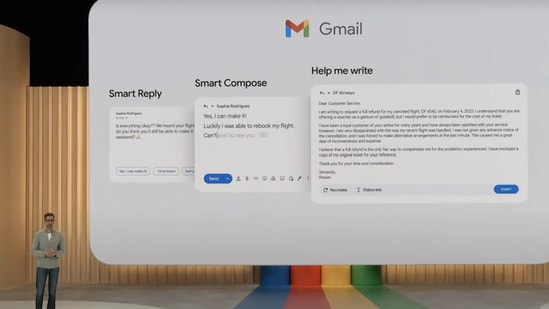
The newly unveiled "Help me write" feature for Gmail can generate a complete email in response to user prompts. The feature will be included in Google Workspace updates in the coming months for both web and mobile users.
It is an upgrade over Smart Reply - short responses that one could select with just one click, and Smart Compose- offered writing suggestions as one type in the email, which the tech giant has introduced in past.
During the Google I/O event, chief executive officer Sundar Pichai Google explained that user can simply type in the prompt of what they want, for example - an email that asks for a full refund. “Hit on create, and a full draft will appear in front of you.”
How to generate email automatically in Gmail?
- Once the feature is available, log in to your Gmail account.
- Click on the compose button to create a new email.
- Start typing your email message.
- Look for a small pencil icon with a sparkle next to the send button as you type.
- Click on the pencil icon to open the "Help Me Write" menu.
- The menu provides different options such as suggesting words and phrases, completing sentences, generating email templates, and checking grammar and spelling.
- Select the option you want to use and let the AI help you with your email.
- Once you finish writing your email, click on the send button to send it.
How to generate email automatically in Gmail?
- Once the feature is available, log in to your Gmail account.
- Click on the compose button to create a new email.
- Start typing your email message.
- Look for a small pencil icon with a sparkle next to the send button as you type.
- Click on the pencil icon to open the "Help Me Write" menu.
- The menu provides different options such as suggesting words and phrases, completing sentences, generating email templates, and checking grammar and spelling.
- Select the option you want to use and let the AI help you with your email.
- Once you finish writing your email, click on the send button to send it.