Ever wondered what you’ll look like as you age? Thanks to advances in generative AI, you can now catch a glimpse of your future self. ChatGPT, a cutting-edge AI tool, allows users to generate images predicting their appearance in their 40s, 50s, and 60s. Whether you’re curious about wrinkles or changes in hair colour, this tool promises to offer a digital glimpse into the future.
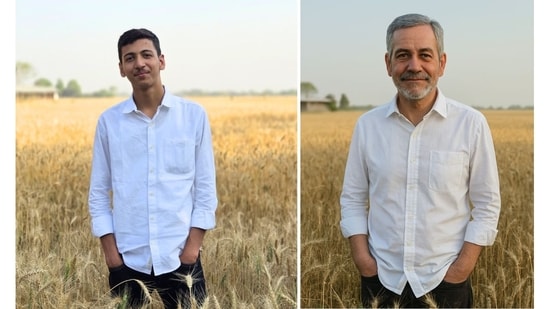
Generative AI, the technology behind tools like ChatGPT, works by predicting or creating images based on a given set of data. In this case, the AI looks at the current image you upload and uses patterns to estimate what you might look like as you age. While this isn’t an exact science and the results may vary, the experience is quite fascinating. If you’re ready to explore this feature and create a visualisation of your future self, here’s a simple step-by-step guide on how to use it.
Also read: Vivo X200 Ultra’s photography kit unveiled with seven smart features ahead of official launch
How to Generate Your Future Look with ChatGPT: A Step-by-Step Guide
Step 1: Upload a Current Photo of Yourself
To begin, you’ll need to upload a recent photo of yourself. For the best results, choose a high-quality, clear, front-facing image. A well-lit photo without any filters will ensure the AI has accurate data to work with, which could improve the final result.
Step 2: Provide a Clear Prompt
Once your photo is uploaded, it’s time to instruct ChatGPT on what you want. This is where you specify the age you’re curious about. Some examples of prompts include:
- “Can you show me what I might look like in my 40s based on this photo?”
- “Help me generate an image of me in my 50s using this uploaded picture.”
- “What could I look like in my 60s?”
Also read: Vivo X200s battery and charging features officially confirmed ahead of launch; Details inside
If you want to see a progression of your appearance across different decades, you can ask the AI to generate multiple images. For instance:
- “Show me three images: me in my 40s, 50s, and 60s.”
Step 3: Wait for the Image to Be Generated
{{/usCountry}}If you want to see a progression of your appearance across different decades, you can ask the AI to generate multiple images. For instance:
- “Show me three images: me in my 40s, 50s, and 60s.”
Step 3: Wait for the Image to Be Generated
{{/usCountry}}After providing the prompt, ChatGPT will process the image and generate a prediction of how you might look at the chosen age. It’s important to remember that the images generated are only estimates and may not reflect your actual ageing process. Various factors, such as lifestyle choices and genetics, play significant roles in how you age, which AI cannot predict with certainty.
Also read: Vivo X200 Ultra’s photography kit unveiled with seven smart features ahead of official launch
Tips for Best Results:
- Choose a high-resolution image to ensure the AI has enough detail to work with.
- Avoid filters, heavy makeup, or alterations to the photo for a more realistic representation.
- Be specific with your request, especially if you want certain features, like your hairstyle or facial hair, to remain consistent.
- If you want lifestyle factors like being a non-smoker or staying fit to influence the image, mention them in your prompt.
While this feature can be fun, there are considerations to keep in mind. Uploading personal photos to an AI tool raises privacy concerns. Your image and facial data might be stored or used in ways you don’t intend, so always be mindful of potential risks before sharing sensitive content.
In short, generating a visual of your future self with AI is a unique experience that offers a fun look at what ageing might look like. However, as with all AI-powered tools, proceed with caution and make informed decisions when sharing personal data.