There is a low-cost computing scenario unfolding in India, as it is in many parts of the world. One where students need a computing device for virtual classes (Delhi NCR still struggles with this scenario due to pollution spikes) and schoolwork. Likely, you’re having to make the same decision in your home too. Parallel paths put us face to face with two choices — a budget Windows 11 laptop, which may often be compromised in terms of overall specs, or an Android tablet often paired with a keyboard accessory to double up for online classes and assignment submission tasks. There should be a viable third scenario, and little do many of us realise, there is. Google’s Android has, from time to time, proved versatile enough to double up as a usable, productivity-focused computing platform. Indian tech company Primebook has proved this time and again. The Primebook 2 Max is the neatest example yet.
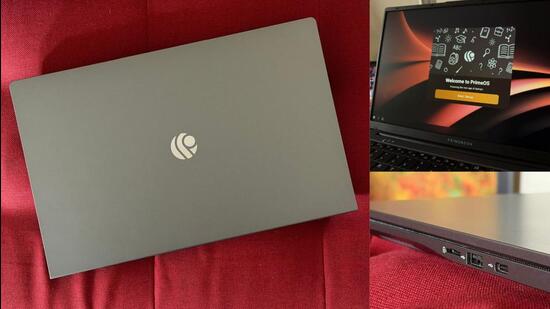
Affordability is key for these evolving computing platforms. The ₹22,990 price tag of the Primebook 2 Max can effectively replace performance compromises that blend lower-end processors with a Windows 11 operating system unoptimised for that foundation. Or even a tablet, which essentially runs mobile versions of many apps and can therefore sometimes be limited by functionality. Primebook has indeed taken Android 15 as the foundation for its PrimeOS 3.3, but with a lot more substance on top. Regular updates are one example — a December 9 release, a fairly large 1.4GB download and the latest in our analysis of this machine, adds a lot of functionality and fixes (on that note, installation does take upwards of 30 minutes, and is something to keep in mind).
The Primebook 2 Max is a remarkably well-built laptop. The large 15.6-inch display gives it a strong visual footprint, while the 36-watt fast charging via USB-C means your smartphone charger can double up as the adapter for this too. The grey-coloured chassis doesn’t really attract attention, but anyone using this would notice the attention to detail — two USB-A ports on the left spine alongside the power input USB-C, and on the opposite side another USB-C, a USB-A port and a card reader. There is a 3.5mm headphone jack too. The keyboard is well laid out and, as you’d expect with this screen size, has its own number pad area as well. There is minimal flex when pressing down in the middle of the keyboard, testifying to good build quality. Be careful with the lid though, because even the slightest intention to twist it leads to backlight panic. Shortcut keys are nicely done, particularly the ‘gaming’ one signified by a game controller — this can be configured for various actions within games, including aim, free look and mouse click behaviour.
{{/usCountry}}The Primebook 2 Max is a remarkably well-built laptop. The large 15.6-inch display gives it a strong visual footprint, while the 36-watt fast charging via USB-C means your smartphone charger can double up as the adapter for this too. The grey-coloured chassis doesn’t really attract attention, but anyone using this would notice the attention to detail — two USB-A ports on the left spine alongside the power input USB-C, and on the opposite side another USB-C, a USB-A port and a card reader. There is a 3.5mm headphone jack too. The keyboard is well laid out and, as you’d expect with this screen size, has its own number pad area as well. There is minimal flex when pressing down in the middle of the keyboard, testifying to good build quality. Be careful with the lid though, because even the slightest intention to twist it leads to backlight panic. Shortcut keys are nicely done, particularly the ‘gaming’ one signified by a game controller — this can be configured for various actions within games, including aim, free look and mouse click behaviour.
{{/usCountry}}I am not entirely sure it is a good idea to mandatorily ask for a mobile number (to send an OTP, of course) to set up a warranty for the machine. This step cannot be skipped, unfortunately. I do hope this is corrected with a future update, switching instead to an email-based setup method.
How you respond to PrimeOS and the overall proposition of the Primebook 2 Max depends on what you’ve purchased it for. The positives include a display that’s crisp enough for reading text, limited preloaded Google apps (Gmail, Drive and Photos, for example; but no Chrome), and even the Gemini AI assistant available easily in what is a typical desktop-esque interface to get you started. The interface and app response are snappy. The MediaTek Helio G99 octa-core processor with 8GB of memory and 256GB of storage provides a rather solid foundation. Even though you’ll mostly be experiencing Android’s mobile-optimised apps on this screen size, the key here isn’t that, but using this display real estate effectively for multitasking, such as side-by-side apps.
On that point, I’m a bit surprised PrimeOS doesn’t have much beyond the three-dot menu near the top left of a window for snap-left or right and orientation options. The template here could be how OnePlus has integrated multitasking and screen-space sharing on the tablet version of OxygenOS. If you feel PrimeOS has tried too hard to bring Windows desktop familiarity (clicking on the battery icon, for instance), you wouldn’t be wrong. A little departure from that might not have been out of place, but I wouldn’t hold it against Primebook for sticking to a template of familiarity. The experience simply works — online classes, quickly working on some documents (make your choice between Google Docs and other options), and some binge-watching after a hard day at school, college or work.
The fact that battery stamina is fantastic too adds credence to the proposition. For a typical online classroom, a 100% charged battery at 8am will dip to only 64% by 2pm, the typical school virtual class sign-off time. Add some more work to it and you’d be looking at more than 50% battery still in the tank at 5pm. Mind you, when you do want to power off, the icon is available by clicking on the battery icon instead of the PrimeOS icon-laden start menu.
For the sort of money you’re spending on a Primebook 2 Max, there is a certain degree of convenience and a sort of guarantee about the overall simplicity of the experience. This laptop may just be a more versatile and familiar proposition for children compared with tablet-and-keyboard combinations. It is rare for a focused product to be this good in more ways than one.