While not exactly a unique product category, because mobile-focused storage drives have been around for many years, it is perhaps for that very reason that SanDisk’s efforts with the new Creator Phone SSD (SSD for solid state drive) bring an element of definitive uniqueness as well as utility. Of course when you think of external storage, you’d think of data backups, and extending storage space beyond your phone’s specs. Since the Apple iPhone is in focus, particularly iPhone 15 or later (the USB-C is a key element), the SanDisk Creator Phone SSD unlocks an interesting capability within iOS — video recording in Apple ProRes 4K at 60fps. On any Apple iPhone, including the latest iPhone 17 Pro phones, the Apple ProRes 4K at 60fps recording option is only enabled if a fast enough (and with lots of space) drive is connected at the time.
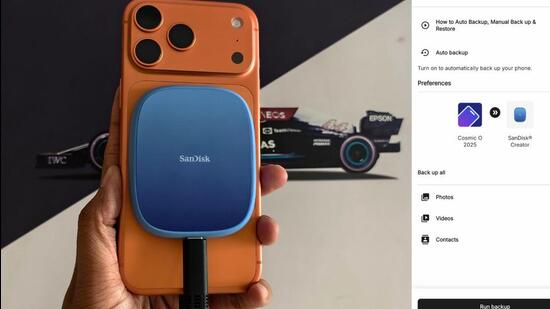
Before we speak about the SanDisk Creator Phone SSD, important to note that you must toggle on the option for Apple ProRes in Settings > Camera > Formats > Apple ProRes, and then enable that within the camera interface before the next video recording (remember, the drive must be connected to the iPhone at that time). This is a good point to note that the Creator Phone SSD is MagSafe compatible — a cinch to magnetically attach this to the back of an iPhone (also works seamlessly with iPhones that may be snuggled inside a case), and safer than a drive that may otherwise be dangling or require your constant attention for docking support. Ruggedness matches your newer iPhones too, with an up to three meter drop protection and IP65 water and dust resistance rating.
For anyone who still rocks an older generation iPhone which uses the Lightning port, you’re out of luck. The SanDisk Creator Phone SSD works exclusively with the USB-C connector, and there is no Lightning converter also provided with the drive. That’s perhaps the only real drawback of this storage solution. That said, I can point to another one — the provided cable is too short for the drive to easily attach to the MagSafe on the back of the iPhone, and you’ll need to take some liberties with the cable’s flex to get this right. A longer USB-C cable, perhaps a more perceptibly rugged one, would have been the ticket.
{{/usCountry}}For anyone who still rocks an older generation iPhone which uses the Lightning port, you’re out of luck. The SanDisk Creator Phone SSD works exclusively with the USB-C connector, and there is no Lightning converter also provided with the drive. That’s perhaps the only real drawback of this storage solution. That said, I can point to another one — the provided cable is too short for the drive to easily attach to the MagSafe on the back of the iPhone, and you’ll need to take some liberties with the cable’s flex to get this right. A longer USB-C cable, perhaps a more perceptibly rugged one, would have been the ticket.
{{/usCountry}}The interface, important to mention at this point, is the USB 3.2 Gen 2 standard, with sequential read speeds rated up to 1000 MB/second. You’ll have the option of 1TB or 2TB storage, the former retailing for around ₹10,999. The fact that this also doesn’t look anything like a typical external SSD, magnifies SanDisk’s intent to make something that certainly stands out. It is a very nice shade of blue, which contrasts nicely with the iPhone 17 Pro Max in Cosmic Orange.
The interesting bit is, SanDisk provides a rather thoughtful accessory with the Creator Phone SSD , a metallic ring that may be useful for Android phone users or for mounting your iPhone someplace for a nice video recording view. With this ring, the drive will also be able to attach to the phone that doesn’t otherwise have a MagSafe-like system.
In general, Apple’s compatibility guidance for ProRes videos is layered, such as needing a 256GB or higher capacity drive to unlock 4K at 60fps on iPhone 15 Pro and iPhone 16 Pro models, but also enabling 4K at 120fps for iPhone 16 Pro models only. This has nothing to do with the SanDisk Creator Phone SSD, but worth checking out to match specs and potential with the iPhone you intend to pair the SanDisk Creator Phone SSD with, for ProRes recording.
That said, most folks buying a SanDisk Creator Phone SSD will use it as a handy way to backup data from the iPhone — the Photo and video gallery for instance, or documents from iCloud and on-device in Files. SanDisk ships this in the exFAT format, which means its plug and play with macOS, Windows PCs and ChromeOS/Android devices too — again, lending credence to this being a useful external storage option, with that additional flexibility for certain use cases.
It is fast enough too, and unlike many drives that otherwise don’t do as well in the real-world, the Creator Phone SSD gets close to the claimed read and write speed ceilings. In our tests, the SanDisk Creator Phone SSD peaked around 940MB/s for write performance and the Blackmagic Disk Speed Test (this can be downloaded from the App Store) returned around 910MB/s as the best read performance.
Speaking of apps, the SanDisk Memory Zone on iOS is an incredibly refined and polished companion app to manage what’s on the Creator Phone SSD. Some may like the option to encrypt certain folders on the drive, and there’s the quick backup option available here. A good practice — properly eject the drive from this app, before physically disconnecting it from the phone (Windows and macOS will natively include these options in Explorer and Finder respectively).
Who’s the SanDisk Creator Phone SSD really for? Two ways to look at this — first, a rugged external drive that compliments an iPhone well enough (not everyone goes around buying 1TB or 2TB specs) as an external storage module with easy backups, and secondly, something that is equally more pro-oriented with the MagSafe compatibility and unlocking doors for Apple’s ProRes video recording formats. The fact that you can edit files residing on the drive without any slowdowns or restrictions, across apps on the iPhone or Mac (I would assume Windows as well in the same way; didn’t have a PC within reach to verify), simply makes this a rather intuitive plug-and-play storage product. The ₹10,999 or so that you’d pay now for the 1TB storage spec, would reap dividends in the years to come.