Storage is going to be a complex discussion, and purchase, for the next few months at the very least. In a way, the geopolitics and the artificial intelligence (AI) progression have turned the clock back, pricing solid-state drives (SSD) out of most budgets. This is particularly true when more storage space is a criterion. External 3.5-inch hard drives are very much in vogue (for the knowledgeable, they were never out of fashion), and the Seagate One Touch desktop external hard drive effortlessly ticks off three important boxes on the checklist—lots of storage space, single port connectivity, and a useful companion utility.
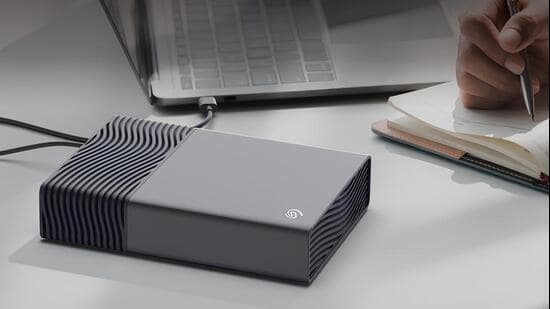
You will pay a fair premium for this troika though, with official prices starting ₹49,999 for the 8TB variant (Amazon, at times, lists this for around ₹30,999)—there’s the choice of 16TB, 20TB and 24TB as well. That is just a premium of this moment in time. Priced favourably in comparison with the likes of the WD My Book desktop external drive 8TB that has an official price tag of around ₹50,000 as well as the Lacie d2 Professional 8TB that holds a market price of around ₹56,990.
In an era where USB-C powered desktop drives are un-common, the Seagate One Touch is what’s called a ‘bus-powered desktop drive’, which conveniently draws its power from the same USB-C connection that plugs it into a Mac or Windows computing device. While this is a typical desktop drive in terms of footprint and a bigger 3.5-inch hard drive, yet this unique characteristic does make it portable too for when you need it. No wall socket is required to power the drive. No bulky adapters to carry around, and no searching for a spare electrical outlet.
The Seagate One Touch itself is substantial in terms of its footprint, measuring 7.3-inches x 1.58-inches x 5.18-inches. There are two reasons for this. First, a good old desktop hard drive, and secondly, there is space on the inside for not just some ventilation (you’ll see pronounced vent designs for that) but also for the bus-powered USB-C connection that transfers data and receives power over this single connection. That is, as long as the PC’s USB port is delivering at least 15-watts of power to get the drive spinning. Hard drives, unlike solid-state drives that don’t have moving parts, store data on platters that spin—the mechanism to get these going requires more power than SSDs.
{{/usCountry}}The Seagate One Touch itself is substantial in terms of its footprint, measuring 7.3-inches x 1.58-inches x 5.18-inches. There are two reasons for this. First, a good old desktop hard drive, and secondly, there is space on the inside for not just some ventilation (you’ll see pronounced vent designs for that) but also for the bus-powered USB-C connection that transfers data and receives power over this single connection. That is, as long as the PC’s USB port is delivering at least 15-watts of power to get the drive spinning. Hard drives, unlike solid-state drives that don’t have moving parts, store data on platters that spin—the mechanism to get these going requires more power than SSDs.
{{/usCountry}}Seagate offers multiple storage options with the One Touch, and the one we are reviewing here is specifically the 8TB drive. The larger capacity you choose for storage, the higher premium you’ll pay in this environment. The drive includes Seagate’s Toolkit software which is useful to set up backups. I am not entirely sure if bundling a 2-month Adobe Creative Cloud Pro subscription really benefits anyone—this cost could well be saved on the bundle and passed on to the customer via a slightly lower sticker price.
I tested the Seagate One Touch on a Mac Studio running the M4 Max with 128GB unified memory, and this bus-powered drive returned very impressive performance numbers for a 3.5-inch hard drive foundation. This peaked at 308.3MB/s in sequential write tests, and 306MB/s in sequential read speeds, in the Blackmagic Disk Speed benchmark. Safe to say, this is slightly faster than the latest generation WD My Passport drive, which is a 2.5-inch Hard Disk Drive (HDD) instead (and gets bogged down by a micro-B connector).
Note that there may be a compatibility issue with the Seagate One Touch because the bus-powered proposition is really only useful if the computing device delivers at least 15 watts of power through the port you’ve connected it to. While this worked seamlessly with the aforementioned Mac Studio, and also with an HP Pavilion laptop as well as a MacBook Pro 13-inch, the drive was intermittently unavailable on the MacBook Neo. On battery power, the drive wouldn’t mount, and when the MacBook Neo was connected to its adapter, the Seagate One Touch was usable but with some performance loss.
This will also not work with an Apple iPad Pro, or most Android tablets.
We live in an era of expensive storage, but that doesn’t mean you should neglect local storage. External storage, particularly hard drives, would always be my pick over cloud storage (these bills don’t seem like much at first, but they add up quickly) for bulk backups, storage or archiving files. It’s also useful for gaming use cases to save games you’re not actively playing.
The Seagate One Touch gives us an evolution of the bus-powered 2.5-inch hard drives that tend to top out at 6TB storage, with a 3.5-inch HDD that offers as much as 24TB storage. It’s like the best of both worlds—lots of storage and no need for an external adapter. Furthermore, the typical observations about 3.5-inch HDDs, usually revolving around bulk and slow transfer rates, no longer really apply. Overall, it’s a win-win for the customer.