WWDC 2025 is all the talk of the tech world these days, with Apple unveiling sweeping changes across its device ecosystem. While much of the buzz surrounds iOS 26, macOS upgrades, and the introduction of Apple Intelligence, a significant yet quieter transformation is coming to Apple CarPlay, and it deserves just as much spotlight.
You may be interested in
47% OFF
TCL 101 cms (40 inches) V5C Series Full HD Smart QLED TV Google TV 40V5C
₹18,990
₹35,990Get This
70% OFF
KUHL Brise E4 1320mm Stylish Power Saving BLDC Ceiling Fan with Remote |30 W | 5 Star | Low Noise | IoT- operates via Mobile & Alexa | Reverse Mode |5 Yrs Warranty on Motor | Free Installation |Black
₹4,299
₹14,500Get This
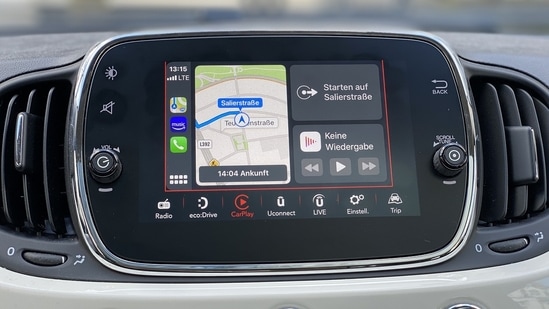
With iOS 26, Apple is redefining the in-car experience through a refined visual identity and intelligent feature upgrades. The CarPlay update introduces a striking new ‘Liquid Glass’ interface, smarter notifications, real-time widgets and advanced communication tools. These features are designed to deliver a more seamless and distraction-free driving experience.
Liquid Glass design
Inspired by Apple’s new aesthetic across iOS 26, the new ‘Liquid Glass’ design brings a modern, almost holographic vibe to your dashboard. This interface features translucent elements, adaptive lighting and smoother UI transitions that make it feel more in sync with the dashboard.
Compact call banners
One of the most practical updates is the compact incoming call notifications. Unlike the current version, which overtakes the entire screen, iOS 26 brings a pop-up banner-style alert that lets drivers see who’s calling while still keeping the map or media interface in view. This minimises distractions and keeps driver’s safety in check, especially when navigating busy roads.
Tapback messaging
Apple CarPlay now supports Tapbacks, emoji-style quick reactions that let users respond to messages with a simple tap. The system also mirrors your pinned conversations from iPhone, making it easier to access important threads without scrolling. In addition, messages can still be read aloud via Siri, ensuring the driver’s eyes stay on the road.
Widget support
Just like your iPhone, CarPlay also introduces widget support. This allows users to view real-time data like calendar events, music controls, weather updates and even live flight trackers without switching screens. Widgets can now appear alongside active apps like Maps to provide information without disrupting the main interface.
Call management tools: Hold Assist and Call Screening
Hold Assist detects when you're on hold and offers to hold your place in line, freeing you up while CarPlay waits for the other side to respond. On the other hand, Call Screening builds on Apple’s Live Voicemail, displaying caller context so drivers can decide if they need to answer or ignore the call. This feature comes in handy especially when dealing with spam or unknown numbers.
Interface customisation for better navigation
{{/usCountry}}Interface customisation for better navigation
{{/usCountry}}Apple iOS 26 has also introduced a new side navigation bar for quicker access to your most-used apps, reducing the need to swipe through multiple screens. While the widget panel and Liquid Glass design modernise the experience, customisation options help users tailor their display screen as per their convenience.
The updated version of Apple CarPlay will be available later this year as part of the iOS 26 update which is aimed at bringing iPhone-level intelligence to the dashboard.