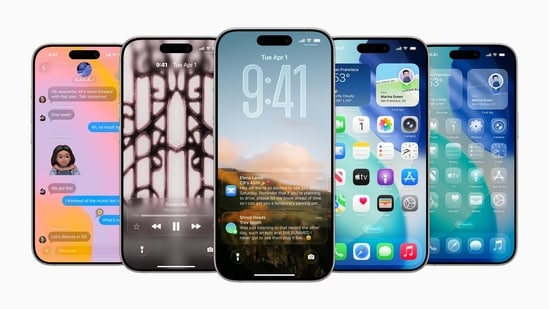
Apple has finally rolled out iOS 26 beta 4 with refinements to the Liquid Glass interface, new features, and improvements. As the new beta model gives greater insight into the iOS 26 update, developers have noticed a major change in the Liquid Glass UI that finally matches Apple’s vision. At WWDC 2025, Apple first introduced Liquid Glass as the redesigned UI for iPhone. But soon after the first beta version, the UI faced major backlash over readability issues. Later, with iOS 26 Beta 3, Apple brought back the frost design, raising questions over the new UI marketing. Now, Apple has finally come to terms with Liquid Glass UI, bringing a more refined and toned version that actually looks pleasing.
Also read: Apple to launch major Siri AI upgrade with iOS 26.4 by March 2026
Liquid Glass UI makes a comeback with iOS 26 beta 4
With the iOS 26 update, Apple introduced a new design interface called Liquid Glass for iPhone. The design included glass-like elements across the operating system, such as app icons, first-party apps, control centre, and others. However, several iPhone users showed disapproval with the design due to poor readability. Since iOS 26 beta 2, Apple has been working to refine the UI; however, the standard did not match the vision until recently.
With iOS 26 beta 4, Apple has rolled out a toned version of the Liquid Glass design, which not only matches the company's vision but also looks quite pleasing. Based on posts shared on the social media platform, you can see darker glass reflections that enhance legibility. Therefore, the iOS 26 UI looks clean, and you can see the vision behind integrating a liquid or a glass-like effect across software.
Also read: iPhone 17 Air likely to come with optional accessories for lasting battery life- Details
Well, despite the clean look, Liquid Glass UI is getting polarising opinions on the internet, with many users mocking it for such a drastic change. Well, it should be noted that Apple has introduced a major UI change after iOS 7, which was introduced back in 2013.
Apart from the changes to Liquid Glass UI, Apple also brings an improved version of Notification Summaries with iOS 26 beta 4. The Camera app design has also received slight changes, along with a new splash screen describing the changes. Lastly, the update brings new options to the Call Screening feature. However, we should wait for the stable iOS 26 update to know its usability and performance in real-time usage.
{{/usCountry}}Apart from the changes to Liquid Glass UI, Apple also brings an improved version of Notification Summaries with iOS 26 beta 4. The Camera app design has also received slight changes, along with a new splash screen describing the changes. Lastly, the update brings new options to the Call Screening feature. However, we should wait for the stable iOS 26 update to know its usability and performance in real-time usage.
{{/usCountry}}Mobile Finder: iPhone 17 Air LATEST specs, features, and price