
 E-Paper



For sign language users on Teams, Microsoft rolls out new feature. Check details
‘Sign Language View’ will enable users to prioritise videos of up to two signers – people who use sign language – for a meeting on the business communication platform.


For its Teams business meeting platform, Microsoft has announced a feature that will enable users to prioritise videos of up to two signers – people who use sign language – in such a way that the prioritised video streams appear in the middle of the screen, at the right aspect ratio, and at the highest available quality.
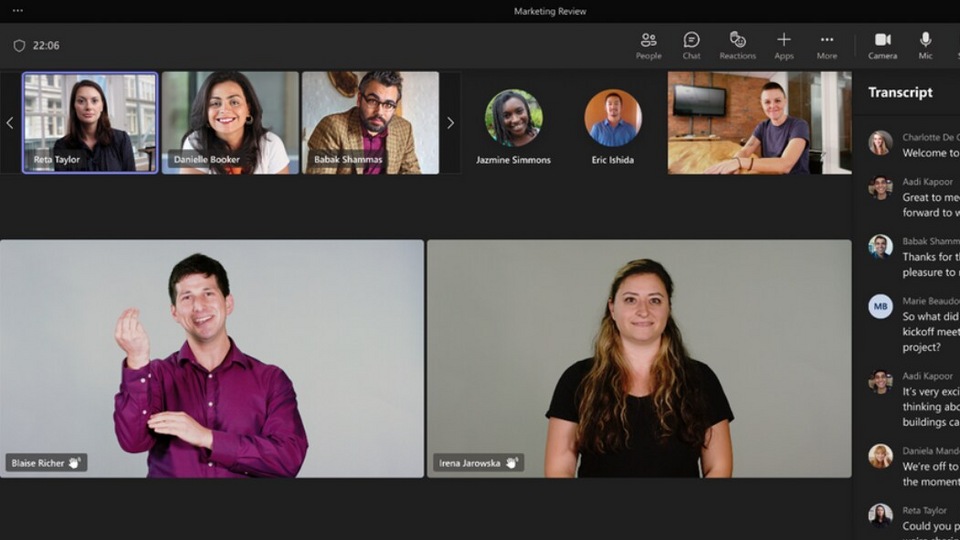
The feature is called ‘Sign Language View,’ said Microsoft in an official blog post.
How does Sign language view work?
(1.) According to the US tech giant, you can enable Sign Language View during a meeting or as default for all your meetings. To enable it, open Teams and select Settings and more > Settings > Accessibility, and then turn on the Sign Language.
(2.) The video of the designated signer should be switched on for the feature to work. Also, when Sign Language View is enabled, other participants are not alerted, and their screen stays unchanged.
(3.) When someone in the meeting shares a content, the designated video stream shifts to a different part of the screen, but continues to be larger, more visible, and of higher quality.
(4.) If you work with the same sign language interpreters from your organisation on a daily basis, you can list them in the ‘Accessibility’ tab, so that they always show up in the list of signers in the feature. An interpreter from outside the organisation can also be added to a meeting.
(5.) Users can assign interpreters before or during a meeting, and designate a signer for everyone.


