Google is expanding the functionality of its Circle to Search tool with a new update that allows continuous translation while scrolling, eliminating the need to restart the process each time content changes on screen. The company announced the rollout this week, beginning with select Samsung Galaxy devices before expanding to other Android smartphones.
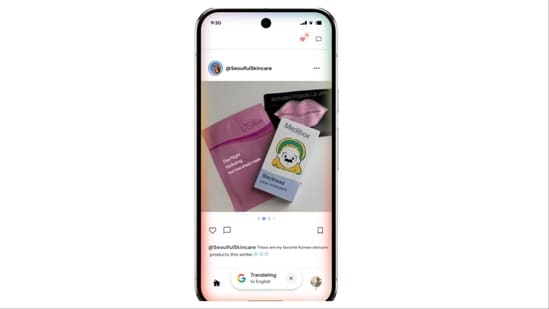
In a blog post, Google said translation has been one of the most widely used features of Circle to Search since its launch. The tool, introduced last year, enables users to search for information on their Android devices by circling, highlighting, scribbling, or tapping on-screen content. “Translation is one of the most-used features in Circle to Search, you can get more context for social posts from creators who speak a different language, or browse menus when you’re booking restaurant reservations while travelling abroad,” the company noted.
Until now, users had to restart translations whenever scrolling or switching apps caused the visible text to change. The new functionality addresses this limitation, offering what Google calls a “continuous experience.” To use it, users long-press the home button or navigation bar to activate Circle to Search, select the Translate icon, and tap on “scroll and translate.” From there, translations will persist as the user scrolls through content or even when moving between apps.
Google highlighted that the update ensures “there’s no interruption,” making the feature more practical for real-world use. For instance, someone browsing a restaurant’s digital menu in a foreign language or scrolling through social media posts written by creators abroad will now see uninterrupted translations without repeated actions.
The update represents the latest step in Google’s effort to make Circle to Search more versatile. At Samsung’s Unpacked event earlier this year, Google introduced expanded AI Overviews for visual searches and added one-tap shortcuts for actions such as dialling phone numbers, opening URLs, or composing emails directly from the screen. More recently, the company integrated “AI Mode,” a feature that allows users to ask follow-up questions and explore complex topics after initiating a search.
The gradual rollout of the translation upgrade underscores Google’s strategy of refining Circle to Search into a comprehensive on-device utility. While Samsung Galaxy users will see the feature first, Google confirmed that a broader release to other Android devices will follow.
{{/usCountry}}The gradual rollout of the translation upgrade underscores Google’s strategy of refining Circle to Search into a comprehensive on-device utility. While Samsung Galaxy users will see the feature first, Google confirmed that a broader release to other Android devices will follow.
{{/usCountry}}By making translation continuous and seamless, the company aims to position Circle to Search as not just a tool for finding information, but as an everyday assistant for navigating digital and real-world interactions across languages.