When we talk about smartwatches, most of the conversation usually revolves around health tracking, workout modes, heart rate monitoring and sleep analysis. While these are important features, I think there is a lot more to a smartwatch than just keeping an eye on your health. In fact, some of the features I end up using the most on my Samsung Galaxy Watch have very little to do with fitness.
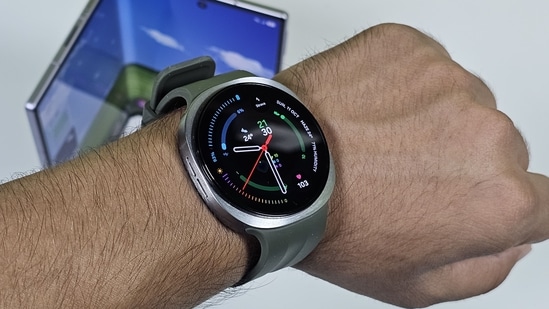
I recently reviewed the Samsung Galaxy Watch 9, and while it does not bring a major change over the Galaxy Watch 8, it reminded me of how much Samsung has packed into its smartwatch experience over the years. From personalising the watch face to controlling your smartphone and listening to music without carrying your phone, there are several features that make it a genuinely useful everyday companion. Here are some of the ones I think deserve more attention.
Watch face customisation is on another level
One of the things I like about Samsung Galaxy Watches is the level of customisation available. There are plenty of watch faces to choose from, and the best part is that you barely need to look at third-party apps to find something that suits your taste. The stock watch faces themselves offer enough options to play around with, including changing colours, complications, layouts and the information displayed on the screen.
What I particularly like is that Samsung also lets you create watch faces based on your outfits. You can use a photograph of your clothes and let the watch generate a matching design. It is a small feature, but it makes the smartwatch feel a little more personal rather than just another gadget strapped to your wrist.
I usually prefer keeping my watch face relatively simple, with the time, date and a few useful complications. However, having the option to change its appearance depending on the occasion is something I appreciate. You can keep it minimal for work and switch to something more colourful for the weekend.
Control your smartphone without taking it out of your pocket
The ability to control certain smartphone functions directly from your wrist is another feature that I find surprisingly useful. Samsung Galaxy Watches can act as a remote control for your phone, letting you manage music playback and even operate the smartphone camera.
The camera controller is particularly interesting because it gives you a live viewfinder on the watch's display. This means you can see what your phone camera is capturing and trigger the shutter directly from your wrist. I find this useful in situations where I want to position my phone at a particular angle but cannot comfortably reach it.
It also comes in handy during group selfies. Instead of setting a timer and rushing back into the frame, you can check the composition on your wrist and take the picture when everyone is ready. It is not something you will use every day, but when you need it, having this feature makes a noticeable difference.
Leave your phone behind during workout
This is another feature that makes a smartwatch feel more independent from your smartphone. Samsung Galaxy Watches come with internal storage, which means you can download music and keep it on the watch itself. You can then connect your Bluetooth earbuds directly to the watch and listen to your favourite tracks without needing your phone.
I find this particularly useful during workouts. Carrying a smartphone in your pocket while running or exercising can get uncomfortable, especially if you prefer moving around without anything weighing you down. With music stored on the watch and your earbuds connected directly to it, you can leave your phone in your bag or at home and still have your playlist with you.
You will need to download your music before heading out, and streaming options depend on the app and connectivity available. But once everything is set up, it is a convenient way to make your smartwatch a little more independent.
Now Bar makes everyday information easier to access
One feature that deserves more attention is Samsung's Now Bar. Available through One UI Watch, it provides quick access to ongoing activities directly from the watch interface. For instance, if you are playing music, running a timer or using another supported application, you can check its status without repeatedly opening the app.
This might not sound like a particularly big addition, but it makes a difference when you are using a smartwatch throughout the day. I do not always want to navigate through menus just to check how much time is left on a timer or change the currently playing track. Having these activities readily accessible makes the experience feel more streamlined.
It also fits into Samsung's approach of making information available at a glance, which is arguably one of the biggest advantages of wearing a smartwatch in the first place.
These features are not limited to the latest Galaxy Watch
I recently reviewed the Samsung Galaxy Watch 9, and as I mentioned in my review, it carries forward much of what made the Galaxy Watch 8 a good smartwatch. While the newer model brings hardware and software improvements, the overall experience remains familiar.
Check out my full review of Galaxy Want 9
The good thing is that you do not necessarily need the latest Galaxy Watch to enjoy several of these features. Samsung has been bringing selected software improvements to eligible previous-generation watches through updates, although the availability of individual features depends on the model.
I think this is what makes Samsung's smartwatch experience interesting. Beyond health tracking, there are enough small but genuinely useful features that can make a difference in everyday use. And if you have only been using your Galaxy Watch to count steps or track workouts, you might be missing out on quite a bit.
Similar articles for you
Asus TUF Gaming 16 (2026) review: A tough new look with plenty of gaming power
HP OmniPad 12 review: A promising comeback that needs more polish
URBN 25000mAh Mega Stack 100W review: One power bank for my laptop and smartphones
- Can I customise watch faces on the Samsung Galaxy Watch?
Yes, Samsung offers several built-in watch faces with customisation options for colours, layouts, complications and even designs that match your outfit.
- Can I control my phone camera using a Samsung Galaxy Watch?
Yes, the Camera Controller app lets you preview the camera viewfinder, adjust the composition and capture photos directly from your wrist.
- Can I listen to music on a Samsung Galaxy Watch without my phone?
Yes, you can download compatible music to the watch's internal storage, connect Bluetooth earbuds and listen without carrying your smartphone.
- Can I connect Bluetooth earbuds directly to a Samsung Galaxy Watch?
Yes, Galaxy Watches support Bluetooth audio devices, allowing you to pair wireless earbuds directly with the watch for music playback.
- Are Samsung Galaxy Watch features available on older models?
Many features are also available on previous Galaxy Watch generations through software updates, although availability depends on the model and One UI Watch version.
Disclaimer: At Hindustan Times, we help you stay up-to-date with the latest trends and products. Hindustan Times has an affiliate partnership, so we may get a part of the revenue when you make a purchase. We shall not be liable for any claim under applicable laws, including but not limited to the Consumer Protection Act, 2019, with respect to the products. The products listed in this article are in no particular order of priority.