
Apple really doesn’t do something unless they’ve thought it through. Amidst that history of consistency comes a change which, within the first few hours of getting used to, certainly doesn’t feel out of place. The first touchscreen on a MacBook is already more at home than touchscreens on Windows laptops have been in years. However, the reason you’d pay top money (and it is a significant monetary outlay) for the MacBook Pro with PROLED XDR Display is certainly the new tandem OLED display—this technology is simply designed to look glorious on computing devices. And the fact that the glowing Apple logo is back (last seen in 2015) may well represent Apple tapping into generational sureness.
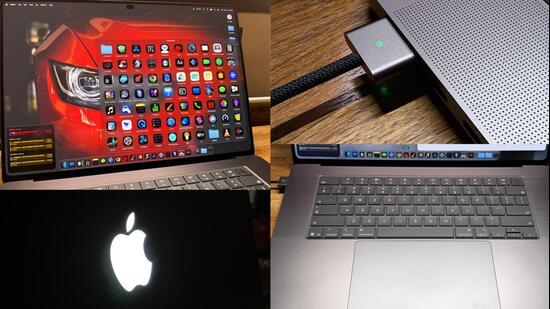
The MacBook Pro with PROLED XDR Display sits alongside the MacBook Pro 16-inch in the current product portfolio, with the M5 Pro and M5 Max silicon options. While there is generally parity spec-for-spec, the key pricing difference emerges from the tandem OLED touchscreen display instead of a Mini-LED non-touch panel. We have established time and again that computing devices (alongside smartphones) have been the worst hit by memory and storage supply chain inventory availability and pricing inflation. That is apparent in the pricing of the MacBook Pro with PROLED XDR Display.
The pricing of the MacBook Pro with PROLED XDR Display 14-inch starts at ₹3,49,900 while the prices of the 16-inch (the one we are assessing here) start at ₹4,09,900. Everything you do, such as the choice of silicon, the nano-texture glass or not, unified memory or storage, will have a bearing on the prices down the line as you get to the point of checkout. The base spec for the MacBook Pro with PROLED XDR Display 16-inch, for the prices mentioned above, has 24GB unified memory and 1TB storage, as well as bundling a 140-watt power adapter (little details: the adapter brick is white, the cable is a very nice braided black colour to match the Space Black machine).
This memory should be enough to run quite a few smaller artificial intelligence (AI) models—such as the Gemma 4 26B A4B or the Qwen 3.8 27B—without any hassles (mind you, download the models optimised for quantisation and set correct context length). Basically, if you really want to push the ceiling, a model around 27 billion parameters can run without hiccups.
{{/usCountry}}This memory should be enough to run quite a few smaller artificial intelligence (AI) models—such as the Gemma 4 26B A4B or the Qwen 3.8 27B—without any hassles (mind you, download the models optimised for quantisation and set correct context length). Basically, if you really want to push the ceiling, a model around 27 billion parameters can run without hiccups.
{{/usCountry}}The new touchscreen and display tech is surely the biggest change, including adding the Dynamic Island around the FaceTime camera, to bring a sense of familiarity with the iPhone experience (the notch is gone, and you might be delighted to hear that). This screen is bright, the nano-texture layer adds a bit more to the arsenal to handle reflections, and most important, colours look great with deep blacks. The fact that OLED displays have pixels that can be lit or dimmed individually, is the reason why the contrast is better, blacks look deeper and in general media also looks better since there are no blown-out details in visuals. This is also where the macOS dark mode begins to really shine.
Your mileage with the touchscreen may vary, but there are two key things to notice here: Apple hasn’t changed macOS in any way as you already know it (Windows 8, if you remember, was a stark contrast) and secondly, they are nudging you towards subtle touch adoption in your workflows rather than forcing the change. The touch of the finger has been designed to replicate the mouse click, which means single taps work as they would with a mouse or trackpad, while you can tap and hold to open the detailed menu as a right-click on the mouse would. Swipe, pinch to zoom and pinch to rotate work as they would on a trackpad. The fact that the Touch Display gets its own layer of settings, tells you how serious Apple is about this evolution.
Coming back to the point about performance, there is really no shortage with either the M5 Pro or the M5 Max chips. And also between the regular MacBook Pro iterations and the MacBook Pro with PROLED XDR Display series. These two chips are very much the cutting edge for silicon performance in computing devices, and there’s no need to get bogged down by why it is a 5 series and not a 6 series. If Apple does skip the Pro and the Max completely for the M6 series, I wouldn’t at all be surprised.
The battery stamina is astonishing, from what is a 100-Whr battery pack. Apple claims up to 17 hours of runtime on a single charge, but there are real-world scenarios where you can get much longer running with the M5 Max chip (with 128GB unified memory, on our test machine) before needing the adapter again. For typical everyday workloads including documents, image editing and work apps, this can even do around 21 hours of usage before the battery charge dips to 15%. If you’re running on-device AI, that mark might dip slightly.
The underside of the MacBook Pro with PROLED XDR Display will get noticeably tepid when you’re stressing performance (that’s a factor of an incredibly powerful chip in a slimmer than usual chassis; more on that shortly)—I noticed this when churning through a 32 billion parameter on-device model, but for the rest of the time, this remains absolutely cool. A key thing to notice here is the redesigned direction of the airflow—it now gets blown out of vents at the back of the machine, rather than upwards near the display. This should do well to extend the longevity of the display from temperature changes.
The fact is, between the standard MacBook Pro 16-inch with the M5 Max chip and the MacBook Pro 16-inch with PROLED XDR Display, the latter is 1.8mm thinner and 310 grams lighter. OLED panels are lighter, and that’s contributed. This is the lightest and most commute-friendly 16-inch laptop that I’ve used in a very long time. The Space Black colour would be my pick between the limited options, and the glowing Apple logo just sits more prominently on that—if that’s a criterion. This will also mark it as a status symbol everywhere you take out the MacBook Pro with PROLED XDR Display to work. At a cafe, in the office, while travelling, the silent message will be the same.
The question in the end is, MacBook Pro with PROLED XDR Display or the MacBook Pro with the mini-LED display? Given that this machine demands a higher monetary spend, you must be convinced that OLED is the way to go, and not the already very impressive display that the standard MacBook Pro already has. Beyond that, there is significant headroom to get to the sort of AI workhorse you need as far as unified memory and storage configurations go. I guess there is little any brand can do about the pricing aspect these days, considering component costs are high and margins need to be maintained somehow.
At this point, you need to decide whether you need the OLED experience, or that plus absolute benchmark performance. If it’s the former, the base spec MacBook Pro with PROLED XDR Display in either screen size, should be the way to go. If there is a need to get the machine primed for open-weight local AI models, you may need 64GB or 128GB unified memory. There’s a premium to be paid, but with everything else around it done with typical Apple-esque attention to fine details, you’ll still see long-term value.
ABOUT THE AUTHOR
Vishal Mathur is Technology Editor for Hindustan Times. When not making sense of technology, he often searches for an elusive analog space in a digital world.