For households that want wireless photo printing alongside everyday documents, the HP Smart Tank 580 is a close all-round match because it supports wireless/mobile printing, borderless output up to A4 and photo paper up to 300 g/m². However, it is still a four-colour all-in-one rather than a specialist photo printer, so dedicated photo printing needs should be considered separately.
Start With Photo Requirements, Not General Home Printing
A printer that produces colour pages is not automatically well suited to photographs. For home photo printing, the more useful questions are whether it can print without borders, what photo-paper sizes and weights it accepts, how its colour ink system is configured and whether photographs are an occasional task or the printer’s main purpose.
To find the best printer for wireless photo printing, five factors matter most:
- Borderless printing: Important for photographs intended for frames, albums, cards or displays.
- Photo-paper support: Check both size and supported media weight.
- Colour system: The printers considered here use pigment black with dye-based colour inks rather than a specialist multi-ink photo system.
- Wireless workflow: Mobile and Wi-Fi printing matter if most photographs begin on a phone.
- Printing pattern: Occasional photos and hundreds of mixed document pages create very different requirements.
Resolution is useful context, but it should not decide the purchase by itself. Photo results also depend on the source image, paper, ink, colour handling and print settings.
Consider a Photo-First Printer Before an All-in-One
{{/usCountry}}Resolution is useful context, but it should not decide the purchase by itself. Photo results also depend on the source image, paper, ink, colour handling and print settings.
Consider a Photo-First Printer Before an All-in-One
{{/usCountry}}If photographs will make up most of what you print, compare general-purpose all-in-ones with a dedicated photo printer before buying. A photo-first model may prioritise photo sizes, media paths and colour reproduction rather than scanning, copying, document feeders or high document volumes.
This distinction matters here because HP India’s current wireless home-printer listing is centred on DeskJet and Smart Tank all-in-ones rather than a dedicated photo-first printer in the same A4 home category.
Therefore, the recommendations below answer a narrower question: which current HP home printer makes the most sense if you want wireless photo printing but also need a normal household printer?
Photo Printing Comparison
| Model | Borderless printing | Photo media | Maximum listed photo-paper weight | Ink/colour arrangement | Overall orientation |
| HP Smart Tank 580 | Yes, up to 210 × 297 mm | 10 × 15 cm; 4 × 6, 5 × 7 and 8 × 10 in listed | Up to 300 g/m² | Pigment black + dye-based colour | Mixed documents + photos |
| HP Smart Tank 585 | Yes, up to 210 × 297 mm | 10 × 15 cm; 4 × 6, 5 × 7 and 8 × 10 in listed | Up to 300 g/m² | Pigment black + dye-based colour | Mixed documents + photos |
| HP Smart Tank 720 | Yes, up to 210 × 297 mm | 10 × 15 cm plus supported photo media | Up to 250 g/m² | Pigment black + dye-based colour | Document productivity + photos |
| HP Smart Tank 750 | Yes, up to 210 × 297 mm | 10 × 15 cm plus supported photo media | Up to 250 g/m² | Pigment black + dye-based colour | Document/scanning productivity + photos |
| HP DeskJet Ink Advantage 2986 | No | 10 × 15 cm photo paper supported | Up to 300 g/m² for HP 10 × 15 cm photo paper | Black + tri-colour cartridges; pigment black/dye colour | Light occasional home printing |
The important difference is easy to miss. The Smart Tank 580 and 585 accept heavier listed photo media than the 720 and 750, while the DeskJet 2986 accepts 300 g/m² 10 × 15 cm photo paper but does not offer borderless printing. That makes document-oriented upgrades such as the 720 or 750 neither automatically better nor worse for photographs.
General Home-Use Specifications
| Model | HP Store price at check* | ISO print speed | Duplex | ADF | Recommended monthly volume | Included ink/page yield stated by HP | Dimensions |
| Smart Tank 580 | ~ ₹15,500 | Up to 12 ppm black / 5 ppm colour | Manual | No | 400–800 pages | Up to 8,000 black / 6,000 colour | 434.66 × 361.53 × 157.26 mm |
| Smart Tank 585 | ~ ₹14,400 | Up to 12 ppm black / 5 ppm colour | Manual | No | 400–800 pages | Up to 4,000 black / 6,000 colour | 434.66 × 361.53 × 157.26 mm |
| Smart Tank 720 | ~ ₹21,900 | Up to 15 ppm black / 9 ppm colour | Automatic | No | 400–800 pages | Up to 12,000 black / 8,000 colour | 427.5 × 364 × 198.6 mm |
| Smart Tank 750 | ~ ₹26,000 | Up to 15 ppm black / 9 ppm colour | Automatic | 35 sheets | 400–800 pages | Up to 12,000 black / 8,000 colour | 427.5 × 364 × 240.3 mm |
| DeskJet 2986 | ~ ₹7,500 | Up to 7.5 ppm black / 5.5 ppm colour | Manual | No | 50–100 pages | Setup cartridges listed at ~160 black / ~120 colour pages | 425 × 304 × 154 mm |
*Prices shown on HP Store India at the September 2026 specification check and may change.
These figures also show why page yield and recommended monthly print volume should not be treated as the same measure. Included ink indicates approximately how much printing the supplied ink can support under HP’s stated methodology. Recommended monthly volume describes the regular workload HP recommends for the device.
HP Smart Tank 580: Balanced for Photos and Everyday Printing
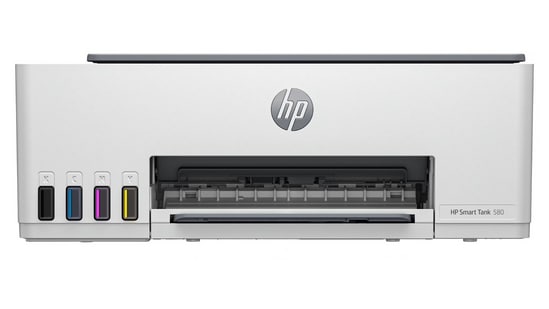
For a household that wants both borderless photographs and routine A4 printing, the HP Smart Tank 580">HP Smart Tank 580 has one of the more relevant combinations in this group.
It supports wireless printing, mobile printing, borderless output up to 210 × 297 mm and photo paper up to 300 g/m². HP lists ISO speeds of up to 12 ppm black and 5 ppm colour, with a recommended monthly volume of 400 to 800 pages. The current India product page states that ink for up to 8,000 black or 6,000 colour pages is included.
That combination makes more sense for a household printing family photographs, scrapbook images, greeting-card artwork and colour documents than choosing solely on document speed.
When not to buy: It uses manual rather than automatic duplex printing and has no ADF. It is also a four-colour general-purpose ink tank printer, so buyers primarily interested in photographic output should still compare it with specialist photo printers.
HP Smart Tank 585: Similar Photo Handling With Less Included Black Ink
The Smart Tank 585 has much of the same photo-related hardware profile as the 580. It supports borderless printing up to A4, photo paper up to 300 g/m², wireless use and ISO speeds of up to 12 ppm black and 5 ppm colour. Its recommended monthly volume is also 400 to 800 pages.
One important difference is the included ink. HP’s current India listing states up to 4,000 black or 6,000 colour pages for the 585, rather than treating its ink provision as identical to the 580.
Photo capability alone therefore does not give the 585 an obvious advantage over the 580. The decision is more likely to depend on current price, availability and included ink requirements.
When not to buy: Do not move from the 580 to the 585 expecting a higher level of photo capability. Their listed borderless and photo-media specifications are closely matched, and both rely on manual duplexing.
HP Smart Tank 720: Better Fit When Documents Are Also Frequent
The HP Smart Tank 720 becomes more relevant when photographs are only one part of a heavier household printing routine.
HP lists speeds of up to 15 ppm black and 9 ppm colour, automatic two-sided printing, a 400–800-page recommended monthly volume and included ink for up to 12,000 black or 8,000 colour pages. It also supports borderless printing up to A4 and photo paper up to 250 g/m².
Those specifications make the 720 easier to justify for a home regularly producing longer reports, notes or other documents in addition to photographs. Automatic duplexing saves manual handling on document jobs, although it does not inherently improve photo quality.
When not to buy: If you mainly print small photographs and only a few documents, the higher document speed, larger paper handling and automatic duplex system may be features you rarely use. The listed maximum photo-paper weight is also 250 g/m² rather than the 300 g/m² stated for the 580 and 585.
HP Smart Tank 750: Choose It for Workflow, Not Better Photos
The HP Smart Tank 750 shares several core printing specifications with the 720, including up to 15 ppm black and 9 ppm colour, automatic duplexing, borderless output up to A4, a 400–800-page recommended monthly volume and photo-paper support up to 250 g/m². HP also lists included ink for up to 12,000 black or 8,000 colour pages.
Its main additional feature is the 35-sheet automatic document feeder. That can matter in a home office where multi-page forms, notes or paperwork are scanned regularly.
The ADF should therefore be treated as a workflow feature, not as evidence that the 750 produces better photographs than lower models.
When not to buy: If scanning batches of documents is rare, there is little reason to pay more for an ADF purely for home photo printing.
HP DeskJet Ink Advantage 2986: For Occasional Photos Where Borders Are Acceptable
The HP DeskJet Ink Advantage 2986 suits a different usage pattern. HP recommends only 50 to 100 pages per month, compared with 400 to 800 for the Smart Tank models. It supports Wi-Fi, phone or tablet printing and 10 × 15 cm photo paper up to 300 g/m².
Its limitation for this particular query is significant: HP lists borderless printing as “No”. Therefore, although it can print photographs, someone wanting edge-to-edge 10 × 15 cm prints for albums or frames may prefer one of the borderless Smart Tank models.
It is better viewed as a compact, occasional-use cartridge all-in-one that can also handle photos rather than as the photo-focused option in this comparison.
When not to buy: Avoid it if borderless photography or regular higher-volume printing is important.
What Actually Changes Photo Quality at Home?
Printer specifications provide only part of the answer. Two photographs printed on the same machine can look noticeably different depending on how the job is prepared.
Start With a Good Source Image
A compressed image downloaded from a messaging app may contain less usable detail than the original photograph from the phone or camera. A higher printer resolution cannot recreate detail that has already been lost.
Match the Paper to the Job
Plain office paper absorbs ink differently from coated photo paper. Use compatible photo media when photographs are meant for albums, frames or display.
Also check media weight rather than assuming every glossy sheet will feed correctly. The printers in this comparison have different stated limits.
Check the Borderless Setting
Loading photo paper does not necessarily make a print borderless. Select an appropriate supported paper size and borderless option in the printer settings where the model supports it.
Review Colour Before Printing Several Copies
Phone displays can appear brighter than paper. Printing one test photograph before producing multiple copies can help identify cropping, brightness or colour problems.
Which Printer Fits Different Photo-Printing Patterns?
For regular borderless photographs plus everyday household documents, the Smart Tank 580 offers a useful balance of borderless A4 capability, support for photo media up to 300 g/m² and refillable ink tanks.
For a similar workload, the Smart Tank 585 can also be considered, but current included-black-ink specifications differ from the 580, so price and ink supplied should be compared at purchase.
For frequent document printing plus photographs, the Smart Tank 720 adds faster ISO document printing and automatic duplexing.
For frequent document scanning as well as printing, the Smart Tank 750 adds a 35-sheet ADF, but that feature should not be interpreted as improving photographic output.
For occasional 10 × 15 cm photographs and light household use, the DeskJet 2986 is the lower-volume option, provided borderless prints are not required.
Final Verdict
There is no single home printer that is automatically the right choice simply because it supports wireless colour printing. For mixed home use where borderless photographs are genuinely important, the HP Smart Tank 580 has a useful combination of A4 borderless printing, photo-paper support up to 300 g/m², wireless printing and refillable ink tanks.
The Smart Tank 720 becomes more relevant as document volume and duplex printing matter more, while the 750 makes sense primarily when multi-page scanning is also part of the routine. The DeskJet 2986 fits lighter use but lacks borderless printing.
If photography is the main purpose rather than an occasional household requirement, compare these all-in-one models with a dedicated photo printer before deciding.
FAQs About Wireless Photo Printing
Can the HP Smart Tank 580 print borderless photos?
Yes. HP lists borderless printing up to 210 × 297 mm and support for photo paper up to 300 g/m².
Is the HP Smart Tank 720 a dedicated photo printer?
No. It is a wireless print-scan-copy ink tank all-in-one with document features such as automatic duplexing. It does support photo media and borderless printing, but its feature set is designed for mixed printing rather than photography alone.
Does a higher DPI automatically mean better photographs?
No. DPI is only one factor. The quality of the image file, photo paper, ink, colour management and settings can all affect the final print.
Which model supports the heaviest listed photo paper?
Among the models compared here, HP lists photo paper up to 300 g/m² for the Smart Tank 580, Smart Tank 585 and DeskJet Ink Advantage 2986. The Smart Tank 720 and 750 list photo paper up to 250 g/m².
Is the Smart Tank 750 better for photographs than the 720?
The specifications checked do not establish that. Both list borderless printing up to A4, photo paper up to 250 g/m² and the same maximum ISO black and colour speeds. The 750 mainly adds productivity features such as a 35-sheet ADF.
Note to readers: This article is part of HT's paid consumer connect initiative and is independently created by the brand. HT assumes no editorial responsibility for the content, including its accuracy, completeness, or any errors or omissions. Readers are advised to verify all information independently.