...
...
Next Story

Google has a new way to prove it's really you - just record a video selfie

Google says that all the selfie videos are saved securely and can be deleted at any time.

Published on: Jul 24, 2026, 15:23:04 IST

Google usually offers three ways to sign into a Google account, which include email or a phone number, a passkey and a QR code. Now, the company is introducing a fourth way to do using selfies. The company today announced that it is introducing 'selfie video' as a new way to sign into a Google account. This new way will ensure that users are able to access their account even if they forget their password or leave their phone behind.

What is a selfie video and how does it work?
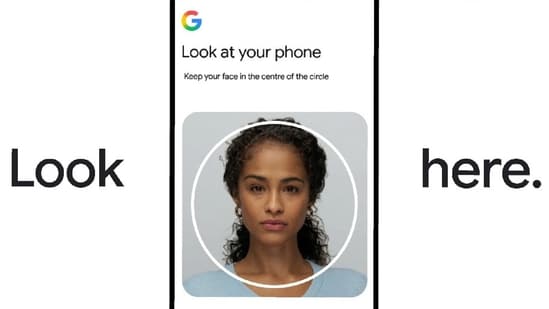
Google has announced a new way for users to log into their accounts. (Google)

Shweta Ganjoo is a Chief Content Producer at HT Tech. She has over 10 years of experience covering technology, during which time she has focused on consumer tech devices, AI, social media, gadgets, and tech policy, delivering authoritative and reader-focused insights across India’s fast-evolving digital ecosystem.

She began her career in the early 2010s, building a strong foundation in digital-first reporting as India’s tech landscape rapidly expanded. Over the years, she has worked with leading media organizations including India Today Tech, Indian Express Group, and Techlusive, where she played a key role in scaling editorial content and audience engagement. At HT Tech, she drives product recommendation coverage, combining newsroom leadership with hands-on reporting experience.

Her expertise spans smartphones, wearables, smart home devices, AI, and social media ecosystems, along with regulatory developments shaping the tech industry. Shweta is known for her analytical approach to product reviews and news coverage, grounded in hands-on testing and real-world usability. She has conducted industry interviews, tracked emerging tech trends, and produced research-backed stories using verified sources and expert inputs. She holds a masters in Mass Communication, which complements her professional experience in digital journalism and content strategy, and aligns with her academic background in technology. Shweta follows a reader-first editorial philosophy, prioritising accuracy, transparency, and fact-checked reporting to deliver reliable, insightful, and practical insights.

Read moreRead less

A selfie video is a short that is captured using the front camera of a smartphone, tablet or a laptop and it is recorded while signing into a Google Account. As a part of this feature, Google will ask a user to record their selfie video while setting up this feature. This selfie video is then compared with the new selfie video that the user records while signing into their Google Account. If the new video matches the one they recorded while setting up this feature, they are granted access to the associated account, if not, they are locked out of the account.

Furthermore, Google says that selfie videos are encrypted and stored securely with users' due consent. Users can delete their video at any time in their Google Accounts.

Furthermore, the company says that When a user uses a selfie to sign in, it uses multiple layers of security to help 'prevent impersonation attempts' such as fake photos and videos, in other word, deep fakes.

How to enable the new selfie video feature?

Here's a step-by-step guide for the same.

Step 1: Go to your Google Account and sign in.

Step 2: Tap the 'Security & sign-in' option.

Step 3: Under 'How you sign in to Google,' tap the 'Selfie video' option.

Step 4: On the 'Add selfie for sign-in' page, tap the 'Continue' option.

Step 5: Follow the steps on screen to complete the process.

Once the selfie video feature has been setup, users can simply choose to record a short video using the front camera of their devices to log into their accounts.

How to delete a selfie video from your Google Account?

Step 1: Go to your Google Account and sign into it.

Step 2: Go to 'Selfie video page'.

Step 3: Next to the selfie video you want to delete, tap the 'Delete' option.

 
Stay updated with the latest Technology News, gadget launches, app updates, artificial intelligence and digital trends. Find reviews, comparisons and useful insights from the world of tech.
SHARE THIS ARTICLE ON