Sign in

Microsoft's Designer tool gets new features: All you need to know

An AI-powered tool that generates a variety of designs with ‘minimal effort,’ Designer was launched in October last year.

Published on: Apr 29, 2023, 09:54:32 IST
By , New Delhi
Share
Share via
  • facebook
  • twitter
  • linkedin
  • whatsapp
Copy link
  • copy link

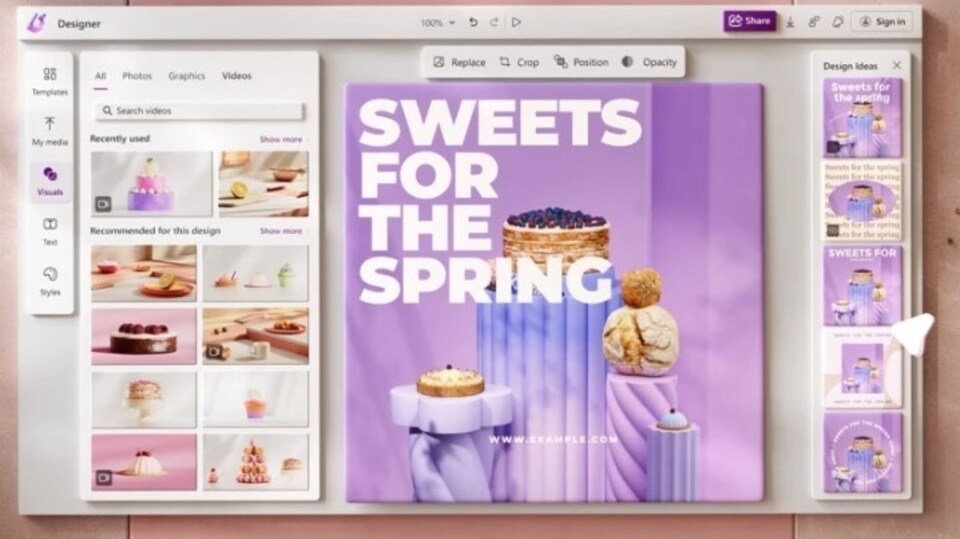
Microsoft has added several new features to Designer, its artificial intelligence (AI)-powered tool that generates a variety of designs with ‘minimal effort,’ and was launched in October last year.

Microsoft launched Designer in October last year

Here are the details:

Get images with just your voice: Users simply need to describe what they want. They will get ‘one-of-a-kind’ images, that too with accompanying text and visuals, as well as design suggestions to meet their needs.

Write text to accompany designs: For quick copy suggestions, including headlines and short texts, people must type a phrase that they think captures their thoughts. Additionally, Designer will offer suggestions to match with the design.

Customise, resize designs: Acting on customer feedback, said Microsoft, it has also made updates to help customise and resize designs more easily. Now, users can change the original design canvas size to a different size, while at the same time, designs elements will shift automatically for a seamless fitting.

Posts can now be resized to up to 20 different social media layout sizes across platforms such as Instagram, Facebook, LinkedIn, and more.

Make designs stand out: For this, people can now create animated visuals on Designer.

Designer on Edge

Also, Microsoft has integrated Designer in the tech giant's in-house web browser, Edge, which means Edge is the first and only browser to have an integrated, AI-powered graphic design app.

Here, you can find the AI-driven tool on the Edge sidebar, and access it by clicking on the Designer icon.

Upcoming features

In the near future, according to Microsoft, more features will be added to the Designer app: Fill, expand background, erase, and replace background.

  • HT News Desk
    ABOUT THE AUTHOR
    HT News Desk

    Follow the latest breaking news, major developments and agenda-setting stories from India and around the world with the newsdesk at Hindustan Times. Operating round the clock, the desk brings together experienced editors, reporters and correspondents to deliver fast, accurate and contextual reporting across subjects that influence public policy, governance, business, society and international affairs. The HT News Desk covers politics, elections, government policies, the economy, business and markets, science and technology, the environment, law and order, infrastructure, education, climate issues and geopolitics, while closely tracking developments across states, institutions and global capitals. The team also leads coverage of major breaking news events, policy announcements, court proceedings, natural disasters, public emergencies and significant international developments. Reports published by the newsdesk are based on information gathered from reporters on the ground, official statements, government agencies, court records, regulatory filings, recognised institutions and other authoritative sources. Stories undergo editorial scrutiny and verification processes to ensure accuracy, fairness and relevance, and are updated as events evolve and additional information becomes available. Whether covering a key political decision in New Delhi, an economic policy shift affecting millions, a landmark court ruling or a major global event, the HT News Desk aims to provide readers with reliable, fact-based journalism that delivers not only the latest developments but also the context and analysis needed to understand their wider implications.Read More