For artists and illustrators, a tablet can offer the freedom to turn ideas into sketches, illustrations and finished artwork without being tied to a desk. However, a good drawing experience depends on how naturally the device responds to your input, making factors such as stylus responsiveness, display quality and screen size important considerations.
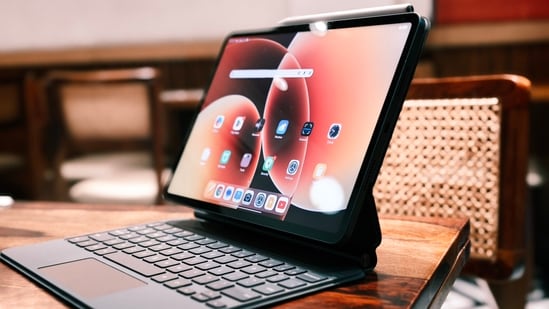
These qualities become particularly relevant when moving from quick sketches to more detailed work, where precision and comfort can influence the creative process. At the same time, a tablet needs enough versatility to handle everyday tasks when you are not drawing, whether that involves browsing, streaming or working on documents.
With several models now catering to creative users in different ways, choosing between them can be difficult. This list brings together six options to help narrow that choice.
Choose better. Buy smarter.
NEHA by HT Tech generates recommendations using proprietary AI analysis built on years of editorial expertise.{{#product}}{{/product}}
The Redmi Pad 2 Pro is the most affordable tablet in this lineup, yet it does not compromise much on drawing performance. When paired with the Redmi Smart Pen, it offers 4,096 pressure levels, low latency, and responsive input for sketching and note-taking.
What are buyers saying on Amazon?
Buyers generally appreciate the tablet’s large display, smooth performance, battery life and overall value. Some users also praise its build quality and stylus support, although drawing-focused feedback highlights occasional pen-accuracy issues and palm-rejection limitations in certain apps.
Why should you consider buying this tablet?
The Redmi Pad 2 Pro is worth considering if you want a spacious screen for drawing without moving into premium tablet pricing. Its 120Hz display, stylus support, capable processor and large battery make it versatile for creative and everyday tasks.
{{#product}}{{/product}}
Our Principles
Full Transparency
Every product review clearly lists the Pros and Cons, giving you a balanced view.
Brand Confidence
We focus on products from brands with a proven reputation and long-standing market trust.
The Xiaomi Pad 8 is a strong choice for artists seeking a tablet that feels capable of more than just drawing. Its sharp 11.2-inch 3.2K display, 144Hz refresh rate, and support for the Xiaomi Focus Pen Pro make sketching and detailed work more fluid, while the Snapdragon 8s Gen 4 delivers ample performance for demanding creative apps.
What are buyers saying on Amazon?
Buyers largely praise the Xiaomi Pad 8 for its sharp display, fast performance, smooth 144Hz experience and premium build. The stylus also receives positive feedback for responsive, low-latency drawing and note-taking, though some users have reported occasional pen-related issues.
Why should you consider buying this tablet?
The Xiaomi Pad 8 is worth considering if you want a powerful drawing tablet without limiting yourself to creative work. Its high-resolution 144Hz display, Snapdragon 8s Gen 4 chip and Focus Pen Pro support give it the hardware to handle demanding creative and everyday workloads.
{{#product}}{{/product}}
The Apple iPad 11-inch offers a capable drawing experience in a familiar, portable design. Its Liquid Retina display provides a spacious canvas, while the A16 chip runs creative apps smoothly. Apple Pencil support enables precise input for sketching and note-taking, making it suitable for artists who also want a versatile everyday tablet.
What are buyers saying on Amazon?
Buyers praise the 11-inch iPad for its smooth performance, sharp display, battery life and premium build. However, some users feel the 60Hz refresh rate is limiting for drawing, while others find the Apple Pencil’s extra cost inconvenient, especially compared with bundled stylus options.
Why should you consider buying this tablet?
The 11-inch iPad is well suited to artists seeking a balanced tablet for drawing and everyday use. Its A16 chip, sharp Liquid Retina display and precise Apple Pencil support provide a capable creative setup without the higher-end hardware of the iPad Air.
{{#product}}{{/product}}
The Lenovo Idea Tab Pro Gen 2 is a strong fit for artists seeking a large canvas without compromising performance. Its 13-inch 3.5K display pairs with the included Tab Pen Plus, which offers 4,096 pressure levels, tilt detection and palm rejection for detailed digital sketches, illustrations and everyday note-taking.
What are buyers saying on Amazon?
Buyers appreciate the Idea Tab Pro Gen 2 for its large display, fast performance and included stylus. Drawing-focused users particularly value the pen’s responsiveness and accuracy, while some note that the tablet is relatively large and that the pen charges via USB-C rather than magnetically.
Why should you consider buying this tablet?
The Idea Tab Pro Gen 2 suits artists seeking a spacious drawing canvas and strong everyday performance. Its 3.5K 144Hz display, Snapdragon 8s Gen 4 chip and included Tab Pen Plus provide a capable setup for sketching, illustration, note-taking and creative applications.
{{#product}}{{/product}}
The OnePlus Pad 4 is built for artists who want a large canvas without compromising performance. Its 13.2-inch 3.4K display combines a 144Hz refresh rate with high colour accuracy, while the optional OnePlus Stylo Pro offers 16,000 pressure levels and ultra-low latency for detailed drawing and note-taking. The Snapdragon 8 Elite Gen 5 also provides substantial headroom for demanding creative apps.
What are buyers saying on Amazon?
Buyers generally appreciate the Pad 4 for its large display, fast performance, slim design and battery life. For drawing, the Stylo Pro's responsiveness and pressure sensitivity are major strengths, although the requirement to buy a separate stylus and the tablet's large footprint may not suit everyone.
Why should you consider buying this tablet?
The OnePlus Pad 4 is worth considering if drawing is only part of your workload. Its high-resolution 144Hz display and Stylo Pro support make it well-suited to creative work, while its powerful processor, large battery, and multitasking features leave plenty of headroom for demanding everyday use.
{{#product}}{{/product}}
The iPad Air 11-inch brings the M4 chip to a slim, portable tablet designed for creative work. Its fully laminated Liquid Retina display, P3 colour support and Apple Pencil Pro compatibility provide a precise canvas for sketching, illustration and other demanding creative tasks.
What are buyers saying on Amazon?
Buyers generally appreciate the iPad Air M4 for its fast performance, premium build, sharp display and smooth everyday experience. For drawing, Apple Pencil Pro support is a major advantage, although the 60Hz display and additional stylus cost may disappoint users seeking a more specialised drawing setup.
Why should you consider buying this tablet?
The iPad Air is worth considering if drawing is a serious part of your workflow. Its M4 chip, laminated Liquid Retina display, support for Apple Pencil Pro and a colour-accurate P3 panel create a capable setup for illustration, sketching and other creative tasks.
Q1. Is a larger screen or a better stylus more important for drawing?
A larger display gives you more room for detailed artwork, but pen accuracy, pressure response and low latency have a greater effect on how natural drawing feels. Prioritise stylus performance first, then choose a screen size that suits your workflow.
Q2. Should I prioritise a high refresh rate when choosing a drawing tablet?
A high refresh rate can make pen movement and on-screen interactions feel smoother, but it should not come at the expense of stylus accuracy and responsiveness. For drawing, a well-tuned pen matters more than simply choosing the tablet with the highest refresh rate.
How Do These Tablets Stack Up?
Product | Display | Processor | Battery |
|---|---|---|---|
| Redmi Pad 2 Pro | 12.1-inch 2.5K LCD, 120Hz | Snapdragon 7s Gen 4 | 12,000mAh |
| Xiaomi Pad 8 | 11.2-inch 3.2K LCD, 144Hz | Snapdragon 8s Gen 4 | 9,200mAh |
| Apple iPad 11-inch (A16) | 11-inch Liquid Retina, 2360 × 1640 pixels | A16 chip | Up to 10 hours |
| Lenovo Idea Tab Pro Gen 2 | 13-inch 3.5K LCD, 144Hz | Snapdragon 8s Gen 4 | 10,200mAh |
| OnePlus Pad 4 | 13.2-inch 3.4K LCD, 144Hz | Snapdragon 8 Elite Gen 5 | 13,380mAh |
| Apple iPad Air 11-inch (M4) | 11-inch Liquid Retina, 2360 × 1640 pixels | M4 chip | Up to 10 hours |
Also Read:
Xiaomi Pad 8 has earned a permanent spot in my backpack: Here's why
iQOO Z11 5G review: Doesn't win every battle, but somehow wins you over
Do not buy an iPad in 2026 until you see what Android tablets offer
- How much storage should I choose for digital drawing?
128GB can be sufficient for casual sketching and a modest app library, but artists working on large projects, high-resolution artwork, or video should consider more storage. Creative apps and project files can quickly consume storage space, making 256GB or more preferable for heavier workloads.
- Does display quality matter more than resolution for drawing?
Yes. Resolution is important for sharpness, but colour accuracy, screen lamination and the gap between the pen tip and displayed stroke can have a greater effect on drawing. These factors are particularly important for artists working on detailed or colour-sensitive projects.
- Do I need tilt support in a stylus for drawing?
Tilt support is useful if you use shading techniques or brushes that respond to the angle of the pen. It is less important for basic sketching and note-taking, so it should be treated as a useful creative feature rather than an essential requirement.
Disclaimer: At Hindustan Times, we help you stay up-to-date with the latest trends and products. Hindustan Times has an affiliate partnership, so we may get a part of the revenue when you make a purchase. We shall not be liable for any claim under applicable laws, including but not limited to the Consumer Protection Act, 2019, with respect to the products. The products listed in this article are in no particular order of priority.