If your social media feed was flooded with nostalgic flash portraits, you know how massive the 1980s AI photo trend became. Now, users are leveraging ChatGPT's latest image-generation prompts to unlock fresh viral aesthetics. From wanderlust and underwater photos to dramatic Luxe collage shots, here are five trending ChatGPT visual templates you can try using simple, ready-to-use text prompts.
Here are the prompts for the 5 different styles to try
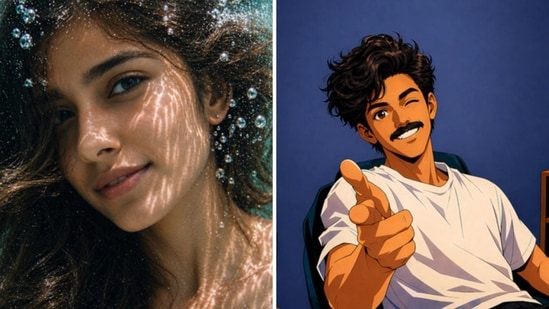
#1: Anime: Create a trending anime art style image from the uploaded subject. Use confident line-work with slight variation and minimal cel shading using flat shadow shapes. Use bright, saturated colors and clean graphic lighting. The style is defined by exaggerated, cartoonish character proportions featuring highly expressive, simplistic facial features that allow for immense emotional range, with highly varied stretched anatomy. Transform the environment into a slightly warped space with playful perspective distortion and simplified objects. Composition and tone should be energetic, lively, and comedic in a fully stylized, non-realistic world.
Also Read: ChatGPT '80s photo trend goes viral: 5 prompts to try for 1990s and 2000s styles
#2: Underwater: Create an extreme close-up underwater portrait after the subject has just jumped into a swimming pool or clear shallow water. Keep the mood calm, weightless, and ethereal, emphasizing light reflections. No struggle or urgency.
{{/usCountry}}#2: Underwater: Create an extreme close-up underwater portrait after the subject has just jumped into a swimming pool or clear shallow water. Keep the mood calm, weightless, and ethereal, emphasizing light reflections. No struggle or urgency.
{{/usCountry}}#3: Luxe Collage: Use the main subject in this image to create a 9:16 image of a warm-toned layered, overlapping photo collage. Golden hour lighting, soft shadows, cozy mood, burgundy, luxe, embroidered indian clothing, gold accessories. Collage with close-ups (eyes, lips, side profile), floral elements (beige/orange lilies). Soft glam, aesthetic social media style, high detail, shallow depth, ultra-realistic, 4K.
#4: Film Strip: Transform the uploaded image into cinematic 3-frame sequential film stills (horizontal frames stacked vertically), full bleed edge-to-edge. Each frame should show a different moment from the same scene, with clear progression. Vary the composition, camera angle, and distances to create a sense of movement and storytelling. Use a cinematic, cooler-toned, high-contrast, deep-space blacks film with a natural color grade. Add subtle film grain, slight motion blur, and natural imperfections to emulate analog photography. Keep the composition candid and emotionally grounded, with a sense of movement and quiet storytelling. Overall aesthetic: cinematic, nostalgic, and organic, like raw film stills.
#5: Wanderlust: Use this image to create a travel collage by placing the main subject of the original image in a travel destination location with location appropriate styling as an instant photo with instant photo style lighting, color and quality. Include a postcard from a random less traveled destination in blue ink pen inspiring me to travel to new places. It should feel intimate, personal, and cleanly curated. Add souvenirs and small details that create a sense of a memento in a balanced layout with natural lighting.
Also Read: 1980s AI photo trend: Step-by-step guide to create your own retro portraits using ChatGPT
Quick guide on how to get the perfect AI pic:
Step 1: Select a clear picture
Step 2: Visit the “Images” option on ChatGPT
Step 3: Upload the photo you want to recreate using AI
Step 4: Add your desired prompt. Alternatively, you can also choose from the “Trending” templates on ChatGPT
If the generated image is not to your liking, add additional prompts to refine the visual.