
 E-Paper



Best printers for office use: Top 10 reliable and high-performance options for your business needs
Searching for the best office printer? Explore our top 10 list featuring multifunction, high-speed, and wireless printers perfect for your business needs.

 Prefer HTon Google


Our Picks
Best overall
Best value for money
FAQs
Our Picks
| Product | Rating | Price |
|---|---|---|
Best overall HP Smart Tank 580 Aio WiFi Colour Wireless Solid Ink Printers with 1 Extra Black Ink Bottle (Upto 8000 Black & 6000 Colour Prints) + 1 Year Extended Warranty with PHA Coverage -Print, Scan & CopyView Details | ₹14,490 | |
 | ||
HP Smart Tank 589 All-in-One WiFi Colour Printer – Print/Scan/Copy, Up to 4000 Black & 6000 Colour Pages, High Capacity Ink Tank, Wireless, Ideal for Home & Office PrintingView Details | ||
| ||
Best value for money HP Smart Tank 720 All-in-One Auto Duplex WiFi Colour Printer, Print, Scan & Cope for OfficeView Details | ||
| ||
HP Laser MFP 1188W Monochrome Laser Printers,Wireless,Print,Copy,Scan,Ethernet,Hi-Speed USB 2.0,Up to 21 Ppm,150-Sheet Input Tray,100-Sheet Output Tray,10,000-Page Duty Cycle,Black and WhiteView Details | ||
| ||
HP Ink Advantage 4278 WiFi Colour Printer - Print/Scan/Copy with ADF Ideal for Home/Small OfficeView Details | ||
| ||

Research-Backed Choices
Every product we recommend is chosen through a combination of Primary Research and Secondary Research.
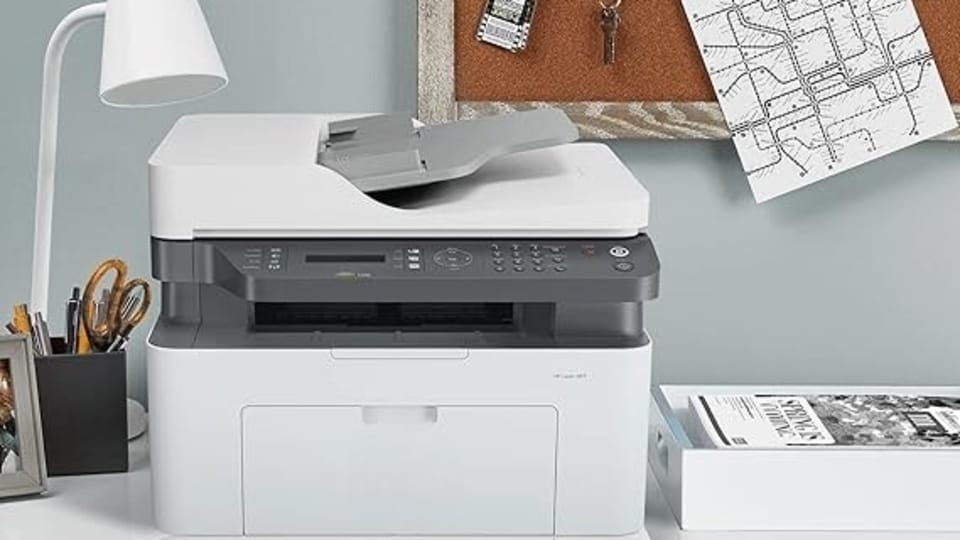
When it comes to setting up an office, one of the most important pieces of equipment is a reliable printer. Whether you need high-speed printing, affordable options, or multifunction capabilities, we've got you covered. In this article, we'll explore the top 10 printers for office use, including colour laser printers, wireless printers, and more. From Canon to HP to Epson, we'll compare the features, pros, and cons of each product to help you make an informed decision. Read on to find the best printer for your office needs.
BEST OVERALL
1. HP Smart Tank 580 Aio WiFi Colour Wireless Solid Ink Printers with 1 Extra Black Ink Bottle (Upto 8000 Black & 6000 Colour Prints) + 1 Year Extended Warranty with PHA Coverage -Print, Scan & Copy
The HP Smart Tank 580 Aio is an ideal choice for home and office use, offering wireless functionality and exceptional print quality. With up to 8000 black and 6000 colour prints supported by its high-capacity ink tank, this printer is built for efficiency. Its extended warranty ensures reliability, while its print, scan, and copy functions make it versatile. Users appreciate its affordability in the long term and its solid ink performance, making it a great investment for high-volume printing.
Specifications of HP Smart Tank 580 Aio
Print Technology: Solid Ink, Colour
Wireless Printing: Yes
Functions: Print, Scan, Copy
Print Capacity: Up to 8000 black & 6000 colour prints
Warranty: 1-year extended warranty with PHA coverage
| Reasons to Buy | Reasons to Avoid |
| High-capacity ink tank | Not suitable for laser printing needs |
| Wireless printing with easy setup | Lacks automatic duplex printing |
| Extended warranty for peace of mind | May not be ideal for very low-volume printing |
2. HP Smart Tank 589 All-in-One WiFi Colour Printer – Print/Scan/Copy, Up to 4000 Black & 6000 Colour Pages, High Capacity Ink Tank, Wireless, Ideal for Home & Office Printing

Our Principles
Full Transparency
Every product review clearly lists the Pros and Cons, giving you a balanced view.
Brand Confidence
We focus on products from brands with a proven reputation and long-standing market trust.
The HP Smart Tank 589 stands out for its cost-effective ink usage and wireless functionality. Capable of printing up to 4000 black and 6000 color pages, it is designed for moderate to heavy printing tasks. Its high-capacity ink tank ensures fewer refills, while its sleek design fits both home and office environments. The Smart Tank 589 is particularly suited for users seeking reliable and quality output for day-to-day document management.
Specifications of HP Smart Tank 589 Aio
Print Technology: Colour, High-Capacity Ink Tank
Wireless Printing: Yes
Functions: Print, Scan, Copy
Print Capacity: Up to 4000 black & 6000 colour prints
Usage: Ideal for home and office printing
| Reasons to Buy | Reasons to Avoid |
| Affordable printing with high ink yield | No automatic duplex printing |
| Wireless functionality | Not suitable for heavy-duty professional use |
| Compact and stylish design | Limited print speeds compared to laser models |
BEST VALUE FOR MONEY
3. HP Smart Tank 720 All-in-One Auto Duplex WiFi Colour Printer, Print, Scan & Cope for Office
The HP Smart Tank 720 offers advanced features like auto duplex printing, making it a versatile and eco-friendly choice for both office and home users. With wireless connectivity and support for high-quality prints, scans, and copies, it’s designed for convenience and performance. The Smart Tank 720 is equipped with a large ink tank that ensures consistent output for high-volume tasks, delivering excellent value for money.
Specifications of HP Smart Tank 720 Aio
Print Technology: Auto Duplex Colour Printer
Wireless Printing: Yes
Functions: Print, Scan, Copy
Special Features: Auto Duplex, High Ink Capacity
Usage: Suitable for office and high-volume printing
| Reasons to Buy | Reasons to Avoid |
| Auto duplex printing saves time & paper | Higher initial cost compared to entry-level models |
| Excellent for high-volume printing | Bulkier design may not suit small spaces |
| Wireless and multi-functional |
4. HP Laser MFP 1188W Monochrome Laser Printers,Wireless,Print,Copy,Scan,Ethernet,Hi-Speed USB 2.0,Up to 21 Ppm,150-Sheet Input Tray,100-Sheet Output Tray,10,000-Page Duty Cycle,Black and White
The HP Laser MFP 1188W is a robust monochrome printer built for professional-grade tasks. With a print speed of up to 21 ppm and a duty cycle of up to 10,000 pages, it is designed for high productivity. Its wireless and Ethernet capabilities ensure seamless connectivity, while its efficient print, scan, and copy functions provide excellent value. Perfect for office environments, this printer delivers sharp, reliable outputs with minimal maintenance.
Specifications of HP Laser MFP 1188W
Print Technology: Monochrome Laser Printer
Wireless Printing: Yes
Functions: Print, Scan, Copy
Print Speed: Up to 21 ppm
Duty Cycle: Up to 10,000 pages
| Reasons to Buy | Reasons to Avoid |
| Fast printing speeds for productivity | Monochrome printing only |
| High duty cycle for professional use | No colour printing capability |
| Wireless and Ethernet connectivity | Slightly higher running cost due to laser toner |
5. HP DeskJet 2778 All-in-One Ink Advantage Wireless Colour Printer
The HP DeskJet 2778 offers all-in-one capabilities with wireless color printing and automatic document feeding. With its user-friendly features and reliable performance, it's a great option for office use.
Specifications of HP DeskJet 2778 All-in-One Ink Advantage Wireless Colour Printer
All-in-one capabilities
Wireless colour printing
Automatic document feeding
User-friendly features
Reliable performance
| Reasons to buy | Reasons to avoid |
| All-in-one capabilities | Relatively high ink cost |
| Wireless color printing | |
| Automatic document feeding |
6. HP LaserJet Pro MFP M126nw
The HP LaserJet Pro MFP M126nw offers integrated printing, scanning, and copying capabilities with automatic document feeding. With its high-speed performance and reliable operation, it's a great choice for office use.
Specifications of HP LaserJet Pro MFP M126nw
Integrated printing, scanning, and copying
Automatic document feeding
High-speed performance
Reliable operation
User-friendly features
| Reasons to buy | Reasons to avoid |
| Integrated capabilities | Limited color printing |
| High-speed performance | |
| Reliable operation |
7. Brother DCP-T820DW Refill Tank System Ink Tank Printer
The Brother DCP-T820DW features a refill tank system for efficient ink usage and high-quality printing. With its reliable performance and low-cost ink refills, it's a great option for office use.
Specifications of Brother DCP-T820DW Refill Tank System Ink Tank Printer
Refill tank system
Efficient ink usage
High-quality printing
Reliable performance
Low-cost ink refills
| Reasons to buy | Reasons to avoid |
| Refill tank system | Relatively high initial cost |
| Efficient ink usage | |
| High-quality printing |
8. HP Smart Tank 530 Colour Printer
The HP Smart Tank 530 offers high-quality colour printing with an integrated ink tank system. With its efficient design and low-cost ink refills, it's a great choice for office use.
Specifications of HP Smart Tank 530
Integrated ink tank system
High-quality colour printing
Efficient design
Low-cost ink refills
Reliable performance
| Reasons to buy | Reasons to avoid |
| Integrated ink tank system | Relatively high initial cost |
| High-quality color printing | |
| Reliable performance |
9. HP Smart Tank 500 Colour Printer
The HP Smart Tank 500 offers high-quality color printing with an integrated ink tank system. With its efficient design and low-cost ink refills, it's a great choice for office use.
Specifications of HP Smart Tank 500
Integrated ink tank system
High-quality colour printing
Efficient design
Low-cost ink refills
Reliable performance
| Reasons to buy | Reasons to avoid |
| Integrated ink tank system | Relatively high initial cost |
| High-quality color printing | |
| Reliable performance |
10. HP LaserJet Pro M203dw Wireless Printer
The HP LaserJet Pro M203dw offers high-speed wireless printing with a compact design and low maintenance. With its efficient performance and reliable operation, it's a great option for office use.
Specifications of HP LaserJet Pro M203dw
High-speed wireless printing
Compact design
Low maintenance
Efficient performance
Reliable operation
| Reasons to buy | Reasons to avoid |
| High-speed wireless printing | Limited color printing |
| Compact design | |
| Reliable operation |
Also reads:Best laser printers for home and office use in 2024: Top 8 all-purpose picks for you
Top 5 features for best printers for office use:
| Best Printers for Office Use | Wireless Printing | Colour Printing | High-Speed Printing | Low-Cost Ink Refills | Automatic Document Feeding |
| HP Smart Tank 580 Aio WiFi Colour Printer | Yes | Yes | Yes | Yes | No |
| HP Smart Tank 589 Aio WiFi Colour Printer | Yes | Yes | Yes | Yes | No |
| HP Smart Tank 720 Aio WiFi Colour Printer | Yes | Yes | Yes | Yes | Yes |
| HP Laser MFP 1188W Monochrome Printer | Yes | No | Yes | Yes | No |
| HP DeskJet 2778 | Yes | Yes | No | No | Yes |
| HP LaserJet Pro MFP M126nw | No | No | Yes | No | Yes |
| Brother DCP-T820DW | Yes | Yes | No | Yes | No |
| HP Smart Tank 530 | No | Yes | No | Yes | No |
| HP Smart Tank 500 | No | Yes | No | Yes | No |
| HP LaserJet Pro M203dw | Yes | No | Yes | No | No |
Factors to keep in mind while choosing the best printer for office use:
Printer Type: Decide between inkjet, laser, or multifunction printers based on your office needs.
Print Speed and Volume: Consider the printer's speed and monthly page capacity for high-demand environments.
Connectivity Options: Look for wireless, Ethernet, or cloud printing features for easy integration with office devices.
Cost of Ink or Toner: Evaluate the ongoing cost of ink or toner to ensure long-term affordability.
Paper Handling: Check the printer's ability to handle different paper sizes and automatic duplexing.
Security Features: Ensure the printer has built-in security features, especially for confidential documents.
Maintenance and Support: Consider the ease of maintenance and the availability of technical support or service plans.
Similar stories for you
Best Epson colour printers: Top 10 versatile choices for reliable and efficient performance
Disclaimer: At Hindustan Times, we help you stay up-to-date with the latest trends and products. Hindustan Times has an affiliate partnership, so we may get a part of the revenue when you make a purchase. We shall not be liable for any claim under applicable laws, including but not limited to the Consumer Protection Act, 2019, with respect to the products. The products listed in this article are in no particular order of priority.



