How to link voter ID with Aadhaar card? Follow these simple steps
The Election Commission has stated that the process of linking Aadhar card with the voter ID will help detect the registration of a voter in more than one constituency or more than once in the same constituency. However, the poll panel has not made it mandatory to link Aadhar with the voter ID.
The Election Commission has started a drive to link voter identity cards with Aadhaar across several states. The poll panel has said that the exercise is being carried out to establish the identities of the voters and authentication of entries in the electoral rolls. This comes months after the Parliament passed the Election Laws (Amendment) Bill 2021 to link electoral roll data with the Aadhaar ecosystem.
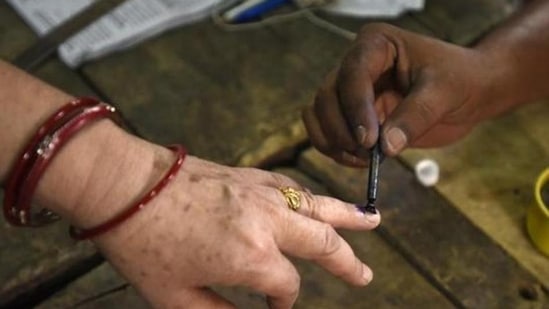
In the panchayat polls in 2021, SEC had introduced biometric system for voters’ identification and also electronic voting machines to check rigging. (HT PHOTO) (HT_PRINT)
{{^htLoading}} {{/htLoading}}
The Election Commission has stated that the process of linking Aadhaar card with the voter ID will help detect the registration of a voter in more than one constituency or more than once in the same constituency. However, the poll panel has not made it mandatory to link Aadhaar with the voter ID, Hindustan Times sister publication Live Hindustan reported.If you wish to link your voter ID with the Aadhaar card, here are the steps you should follow.
STEP 1: Download the ‘Voter Helpline App’ on your smartphone either from the Google Play Store or the Apple App Store.
STEP 2: Open the app, select ‘I Agree’ option and tap the Next button. STEP 3: Select the ‘Voter Registration’ option. STEP 4: Click on Electoral Authentication Form (Form 6B). STEP 5: Tap on the ‘Let’s Start' option. STEP 6: Enter your mobile number registered with Aadhaar and click on ‘Send OTP’ option. STEP 7: Select ‘Yes I have voter ID’ option and click on ‘Next’. STEP 8: Enter your voter ID (EPIC) number, select the state and tap on the ‘Fetch Details’ option. STEP 9: Select ‘Proceed’ option. STEP 10: Enter your Aadhaar number, the registered mobile number and click on 'Done'.
{{^htLoading}} {{/htLoading}}
{{^usCountry}}
STEP 11: After the process is complete, the preview page of Form 6B will appear. Check your details again and select ‘Confirm’ to submit.
{{/usCountry}}
{{#usCountry}}
STEP 11: After the process is complete, the preview page of Form 6B will appear. Check your details again and select ‘Confirm’ to submit.
Follow the latest breaking news, major developments and agenda-setting stories from India and around the world with the newsdesk at Hindustan Times. Operating round the clock, the desk brings together experienced editors, reporters and correspondents to deliver fast, accurate and contextual reporting across subjects that influence public policy, governance, business, society and international affairs. The HT News Desk covers politics, elections, government policies, the economy, business and markets, science and technology, the environment, law and order, infrastructure, education, climate issues and geopolitics, while closely tracking developments across states, institutions and global capitals. The team also leads coverage of major breaking news events, policy announcements, court proceedings, natural disasters, public emergencies and significant international developments. Reports published by the newsdesk are based on information gathered from reporters on the ground, official statements, government agencies, court records, regulatory filings, recognised institutions and other authoritative sources. Stories undergo editorial scrutiny and verification processes to ensure accuracy, fairness and relevance, and are updated as events evolve and additional information becomes available. Whether covering a key political decision in New Delhi, an economic policy shift affecting millions, a landmark court ruling or a major global event, the HT News Desk aims to provide readers with reliable, fact-based journalism that delivers not only the latest developments but also the context and analysis needed to understand their wider implications.
Stay updated with the latest Technology News, gadget launches, app updates, artificial intelligence and digital trends. Find reviews, comparisons and useful insights from the world of tech.
Stay updated with the latest Technology News, gadget launches, app updates, artificial intelligence and digital trends. Find reviews, comparisons and useful insights from the world of tech.
Home/Technology/How to link voter ID with Aadhaar card? Follow these simple steps