You walk into a TV showroom, look at a massive 75-inch screen and think, “This is exactly what I want.” Then you bring it home, sit on your sofa and suddenly realise the screen feels far too big for the room. The opposite can happen too: a 43-inch TV that looked perfectly fine in the store can feel surprisingly small once it is mounted on a large living room wall.
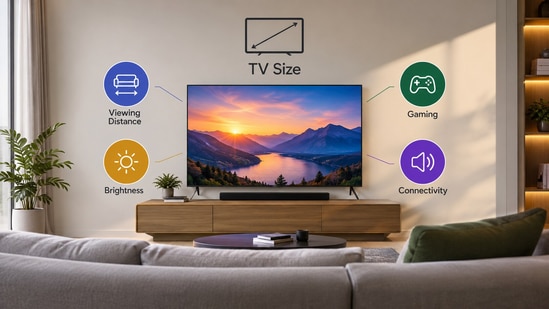
Picking the right smart TV size is not simply about getting the biggest screen your budget allows. The distance between your sofa and the TV, the amount of daylight entering the room, your gaming setup and even the sound system you plan to use can all change which screen size makes sense. Before you make the purchase, here are the things I would check to make sure the TV actually fits your room and your viewing habits.
Start with your viewing distance
The distance between your sofa and the TV is one of the easiest ways to narrow down your options. You do not necessarily need to follow one exact formula, but the viewing distance can give you a useful starting point.
| Viewing distance | Recommended TV size |
|---|---|
| 4 to 6 feet | 43 to 50 inches |
| 6 to 8 feet | 50 to 55 inches |
| 8 to 10 feet | 55 to 65 inches |
| 10 to 12 feet | 65 to 75 inches |
| 12 feet or more | 75 inches and above |
These are general recommendations rather than fixed rules. Your preferred viewing experience also matters. If you like a more cinematic experience, you may prefer a larger screen even when you are slightly closer to it. The important thing is to avoid buying a screen purely because it looks big in a showroom.
Check how bright your room gets
The next thing I would look at is the amount of light in the room. This becomes particularly important if you have a large window opposite or close to the TV installation wall.
A TV with a brighter display can make a significant difference during daytime viewing. If sunlight falls directly on the screen, a lower brightness panel may struggle to maintain contrast and visibility. You could end up watching your own reflection instead of the movie or show playing on the screen.
If your living room gets plenty of daylight, look for a TV with strong brightness and good reflection handling. If the room is naturally dark or you mostly watch TV at night, you can put more emphasis on contrast and black levels instead.
Think about gaming before choosing the TV
If you have a PlayStation, Xbox or gaming PC connected to the TV, screen size is only one part of the decision. You should also check the TV's gaming features before buying it.
A higher refresh rate can make games feel smoother, particularly when playing fast-paced titles. A TV with 120Hz support is worth considering if you have a compatible console or gaming PC. Features such as HDMI 2.1, variable refresh rate and low input lag can also improve the gaming experience.
This is one area where spending slightly more on the right TV can make more sense than simply buying a larger screen.
Do not forget your sound system
Your TV may have good built-in speakers, but if you plan to connect a soundbar or home theatre system, check the connectivity before buying it.
HDMI eARC is particularly useful because it can send high-quality audio from the TV to a compatible sound system through a single HDMI connection. This becomes important if you use streaming apps directly on the TV and want their audio to play through an external sound system.
It is also worth checking how many HDMI ports the TV has, especially if you have a console, set-top box, streaming device and soundbar.
Consider where you will install it
The wall itself can also influence the size of TV you should buy. A very large screen may look overwhelming on a narrow wall, while a small TV can appear lost on a wide wall.
Also consider the TV stand or wall mount, viewing height and the space around the screen. If you are wall mounting the TV, check the VESA mounting compatibility and make sure the wall can safely support the television.
You should also leave enough space around the TV for ventilation and cable management. A few extra minutes spent measuring the installation area can save you from an expensive mistake.
Think about what you watch most
Finally, consider your own viewing habits. If you mostly watch movies and sports, a larger screen can make the experience more immersive. For regular TV channels, news and casual viewing, you may not need to go as large.
The same applies to resolution. A larger 4K TV can make sense when you sit farther away, while a smaller screen may already look sufficiently sharp from a closer distance.
Similar articles for you
Top affordable smart TVs that fit perfectly in small spaces
Best 32-inch smart TV: Top 10 choices for compact yet feature-packed entertainment
- How do I choose the right TV size for my room?
Check the distance between your sofa and the TV wall. A larger viewing distance generally allows for a larger screen.
- Is a bigger TV always better?
No. A screen that is too large for your viewing distance can feel uncomfortable, while a small TV may not provide an immersive experience.
- Does room brightness matter when buying a TV?
Yes. Bright rooms need a TV with higher brightness and good reflection handling for comfortable daytime viewing.
- What TV features should gamers look for?
Look for a 120Hz refresh rate, low input lag, VRR and HDMI 2.1 if you use a modern gaming console.
- Do I need HDMI eARC on my smart TV?
If you plan to connect a soundbar or home theatre system, HDMI eARC is useful for sending high-quality audio from the TV to the external sound system.
Disclaimer: At Hindustan Times, we help you stay up-to-date with the latest trends and products. Hindustan Times has an affiliate partnership, so we may get a part of the revenue when you make a purchase. We shall not be liable for any claim under applicable laws, including but not limited to the Consumer Protection Act, 2019, with respect to the products. The products listed in this article are in no particular order of priority.