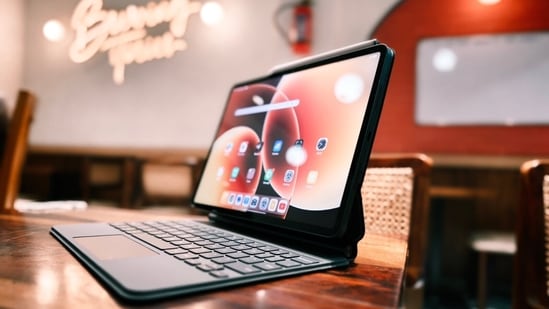
A tablet can be a useful work companion for reading documents, replying to emails, joining Meet and Zoom calls, reviewing presentations and taking notes. With a keyboard and stylus, some models can also handle a fair amount of writing and document editing without requiring you to carry a laptop everywhere. Actually, the right choice depends on your workload. A large display and desktop-style multitasking can help if you regularly work across several apps, while a lighter tablet may be more convenient for meetings and travel. Here I've covered seven options from Apple, Lenovo, OnePlus, Xiaomi, Samsung and Redmi. They range from compact tablets for everyday tasks to larger models with powerful processors and productivity-focused accessories. Check the software, keyboard support and connectivity before deciding.
{{#product}}{{/product}}
The 11-inch iPad Air is a compact option for work that involves documents, email, video calls and creative apps. Its M4 chip provides plenty of processing headroom, while the Liquid Retina display supports Apple Pencil input for handwritten notes and markups. The 128GB Wi-Fi model listed here is portable, but a keyboard and stylus are separate purchases.
What are buyers saying on Amazon?
Customers are highly satisfied with the iPad Air’s performance, particularly the M4 chip’s speed and smooth multitasking. The Liquid Retina display also receives praise for its vibrant visuals. Buyers say it works well for a range of activities, including work, gaming and creative tasks.
Why should you choose this product?
The iPad Air is worth considering if you want a portable tablet with powerful hardware and a broad selection of productivity and creative apps. It suits users already invested in Apple devices, especially those who plan to add a keyboard or Pencil.
{{#product}}{{/product}}
Our Principles
Full Transparency
Every product review clearly lists the Pros and Cons, giving you a balanced view.
Brand Confidence
We focus on products from brands with a proven reputation and long-standing market trust.
The Lenovo Yoga Tab Plus is a large-screen productivity bundle that includes a keyboard and pen, making it ready for typing and handwritten notes out of the box. Its Snapdragon 8 Gen 3 processor, 16GB RAM and 512GB storage give it room for demanding apps and large files. The 12.7-inch 3K display is also suited to working across documents and windows.
What are buyers saying on Amazon?
Customers describe the tablet as a premium Android device, praising its battery life, sound quality and overall package. Some say the battery can last up to two days, while feedback on the display and performance is mixed. A few buyers report operating-system crashes.
Why should you choose this product?
The Yoga Tab Plus stands out as a ready-to-work bundle, with a keyboard and pen included alongside generous memory and storage. It is worth considering if you want a large Android tablet for typing, annotating documents and multitasking.
{{#product}}{{/product}}
The OnePlus Pad 4 is designed for users who need a large workspace and substantial processing power. Its 13.2-inch 3.4K display, Snapdragon 8 Elite Gen 5 platform and 12GB RAM are suited to demanding apps and multi-window work. The 512GB model also leaves room for documents and offline files, though its size makes it less convenient than smaller tablets on the move.
What are buyers saying on Amazon?
Customers praise the OnePlus Pad 4’s display, describing its colours and viewing experience positively. Performance and battery life also receive favourable feedback, with buyers appreciating its speed for work and other demanding tasks. The overall sentiment provided points to satisfaction with the tablet’s feature set and value.
Why should you choose this product?
The Pad 4 is worth considering if you want a large Android tablet with high-end processing power and plenty of storage. Its expansive display makes it relevant for users who regularly keep multiple apps or documents open.
{{#product}}{{/product}}
The Xiaomi Pad 8 comes with a slim design, a sharp 11.2-inch display and Snapdragon 8s Gen 4 performance. Its 3.2K resolution and 144Hz refresh rate make text, scrolling and supported apps look crisp and fluid. Xiaomi’s HyperOS 3 includes productivity features, while support for the Focus Pen Pro and keyboard gives users options for notes and longer writing sessions.
What are buyers saying on Amazon?
Customers praise the Pad 8’s display, with one highlighting its 12-bit panel, and appreciate its battery life. However, reliability feedback is mixed. Several customers report recurring system failures, so buyers may want to weigh the positive screen and battery feedback against those concerns.
Why should you choose this product?
The Xiaomi Pad 8 is worth a look if your work involves reading, writing, presentations or using a tablet as a secondary display. Its high-resolution screen and productivity tools give it flexibility beyond basic browsing and media use.
{{#product}}{{/product}}
The Galaxy Tab A11+ is a pretty decent tablet for everyday office tasks, web-based tools, reading and video meetings. This Wi-Fi configuration has 8GB of RAM and 256GB of storage, with microSD expansion available for additional files. Its 11-inch display supports a 90Hz refresh rate, while the 7040 mAh battery is designed to keep routine tasks going through the day.
What are buyers saying on Amazon?
Customers are positive about the tablet’s overall quality, performance and value. The display also receives praise, with one customer describing it as AMOLED. That is a customer description rather than the official panel specification, which lists a TFT display.
Why should you choose this product?
The Galaxy Tab A11+ is a practical option for everyday work if you want expandable storage and a familiar Android experience. The 256GB configuration is useful for people who keep documents, downloads and apps on their tablet.
{{#product}}{{/product}}
The Redmi Pad 2 Pro houses a 12.1-inch 2.5K display, a Snapdragon 7s Gen 4 processor and a 12000 mAh battery. The large screen is useful for reading, spreadsheets and split-screen work, while the battery capacity is suited to long stretches away from a charger. This Wi-Fi model supports keyboard and stylus accessories, which are sold separately.
What are buyers saying on Amazon?
Customers praise the Redmi Pad 2 Pro’s battery life, clear display and sound quality. Some report smooth performance for everyday use and say the battery can last up to two days. Feedback on the user experience and connectivity is mixed, and buyers also mention Smart Pen compatibility concerns.
Why should you choose this product?
The Redmi Pad 2 Pro is worth considering if you want a large-screen tablet with a high-capacity battery for documents, online meetings and everyday multitasking. It is especially relevant if you mostly work near Wi-Fi and do not need cellular data.
{{#product}}{{/product}}
The OnePlus Pad Go 2 offers a 12.1-inch 2.8K display, a 120Hz refresh rate and a 10050 mAh battery. Its Dimensity 7300-Ultra processor and OxygenOS 16 support everyday productivity, while Open Canvas allows up to three app windows on screen. The 8GB RAM and 128GB storage Wi-Fi model is aimed at users who want a large workspace without stepping up to a flagship tablet.
What are buyers saying on Amazon?
Customers appreciate the tablet’s build quality, smooth performance and value for money. The display, battery life and sound quality also receive positive feedback, and some users praise OxygenOS 16. Stylus availability receives mixed feedback, with several buyers saying the pen was missing despite being mentioned in the listing.
Why should you choose this product?
The Pad Go 2 offers a large screen and multi-window tools at a step below flagship hardware. It is worth considering for everyday office tasks, online meetings and note-taking, provided 128GB storage is enough for your files.
Top 3 features of tablets for work
Tablet | Display | Performance | Productivity feature |
|---|---|---|---|
Apple iPad Air 11-inch (M4) | 11-inch Liquid Retina | Apple M4 | Apple Pencil support |
Lenovo Yoga Tab Plus | 12.7-inch 3K, 144Hz | Snapdragon 8 Gen 3 | Keyboard and pen included |
OnePlus Pad 4 | 13.2-inch 3.4K, 144Hz | Snapdragon 8 Elite Gen 5 | Large multi-window workspace |
Xiaomi Pad 8 | 11.2-inch 3.2K, 144Hz | Snapdragon 8s Gen 4 | PC-level WPS Office |
Samsung Galaxy Tab A11+ | 11-inch, 90Hz | Octa-core processor | Expandable storage |
Redmi Pad 2 Pro | 12.1-inch 2.5K, 120Hz | Snapdragon 7s Gen 4 | 12,000mAh battery |
OnePlus Pad Go 2 | 12.1-inch 2.8K, 120Hz | Dimensity 7300-Ultra | Up to three app windows |
Factors to consider when buying a tablet for work
- Keyboard and stylus support: If you type for long periods or annotate documents, check whether the accessories are included or sold separately.
- Display size: A larger screen is useful for spreadsheets and split-screen work, while a smaller tablet is easier to carry.
- Software and app compatibility: Check whether the tablet supports the desktop-style tools and work apps you rely on. Some workflows may still require a laptop.
- Connectivity and storage: Decide whether Wi-Fi is sufficient or if you need cellular data. Check built-in storage and microSD support if you work with large files.
Similar articles for you:
Movies feel different on the right screen, and these 5 TVs are made to bring that magic home
After testing dozens of earbuds, I realised ANC and ENC are not what many think
- Can a tablet replace a laptop for work?
A tablet can handle email, documents, video calls and many productivity tasks. A laptop may still be necessary for specialised desktop software or complex workflows.
- Is a keyboard necessary for using a tablet for work?
Not for every task. A keyboard is useful for long emails, reports and document editing, while the on-screen keyboard is sufficient for short replies and searches.
- How much storage should a work tablet have?
Choose based on your files and apps. More storage helps if you keep large documents, presentations or downloaded files offline. Expandable storage can also be useful.
- Is a stylus useful for office work?
A stylus can help with handwritten notes, signatures, document markups, and diagrams. Check compatibility and whether it is included with the tablet.
- Should I buy a Wi-Fi or cellular tablet?
A Wi-Fi tablet is suitable if you usually work near a reliable network or can use your phone’s hotspot. Cellular connectivity is useful when you need internet access away from Wi-Fi.
Disclaimer: At Hindustan Times, we help you stay up-to-date with the latest trends and products. Hindustan Times has an affiliate partnership, so we may get a part of the revenue when you make a purchase. We shall not be liable for any claim under applicable laws, including but not limited to the Consumer Protection Act, 2019, with respect to the products. The products listed in this article are in no particular order of priority.