
 E-Paper



iPhone trick: Use this hidden iOS feature to track flights for free, without any apps
Frequently track flights using various apps, but want a simpler solution? iOS has a built-in feature for that. Read on for the details.

 Prefer HTon Google


You may be interested in









If you fly frequently, you know how important it is to track your flights. You need to know in advance whether your flight is on time, what time it will depart, and when it will land, so you can make arrangements beforehand. Many people use dedicated tracking apps for this purpose, such as Flighty or similar platforms. But what if we told you that, if you are using an iPhone, you don't need any third-party app at all to track your flights? There are two simple tricks you can use, and the best part is, they are built right into iOS. There are no extra downloads needed, everything is already there.

Also Read: Instagram Blend explained: How to use this new feature
How To Track Your Flights On iOS For Free, Without Any App
Method 1: Using iOS Search
Simply scroll down on your home screen to access the Search bar. In the search field, enter your flight number. For instance, there's an Indigo flight from Jaipur to Delhi with the flight code 6E 2165. Type 6E 2165 into the search bar.
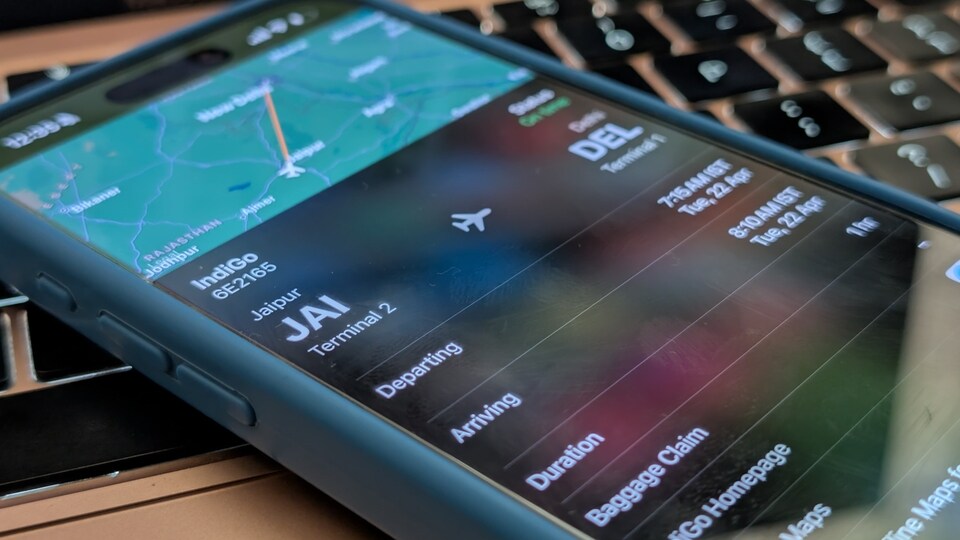
Once you do, you will see the flight’s status, whether it's on time, which terminal it departs from, and where it will arrive, along with other relevant details.
Method 2: Using Flight Details In Messages App
If you have received your flight details via text message, the flight code will usually be underlined or highlighted. Simply tap on it. Select Preview Flight, and you will get a card displaying a live map of the flight, departure and arrival times, duration, and more.
If you haven’t received the flight info as a message, you can just type it yourself, for example, type the airline followed by the flight code, such as Indigo 6E 2165. Send this message to yourself or someone else. Once sent, the flight code will become tappable. Tap on it, then choose Preview Flight to view all the details.
Also Read: New Gmail scam alert: It’s hard to spot and Google is rushing to fix it
Also Works With macOS And iPadOS
It must be noted that these tricks also work across other Apple platforms, including iPadOS and macOS (use macOS Spotlight Search). Just follow the same steps, either tap on the flight code or search for it, and you will get all the relevant information.
Mobile finder: iPhone 16 LATEST price, specs and all details


