Ganesh Chaturthi is here, and festive celebrations have taken over homes, temples and streets across India. From beautifully decorated Ganpati pandals to families coming together for prayers and celebrations, the festival is being marked with devotion and enthusiasm.
(Also read: ChatGPT ’80s photo trend: 5 prompts to create retro Kerala-style images)
Social media is also filling up with festive photographs, greetings and creative posts dedicated to Lord Ganesha. If you want to give your own pictures a Ganesh Chaturthi makeover, artificial intelligence can help.
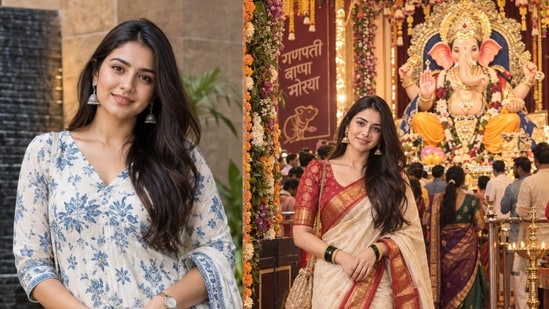
ChatGPT can be used to transform a regular photograph into a festive portrait by adding traditional outfits, Ganpati decorations, flowers, diyas and other celebratory elements. Users can upload a clear photograph and describe exactly how they want the final image to look.
How to create your Ganesh Chaturthi picture with ChatGPT
For better results, upload a clear, well-lit photograph in which your face is properly visible. You can then use one of the following prompts and customise details such as clothing, location or background according to your preference.
1. Traditional Ganpati celebration
“Transform my uploaded photo into a realistic Ganesh Chaturthi celebration. Keep my face, facial features and identity unchanged. Dress me in elegant traditional Indian attire and place me beside a beautifully decorated Lord Ganesha idol. Add marigold flowers, diyas, modaks and warm festive lighting in the background. Make the image photorealistic and natural.”
2. Seeking blessings from Lord Ganesha
{{/usCountry}}“Transform my uploaded photo into a realistic Ganesh Chaturthi celebration. Keep my face, facial features and identity unchanged. Dress me in elegant traditional Indian attire and place me beside a beautifully decorated Lord Ganesha idol. Add marigold flowers, diyas, modaks and warm festive lighting in the background. Make the image photorealistic and natural.”
2. Seeking blessings from Lord Ganesha
{{/usCountry}}“Create a photorealistic image of me seeking blessings from Lord Ganesha during Ganesh Chaturthi. Keep my face exactly the same as in the uploaded photograph. Show me wearing traditional Indian clothes with folded hands in front of a beautifully decorated Ganpati idol, surrounded by flowers, lamps and festive decorations.”
3. Grand Ganpati pandal look
“Create a highly realistic portrait of me inside a grand Ganesh Chaturthi pandal, with a beautifully decorated and impressive Lord Ganesha idol in the background. Preserve my original face, identity, and facial features accurately. Dress me in elegant traditional festive attire, complemented by authentic jewellery and refined festive makeup. Enhance the scene with colourful flowers, decorative lights, and devotees in the background to capture the vibrant spirit of the celebration. Make the overall image look like a professionally shot festival photograph, with rich details, warm lighting, and a premium, realistic finish.”
4. Ganpati celebration at home
“Turn my photo into a warm Ganesh Chaturthi celebration at home. Preserve my exact facial features. Show me sitting beside a decorated Lord Ganesha idol with an aarti thali, flowers, diyas and modaks. Add traditional home decorations and soft golden lighting for a realistic and intimate festive atmosphere.”
(Also read: 1980s AI photo trend: Step-by-step guide to create your own retro portraits using ChatGPT)
5. Cinematic Ganesh Chaturthi portrait
“Create a cinematic Ganesh Chaturthi portrait using my uploaded photo. Keep my face completely unchanged and realistic. Dress me in elegant traditional attire with a majestic Lord Ganesha idol behind me. Add glowing diyas, marigold flowers, subtle incense smoke and warm golden lighting. Make the final image highly detailed, realistic and professionally photographed.”
Users can further modify these prompts by mentioning their preferred outfit, pose, decorations or setting to create a more personalised Ganesh Chaturthi picture.