
 E-Paper



Cyber crimes: Got a call for updating your KYC? Beware!
Online fraudsters are duping unsuspecting people of their hard-earned money in the name of KYC update, at least five such cases registered by cyber crime cell in Chandigarh in past one week

 Prefer HTon Google


In case you get a call asking you to update your KYC (know your customer) details, either for your bank account or SIM card, think twice before proceeding.
Online fraudsters are duping unsuspecting people of their hard-earned money in the name of KYC update, and at least five such cases have been registered by the cyber crime investigation cell of Chandigarh Police in the past one week.
KYC is a mandatory verification procedure by which banks or mobile SIM providers obtain information about the identity and address of the customers. It is to be completed by banks while opening accounts and is also updated periodically.
Also read: Chandigarh pensioner loses ₹12 lakh in online fraud, three held
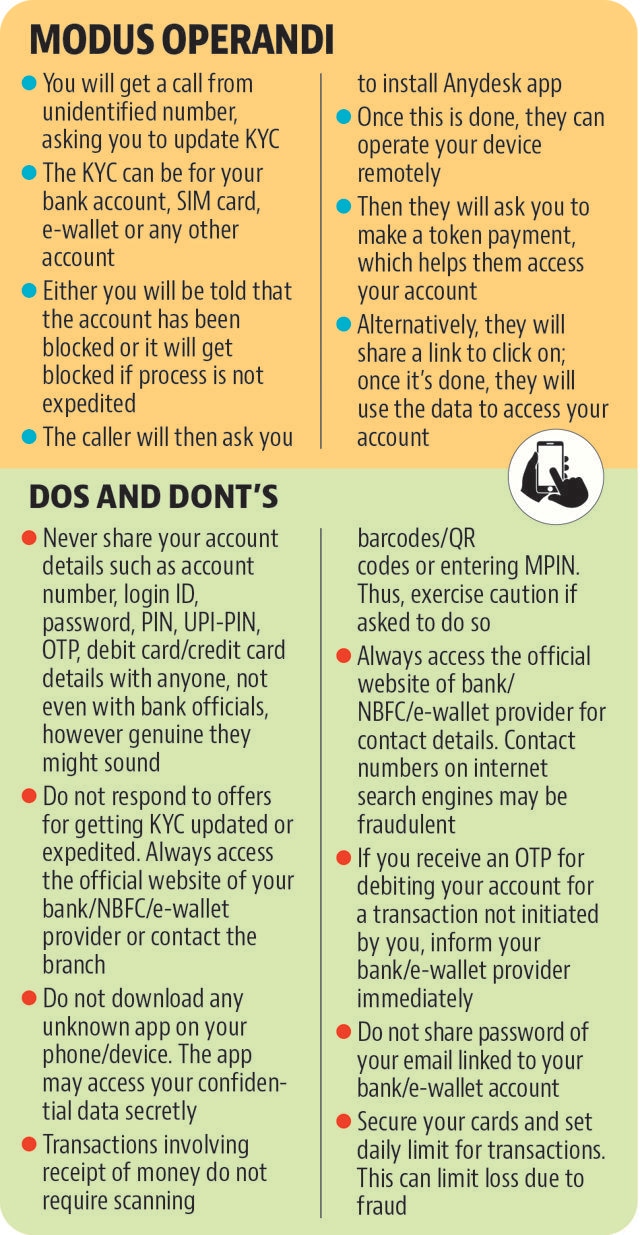
“The online fraudsters are calling up posing as bank employees or mobile company employees and asking the residents to update KYC. To facilitate the process, they ask their targets to install AnyDesk app, which gives them remote access to the electronic device. It is then used to fraudulently withdraw the money,” says Ketan Basal, superintendent of police (cyber), Chandigarh.
To show urgency, the swindlers either tell the victims that their account has been blocked or it will get blocked if the process is not expedited. “We appeal to the public to not entertain any such message or call, and not click any web link shared by unknown numbers,” says Bansal.
Police suspect these frauds are handiwork of a gang operating from Jamtara in Jharkhand, which has gained notoriety for such cyber crimes.
“Complaints of cybercrimes have been increasing with each passing day. At least 21 FIRs related to different cyber crimes, especially cheating, were registered in the past one month. Withdrawing cash after sharing web links on the pretext of updating KYC details has become a common modus operandi of fraudsters,” says another senior official in the cyber crime cell of Chandigarh Police.
According to Samarpal Singh, deputy superintendent of police, state cyber crime, Punjab, the main challenge in tracing and catching the fraudsters is “accessibility”. “Mostly, servers used by them are located outside the country. Those operating from places like Jamtara have a strong network, and manage to escape before raids are conducted,” he says.
The trap: Blocked bank accounts and SIM cards
Jagbir Singh Dhillon, 83, who retired as a BSF commandant, lost ₹4.34 lakh to an online fraudster in the name of getting the KYC for his mobile SIM card updated.
A resident of Sector 35, Chandigarh, he received an SMS on January 30, asking him to complete the KYC or his SIM would be suspended within 24 hours. The next day, he got a call from a person who identified himself as an employee of his mobile service provider. The caller asked him to install the AnyDesk app on his mobile phone, and then to pay ₹10 using a debit card. After he made the payment, ₹4.34 lakh were withdrawn in three separate instalments from his bank account.
Kiranjit Dhillon, 60, a resident of Sector 18, lost ₹10 lakh in the same manner. In the case of BS Walia, a resident of Sector 24, the swindlers sent him a link via an SMS, claiming that his bank account had been blocked and he needs to update the KYC.
Walia visited the site using the link and tried to update the KYC, upon which he received OTPs. During the updating process, an amount of ₹25,500 was debited via two transactions from his account. Hira Lal Mahajan, who owns a hotel in the Industrial Area, Phase 2, lost ₹9.99 lakh in a similar manner a few weeks back.
How you can prevent such frauds
Never share your account details such as account number, login ID, password, PIN, UPI-PIN, OTP, debit card/credit card details with anyone, not even with bank officials, however genuine they might sound.
Do not respond to offers for getting KYC updated or expedited. Always access the official website of your bank/NBFC/e-wallet provider or contact the branch.
Do not download any unknown app on your phone/device. The app may access your confidential data secretly.
Transactions involving receipt of money do not require scanning barcodes/QR codes or entering MPIN. Thus, exercise caution if asked to do so.
Always access the official website of bank/ NBFC/e-wallet provider for contact details. Contact numbers on internet search engines may be fraudulent.
If you receive an OTP for debiting your account for a transaction not initiated by you, inform your bank/e-wallet provider immediately.
Do not share password of your email linked to your bank/e-wallet account.
Secure your cards and set daily limit for transactions. This can limit loss due to fraud.


