
 E-Paper



iOS 26.2 finally fixes the ‘Liquid Glass’ issues: Here’s what changed
Apple has updated iOS 26.2, fixing issues with Liquid Glass. Users can now enjoy clearer visuals and better interface customisation options.

 Prefer HTon Google








Apple has finally addressed early concerns around its new Liquid Glass interface with the release of iOS 26.2, which marks a key step in refining the visual changes introduced with iOS 26. The update follows months of feedback during the beta testing phase, where users raised issues about clarity and ease of reading across the system.

What Liquid Glass Brings to iOS 26
When Apple launched iOS 26, it also introduced Liquid Glass as a new design interface meant to change how menus, icons, and system elements appear. The company said the design would add depth and movement while keeping the interface familiar. However, once the update reached users, many reported that the new design interface made text and icons harder to read, especially on the Lock Screen and home screens. These changes aim to align the software’s appearance with what Apple first showed during its developer event.
Also read: These 5 smart home gadgets will change how your smart home
Apple began adjusting Liquid Glass during the iOS 26 beta cycle, but the most noticeable improvements arrived with iOS 26.2. The update restores animation behaviour first shown during the initial preview and brings changes to icon design and interface balance. These updates make system elements easier to identify while keeping the visual style consistent across apps and screens.
Improved Readability on Lock Screen
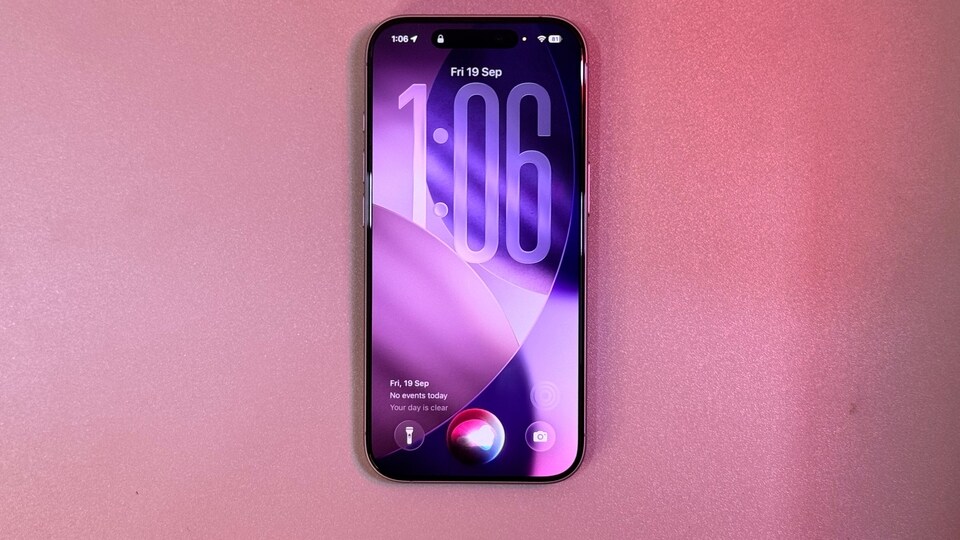
One major focus in iOS 26.2 is text clarity. Apple updated the Lock Screen Clock by adding two display choices, called “Glass” and “Solid.” Users can access these options by pressing and holding the Lock Screen, selecting the Customise option, and then choosing the clock settings. Apple says more clock styles tied to wallpaper choices will arrive in later updates.
Also read: Apple overtakes Samsung to become the world’s top smartphone brand in 2025: Report
Options to Adjust Transparency
Apple also added controls that allow users to reduce transparency across the system. In iOS 26.1 and later, users can enable this option by opening Settings, navigating to Accessibility, and selecting Display and Text Size. Turning on Reduce Transparency blurs certain backgrounds to improve text contrast.
Another option appears under Settings, Display and Brightness, and Liquid Glass. Users can switch the interface from Clear mode to Tinted mode. Apple states that Tinted mode increases opacity and improves contrast across menus and icons.
With iOS 26.2, Apple has refined Liquid Glass through gradual changes rather than a full redesign. Users who still struggle with visibility can now adjust these settings to create a layout that better suits their needs.


