
 E-Paper



Nano Banana Pro: Billionaires Musk, Sundar Pichai, Huang hang out in AI pic but it looks eerily real at first glance
Sundar Pichai introduced Google's latest AI editing tool, Nano Banana Pro.

 Prefer HTon Google


Social media users are having fun with Google’s latest release, Nano Banana 3. While many are creating stunning storyboards from texts using simple prompts, others are busy generating pictures that feature the biggest names in the tech industry. One of the popular ones is imagining Elon Musk, Sundar Pichai, Sam Altman, Jensen Huang, Tim Cook, Mark Zuckerberg and others, hanging out together or simply taking a selfie.
“At first glance you may think it’s real, but no, it’s Gemini 3.0 Pro Image / Nano Banana Pro. Character consistency is next level,” an X user wrote while sharing an AI image that shows the tech titans looking at a phone held by Elon Musk.
Also Read: Google Nano Banana Pro: How to create? What prompts to use? All you need to know
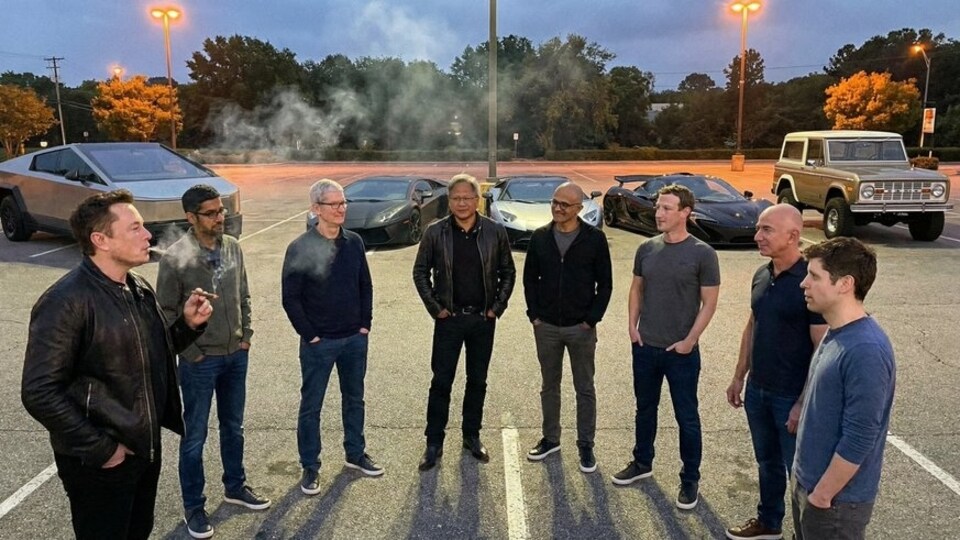
In another tweet, a user reimagined several tech entrepreneurs and business executives socialising together in what appears to be a parking lot. A series of luxury cars, including a Cybertruck, is visible in the background of the group.
How did social media react?
While some found this new AI tool interesting, others expressed concerns about the potential for creating misleading images using the technology.
An individual wrote, “AI is scary.” Another added, “Dude! The details!” A third expressed, “It’s not image generation anymore. It's an illusion.” A fourth commented, “How long till people's likeness is misused and people have to be conscious of putting content out there with their face on it?”
How to use Nano Banana Pro?
Step 1: Visit the Gemini website or download the app
Step 2: Log in using Google credentials
Step 3: Select “Thinking with 3 Pro” as your model
Step 4: Select “Create images” from the Tools option
AI image verification:
Google has introduced a new feature in Google Gemini, using which you can identify if “an image was generated with or edited by Google AI.”
To use the feature, you can upload an image to Google Gemini and put prompts like "Was this created with Google AI?" or “Is this AI-generated?” to get the result.


