
 E-Paper



AA23 Reel trend: How to transform your photo into a viral intro Reel
Here’s how to turn your photo into a Tamil gangster-style AA23 trend intro reel with AI tools, music beats, and quick editing steps.

 Prefer HTon Google


Instagram feeds are seeing a surge of short character-intro reels inspired by a recent film announcement from actor Allu Arjun. Known as the AA23 trend, the format allows users to turn a normal photo into a Tamil gangster-style reveal video using AI tools, editing templates, and a popular background score. The trend has also spread to TikTok and YouTube Shorts.
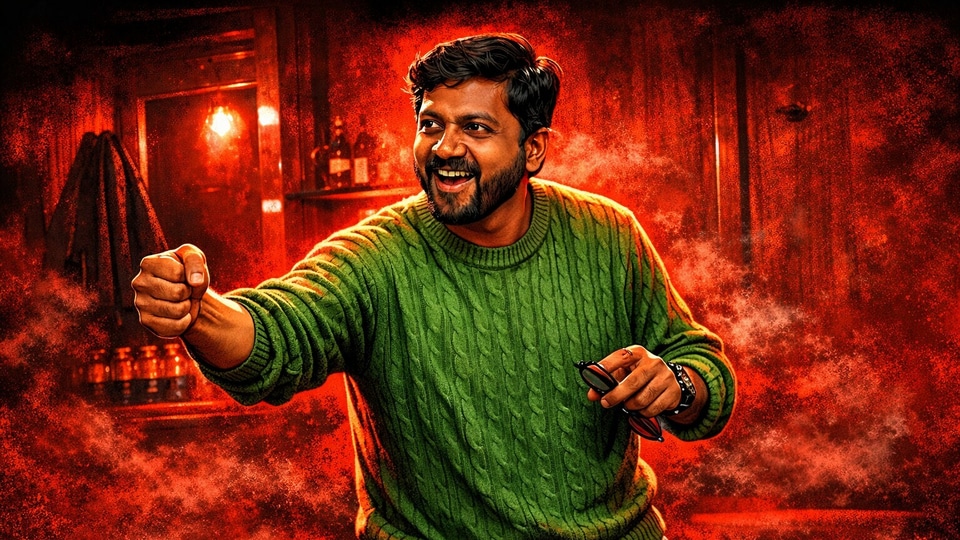

The AA23 trend takes cues from a teaser released in January 2026 to announce Allu Arjun’s 23rd film, directed by Lokesh Kanagaraj. The announcement used a character reveal format where a regular image shifted into a stylised illustration at a music drop. Social media users have recreated the same format for personal intro reels.
Also read: iPhone 17e set to launch soon with new chip, MagSafe, and no price hike: Report
The trend usually follows a simple structure. A normal portrait or selfie clip appears first. At the beat drop, the video switches to an illustrated poster-style image synced with the “23 Theme” background music by Anirudh Ravichander. AI image generators handle the photo conversion, while editing apps manage timing and transitions.
How to create an AA23 image
- Choose a clear portrait with good lighting and a visible face
- Open an AI image generator that supports reference photos
- Upload your photo as the reference image
- Paste a detailed prompt asking the tool to keep facial features unchanged and convert the image into a red-toned Tamil gangster-style illustration
- Generate the image and download the final output
Also read: I spent weeks with the Realme 16 Pro Plus, and here's why it left me surprisingly conflicted
How to create the AA23 intro Reel
- Open CapCut and search for templates using terms like “AA23 Trend” or “Character Intro”
- Select a template that includes the trending AA23 background music
- Add your normal selfie video or photo as the opening clip
- Insert the AI-generated image at the reveal point in the timeline
- Export the video in high resolution and upload it as an Instagram Reel
Also read: iPhone tip: How to turn multiple live photos into a single video
Manual editing method
- Import the trending AA23 background music into your editing app
- Place your original clip at the start of the timeline
- Add a transition at the music beat drop
- Reveal the AI-generated image immediately after the transition
- Export the final video and post it on Instagram


