
 E-Paper



AI laptops vs traditional laptops: A comparison guide with our selection of the best picks
AI laptops integrate machine learning for enhanced performance and efficiency, offering smarter functionalities compared to traditional laptops.

 Prefer HTon Google


Our Picks
FAQs
Our Picks
| Product | Rating | Price |
|---|---|---|
Dell New Inspiron 14 Plus Laptop with AI Enabled LaptopView Details  | ||
 | ||
HP Pavilion Plus 14 AI-enhanced LaptopView Details | ||
| ||
Dell New Inspiron 13 Laptop with AI Enabled Intel Core Ultra 5 125H ProcessorView Details | ||
| ||
MSI Modern 15 H AI, Intel 1st Gen. Ultra 5 125H,Built-in AI, 40CM LaptopView Details | ||
| ||
MSI Cyborg 15 AI, Intel Core Ultra 7 155H,Built-in AIView Details | ||
| ||

Research-Backed Choices
Every product we recommend is chosen through a combination of Primary Research and Secondary Research.
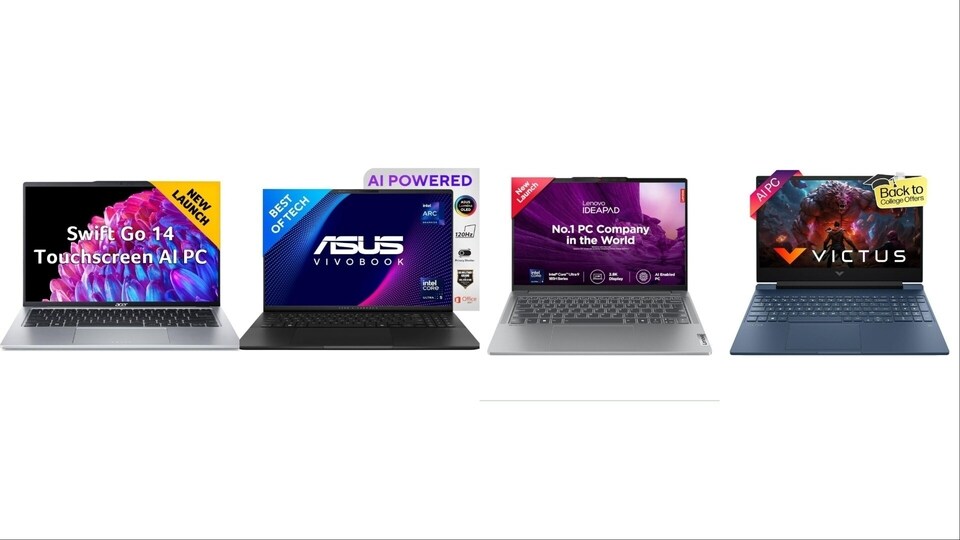
AI laptops are transforming technology, integrating artificial intelligence (AI) and machine learning (ML) into everyday tasks. As these innovations become mainstream, professionals must adapt to the rapid changes and challenges they present. Staying ahead requires understanding AI's capabilities, ensuring you're equipped to harness its full potential in a competitive landscape.
Most professionals are familiar with such technologies and frequently-used phrases like AI and ML. However, how do these technologies manifest themselves and how are they different from traditional laptops? In this article, we will try and understand these points.
What is an AI laptop?
Let's begin with the most basic question - what does an AI laptop do? An AI laptop integrates artificial intelligence to enhance performance, optimise tasks, and provide personalised experiences. It uses machine learning for improved efficiency, intelligent automation, and advanced data processing, enabling users to handle complex applications seamlessly.
How is an AI laptop is different from a traditional laptop?
A potential user can get very confused trying to understand the difference between these two kinds of laptops. The buying decision too will get affected without proper comprehension. Let's take a quick look at the the key differences.
Enhanced processing power: AI laptops feature advanced processors and GPUs designed for AI and ML tasks, outperforming traditional laptops in speed and efficiency.
Smart features: These laptops offer intelligent automation, personalised user experiences, and adaptive performance (basically the laptop's ability to adjust its performance levels dynamically based on the user's activities and needs).
Data handling: AI laptops are better equipped to process large datasets, making them ideal for complex tasks like data analysis and real-time computing.
What is GPU acceleration in AI laptops?
Reading up on AI laptops is likely to throw up some key points such as GPU acceleration. Just what does it mean? Let's try and understand. GPU acceleration in AI laptops uses powerful graphics processing units (GPUs) to speed up complex tasks like machine learning and data analysis. Unlike regular CPUs, GPUs handle multiple operations at once, making AI applications faster and more efficient, enhancing performance in tasks like image processing and neural network training.
Processor, RAM, storage, connectivity options needed in AI laptops
Here's a look at the kind of specifications needed in AI laptops.
Processor: AI laptops require high-performance processors like Intel Core i7/i9 or AMD Ryzen 7/9. These processors support advanced multi-threading and faster clock speeds, essential for handling AI tasks and machine learning applications efficiently.
RAM: A minimum of 16GB RAM is recommended for AI laptops, but 32GB or more is ideal. More RAM allows the system to manage larger datasets and multiple applications simultaneously, ensuring smooth performance during resource-intensive tasks.
Storage: Solid State Drives (SSD) are crucial for AI laptops. At least 512GB SSD is recommended, but 1TB or more is preferable. SSDs offer faster data access speeds, which is important when working with large AI models and datasets.
Connectivity options: AI laptops should include a variety of connectivity options, such as Thunderbolt 4, USB-C, and HDMI, to support high-speed data transfer and external GPU connectivity. Wi-Fi 6 or Wi-Fi 6E ensures faster, more reliable internet connections, essential for cloud-based AI tasks and real-time collaboration.
These specifications are vital for an AI laptop to effectively manage the demanding requirements of AI and machine learning applications, ensuring optimal performance and future-proofing your investment.
Processor, RAM, storage, connectivity options needed in traditional laptops
Now, let's see what are specifications in basic laptops.
Processor: Traditional laptops typically use Intel Core i3/i5 or AMD Ryzen 3/5 processors. These provide sufficient power for everyday tasks like browsing, word processing, and media playback.
RAM: 8GB RAM is standard for traditional laptops, allowing smooth multitasking for general applications. Some models may offer 4GB for basic use.
Storage: Traditional laptops often come with 256GB or 512GB SSDs for fast boot times and file access. Some may include HDDs for larger storage needs.
Connectivity options: USB-A, USB-C, HDMI, and Wi-Fi 5 are common connectivity options, suitable for everyday tasks and peripheral connections.
Do AI laptops fall in the affordable bracket?
AI laptops are generally not in the affordable bracket. Their advanced specifications, including powerful processors and GPUs, make them pricier than traditional laptops, though some budget-friendly options are emerging as technology evolves.
Can traditional laptops be adapted to perform AI and ML functions?
A question which is likely to be asked is where traditional laptops can be made AI friendly? Not all would be inclined to buy a new AI laptop, if one already has a good one. The simple answer is in the negative. AI laptops are purpose-built for serious machine learning applications. While some traditional laptops could be adapted for AI and ML functions by upgrading RAM, storage, and adding external GPUs, they are likely to struggle with intensive tasks. It is also a time consuming process and an expensive one too. Hence such adventures are best avoided.
Let's take a look at some of the best AI laptops available on Amazon.
1) ASUS Zenbook Duo OLED (2024), 14 inch Built-in AI, Dual Screen Laptop
1. ASUS Zenbook Duo OLED (2024), 14" (35.56cm) FHD OLED Touch Display, Intel Core Ultra 9 185H, Built-in AI, Dual Screen Laptop
The ASUS Zenbook Duo OLED (2024) is a cutting-edge dual-screen laptop featuring a 14-inch FHD OLED touch display for stunning visuals. Powered by the Intel Core Ultra 9 185H and Intel Arc Graphics, it delivers exceptional performance. With 32GB RAM and a 1TB SSD, multitasking and storage are effortless. The built-in AI enhances user experience, making this sleek, 1.65 kg laptop both smart and efficient. Running on Windows 11, it’s ideal for professionals seeking productivity and innovation.
Specifications of ASUS Zenbook Duo OLED (2024), 14 inch Built-in AI, Dual Screen Laptop
- 14 inch FHD OLED Touch Display
- Intel Core Ultra 9 185H
- 32GB RAM, 1TB SSD
- Intel Arc Graphics
- Weight: 1.65 kg
2) Lenovo IdeaPad Pro 5 Built-in AI 14 inch Laptop
2. Lenovo IdeaPad Pro 5 Intel Evo Core Ultra 9 185H Built-in AI 14" (35.56cm) 2.8K-OLED 400Nits 120Hz Laptop

Our Principles
Full Transparency
Every product review clearly lists the Pros and Cons, giving you a balanced view.
Brand Confidence
We focus on products from brands with a proven reputation and long-standing market trust.
The Lenovo IdeaPad Pro 5 is a premium laptop equipped with a 14-inch 2.8K OLED display, offering 400 nits of brightness and a 120Hz refresh rate for crisp, vibrant visuals. Powered by the Intel Evo Core Ultra 9 185H, it ensures top-tier performance. With 32GB RAM and a 1TB SSD, it handles multitasking and storage with ease. The built-in AI and FHD+ IR camera add smart functionality. Weighing just 1.4 kg, this sleek grey laptop includes Windows 11, Microsoft Office 21, and a 3-month Game Pass.
Specifications of Lenovo IdeaPad Pro 5 Intel Evo Core Ultra 9 185H Built-in AI 14 inch (35.56cm) 2.8K-OLED 400Nits 120Hz Laptop
- 14 inch 2.8K OLED Display
- Intel Evo Core Ultra 9 185H
- 32GB RAM, 1TB SSD
- FHD+ IR Camera
- Weight: 1.4 kg
3) ASUS Vivobook S 16 OLED (2024) Built-in AI
3. ASUS Vivobook S 16 OLED (2024), Intel Core Ultra 5 125H, Built-in AI Laptop
The ASUS Vivobook S 16 OLED (2024) features a 16-inch 3.2K OLED display with a 3200 x 2000 resolution and a 120Hz refresh rate for stunning, smooth visuals. It is powered by the Intel Core Ultra 5 125H and Intel Arc Graphics, ensuring powerful performance. With 16GB RAM and a 1TB SSD, it handles demanding tasks effortlessly. The built-in AI enhances functionality. This sleek black laptop, weighing just 1.50 kg, comes with Windows 11 and Microsoft Office 2021, offering both performance and productivity.
Specifications of ASUS Vivobook S 16 OLED (2024), Intel Core Ultra 5 125H, Built-in AI
- 16 inch 3.2K OLED Display
- Intel Core Ultra 5 125H
- 16GB RAM, 1TB SSD
- Intel Arc Graphics
- Weight: 1.50 kg
4) Acer Swift Go 14 Built-in AI PC Premium Laptop
4. Acer Swift Go 14 Built-in AI PC Premium Laptop
The Acer Swift Go 14 combines premium features with a sleek design. It boasts a 14-inch IPS touchscreen WUXGA display for vibrant, sharp visuals. Powered by the Intel Core Ultra 7 155H and Intel Arc Graphics, it delivers robust performance. With 16GB RAM and a 1TB SSD, it handles tasks efficiently. The laptop includes a 1440p camera with a shutter for added privacy. Weighing just 1.3 kg and finished in pure silver, it runs on Windows 11 and includes Microsoft Office, blending style and functionality.
Specifications of Acer Swift Go 14 Built-in AI PC Premium Laptop
- 14 inch IPS Touchscreen WUXGA
- Intel Core Ultra 7 155H
- 16GB RAM, 1TB SSD
- Intel Arc Graphics
- Weight: 1.3 kg
5) HP Victus Gaming Laptop
5. HP Victus Gaming Laptop
The HP Victus Gaming Laptop offers impressive performance with its AMD Ryzen 7 8845HS processor and 6GB RTX 4050 GPU. The 15.6-inch FHD IPS display, featuring a 144Hz refresh rate and 300 nits brightness, ensures fluid and vibrant visuals. Equipped with 16GB DDR5 RAM and a 1TB SSD, it supports smooth multitasking and ample storage. The backlit keyboard and DTS Ultra audio enhance the gaming experience. Finished in blue and weighing 2.29 kg, it runs on Windows 11 and includes Microsoft Office.
Specifications of HP Victus Gaming Laptop
- 15.6 inch FHD IPS Display, 144Hz
- AMD Ryzen 7 8845HS
- 6GB RTX 4050 GPU
- 16GB DDR5 RAM, 1TB SSD
- Weight: 2.29 kg
Similar articles for you
Best laptops for every need: Comprehensive comparison guide of top 10 options to choose from
Best laptops for students in 2024: Top 10 reliable options for college and internship needs
Disclaimer: At Hindustan Times, we help you stay up-to-date with the latest trends and products. Hindustan Times has an affiliate partnership, so we may get a part of the revenue when you make a purchase. We shall not be liable for any claim under applicable laws, including but not limited to the Consumer Protection Act, 2019, with respect to the products. The products listed in this article are in no particular order of priority.



