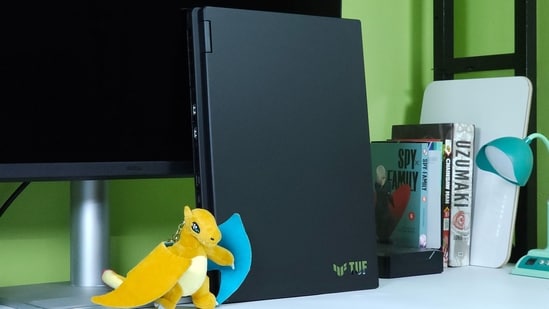
The Asus TUF Gaming series has always been about getting the most performance you can for your money, but design was never really the reason you bought one. The new TUF Gaming 16 changes that. I have been using the laptop for a couple of weeks and, honestly, I did not expect to like its design this much. The new chassis looks cleaner, feels much tougher than I expected from an all-plastic laptop, and most importantly, it does not try too hard to look like a gaming laptop.
My review unit comes with the Intel Core i5 14450HX, Nvidia GeForce RTX 5050 with 8GB GDDR7, 16GB RAM and a 512GB SSD. It also gets a 16-inch 1920 x 1200 144Hz display with 100% sRGB coverage. Asus has also made some interesting changes to the cooling system and chassis, including larger rear exhausts, three heat pipes and dual 80 blade fans. The Asus TUF Gaming 16 with these specs is currently listed at ₹1,59,990 on Asus' store.
Asus TUF Gaming 16 (2026) specifications
Specifications | Details |
|---|---|
| Processor | Intel Core i5 14450HX |
| GPU | Nvidia GeForce RTX 5050 8GB GDDR7, 85W |
| Display | 16 inch 1920 x 1200 IPS level, 144Hz |
| Colour gamut | 100% sRGB |
| RAM | 16GB DDR5 5600 |
| Storage | 512GB PCIe 4.0 SSD |
| Battery | 63Wh |
| Weight | 2.2kg |
| Price | ₹1,59,990 |
Choose better. Buy smarter.
NEHA by HT Tech generates recommendations using proprietary AI analysis built on years of editorial expertise.{{#product}}{{/product}}
{{#product}}{{/product}}
Our Principles
Full Transparency
Every product review clearly lists the Pros and Cons, giving you a balanced view.
Brand Confidence
We focus on products from brands with a proven reputation and long-standing market trust.
{{#product}}{{/product}}
Asus TUF Gaming 16 (2026): Design and build
The first thing I noticed about the TUF Gaming 16 is the plastic chassis. Now, plastic usually means one thing in gaming laptops: it looks and feels like plastic. Asus has somehow managed to avoid that here. The chassis actually feels pretty solid and premium, and I loved that Asus did not cover it in some cheap-looking metal effect paint.
Instead, it reminds me of a bare Pelican case that you would use to carry your tools. It has that tough, slightly rugged look, but at the same time the new design is quite stylish. The new TUF logo and the way Asus has positioned it on the lid look beautiful. I genuinely think Asus has done an amazing job with this new design.
What I also like is how slim the laptop looks. This is not a thin or lightweight laptop by any means. It weighs 2.2kg and the chassis goes up to 26.9mm at its thickest point, so this is still very much a gaming laptop. But the clean lines and the new design make it look much thinner than it actually is.
Build quality is also excellent. There is no flex anywhere on the chassis, and even the keyboard deck feels very solid. The hinge is equally good and holds the display firmly in place, although this is definitely not a laptop you can casually open with one hand.
I also like the new rear-focused port arrangement. Asus has put the HDMI, Ethernet and power connections towards the back, which keeps some of the mess away from your desk. You also get two USB A 3.2 ports, one USB A 2.0 port, a USB C port with DisplayPort and power delivery, HDMI 2.1 and a headphone jack.
There is one thing I don't understand, though. A USB 2.0 port in 2026 feels unnecessary on a laptop like this. I would have much rather seen another faster USB port.
Asus TUF Gaming 16 (2026): Keyboard and trackpad
I have been using an Asus keyboard for a long time on my personal ROG Strix laptop, so I was already familiar with what to expect here. The good news is that Asus has not messed around with the formula, and the keyboard feels very similar to what I have been using for years.
The keyboard itself is good, with decent key travel and a fairly satisfying feel while typing. It is a full-size keyboard with a number pad, but I am still not a big fan of this layout on a gaming laptop. It shifts the main keyboard towards the left, and that ticks my OCD because I have to move my hands to one side while typing.
I absolutely love the separate power button, though. I also want to give Asus some credit for keeping the full-size arrow keys. Amazing job, Asus. I don't care that you shrank the right Shift key for this. I just want full-size arrow keys on my gaming laptop.
You also get separate keys for volume control, microphone mute and a quick launch button for Armoury Crate. These are small things, but I use them quite often, and they are much better than having to rely on Fn shortcuts.
But not putting the Delete key in the top right corner of the keyboard is a strange design decision. I use that key constantly, and having another key sitting in that position instead takes some getting used to. The trackpad is also quite good. It is large enough, tracks accurately and has a nice surface, although the click feels a little deeper than I would have liked.
Asus TUF Gaming 16 (2026): Display
I have always been a fan of Asus laptop displays, and the TUF Gaming 16 is no different. The 16-inch panel has a 1920 x 1200 resolution, 16:10 aspect ratio, 144Hz refresh rate and 100% sRGB coverage. Asus also rates it at 300 nits and uses a matte anti-glare finish.
I really like the way this display looks. Colours are punchy without looking completely artificial, and the panel has enough accuracy for pretty much everything I do on a laptop. I used it for browsing, watching videos, editing content and gaming, and I never felt like the display was holding the laptop back.
The 16:10 aspect ratio is also something I have started appreciating on gaming laptops. You get a little more vertical space for documents, websites and editing timelines without making the laptop physically much bigger.
My only complaint is brightness; it is usable outdoors, but I would have liked a little more headroom here. The matte finish helps a lot with reflections, though, so the laptop remains easier to use outside than a glossy panel.
For gaming, 144Hz is more than enough for this hardware. The RTX 5050 is really designed around 1080p or 1200p gaming, and the 1920 x 1200 panel makes sense because you are not asking the GPU to push an unnecessarily high resolution. Comparable RTX 5050 TUF testing also shows that the GPU is capable of handling modern games well at this resolution, with DLSS and frame generation making a noticeable difference in demanding titles.
Asus TUF Gaming 16 (2026): Performance and gaming
The combination of the Core i5 14450HX and RTX 5050 is not something I would call cutting-edge, but it is a very sensible combination for this laptop.
I ran PCMark 10, Geekbench 7, Cinebench R23, Cinebench 2026 and several 3DMark tests. The laptop scored 7,925 in PCMark 10, while Geekbench 7 returned 2,114 in single-core and 10,472 in multi-core. Cinebench R23 gave me 1,819 points in single-core and 13,122 in multi-core.
The RTX 5050 also put up 8,774 points in 3DMark Time Spy, with a graphics score of 8,958. Speed Way returned 2,270, Port Royal came in at 5,521, and Steel Nomad scored 1,986.
In real-world use, the laptop is more than capable of handling everything I normally throw at it. Chrome with a ridiculous number of tabs, Office, Photoshop, video editing and general multitasking were all handled without any major issues.
Gaming is obviously where the RTX 5050 matters the most. This is not a laptop I would buy expecting native high-resolution gaming at maximum settings. The sweet spot is 1920 x 1200, and that is exactly what this display gives you.
In heavier games, the RTX 5050 can still deliver very playable frame rates at this resolution. Cyberpunk 2077 sits in the 50 to 60 FPS range at 1080p without DLSS, while Shadow of the Tomb Raider can push well past 110 FPS and Far Cry 6 gets close to 100 FPS. Competitive games are obviously much easier for the GPU, with frame rates comfortably crossing the 200 FPS mark in lighter titles.
For something like Black Myth: Wukong, which is much more demanding, you are looking at roughly 50 FPS without relying heavily on frame generation, while DLSS and Multi Frame Generation can push the displayed frame rate considerably higher. Cyberpunk can also go well beyond 60 FPS once Nvidia's DLSS features are enabled.
Asus TUF Gaming 16 (2026): Cooling
This is one area where Asus deserves a lot of credit. The TUF Gaming 16 uses two 80 blade fans and three heat pipes, and Asus claims around 40dB of noise in Turbo mode. In Turbo mode, the machine can deliver up to 105W of total power.
I am not going to turn this section into a thermal chart because the real-world experience matters more. During gaming, the laptop managed heat very well, and I did not see the kind of performance drop that can make a gaming laptop frustrating after a long session.
The keyboard can get warm, as expected, but it never became uncomfortable enough to make me stop using it. The bigger story here is that Asus has managed to keep the performance consistent without making the TUF Gaming 16 sound like a jet engine. That is particularly impressive considering the Core i5 14450HX is not exactly a low-power processor.
Asus TUF Gaming 16 (2026): Battery life
This is probably my least favourite part of the laptop. The TUF Gaming 16 comes with a 63Wh battery, which is not particularly large for a 16-inch gaming laptop. Asus does support 100W USB-C charging and claims the laptop can reach 50% in around 30 minutes using USB Power Delivery. The bundled charger is a 150W adapter.
In normal use, I was getting around 3 to 4 hours of battery life, which is okay but nothing special. Once you start gaming on battery, things get much worse. You can expect roughly an hour of gaming before you need to find a charger.
This is still a gaming laptop, so I never expected it to last through a full gaming session away from a wall socket. But I would have liked a bigger battery, especially because the rest of the laptop is actually quite usable away from the desk.
The fast charging support helps, though. Asus says the battery can go from 0 to 50% in around 30 minutes using USB Power Delivery, so a short charging session can give you a useful amount of battery before you head out.
Asus TUF Gaming 16 (2026): Upgradeability and software
One of my favourite things about the TUF Gaming 16 is that Asus has not tried to lock everything down. There are two RAM slots and two M.2 SSD slots, with support for up to 64GB of RAM on the Indian configuration. That means the 16GB RAM and 512GB SSD configuration I tested does not have to stay that way. You can add more RAM and another SSD later.
And trust me, you are probably going to need that second SSD sooner than you think. 512GB disappears very quickly once you start installing modern AAA games.
Armoury Crate remains the main control centre for the laptop. You get performance modes, fan controls, lighting controls and system monitoring, and I like having all of these controls in one place. It is still not the cleanest piece of software around, but it gets the job done.
The laptop also comes with a 720p webcam, which is pretty basic for 2026. It is fine for the occasional video call, but this isn't a laptop I would buy for its camera.
Asus TUF Gaming 16 (2026) pros and cons
Pros
- Excellent new TUF design
- Vibrant display
- Strong RTX 5050 gaming performance
- Excellent cooling
- Two RAM and two SSD slots
- Full-size arrow keys
- Good port selection
- USB-C fast charging
Cons
- Battery life is average
- Display could be brighter
- 512GB SSD feels limiting
- Noisy enough under heavy gaming
Asus TUF Gaming 16 (2026): Should you buy it?
The Asus TUF Gaming 16 surprised me, and most of that has nothing to do with its benchmark scores. I expected it to be another fairly typical TUF laptop that puts performance ahead of everything else, but Asus has actually done a great job with the new design. The plastic chassis feels tough and premium, the new TUF branding looks fantastic, and the laptop manages to look much slimmer than it actually is.
The battery is the obvious weakness, and I would have liked a brighter display. But after spending time with it, I think this new TUF Gaming 16 is one of the better examples of Asus understanding what people actually want from a gaming laptop. It does not waste money trying to look premium where it doesn't need to, and instead gives you a solid chassis, good display, strong gaming performance, excellent cooling and plenty of room to upgrade.
Read more reviews
Alienware 15 (2026) review: Good gaming laptop, but less Alienware than I would like
ASUS Jelly75 keyboard KD201 review: A prebuilt keyboard I didn't feel like modifying
Fujifilm X-T30 III review: The specs are familiar, but the shooting experience is hard to ignore
Disclaimer: At Hindustan Times, we help you stay up-to-date with the latest trends and products. Hindustan Times has an affiliate partnership, so we may get a part of the revenue when you make a purchase. We shall not be liable for any claim under applicable laws, including but not limited to the Consumer Protection Act, 2019, with respect to the products. The products listed in this article are in no particular order of priority.