E-Paper



Stop paying for apps: 5 wireless printers that print directly from your iPhone, Android phone’s camera roll
These printers are ideal for both home and office usage and they are available with a discount of up to 35% on Amazon right now.

 Prefer HTon Google


Our Picks
FAQs
Our Picks
| Product | Rating | Price |
|---|---|---|
HP Smart Tank 589 All-in-One WiFi Colour Printer |Up to 4000 Black & 6000 Colour Prints I Print,Scan & Copy for Home/OfficeView Details  | ₹12,199 | |
 | ||
Epson EcoTank L3250 A4 Wi-Fi All-in-One Ink Tank Printer InkView Details | ₹13,899 | |
| ||
Canon PIXMA MegaTank G3000 All in One WiFi Inktank Colour Printer with 2 Additional Black Ink Bottles for Home and OfficeView Details | ₹12,999 | |
| ||
Brother HL-L2440DW (New Launch) Auto Duplex Laser Printer, 30 PPM Print Speed, LCD Display, 64 MB Memory, (WiFi WiFi Direct LAN USB), 250 Sheet Paper Tray, 3000 Pages Inbox Toner, Free InstallationView Details | ₹13,779 | |
| ||
HP Laser MFP 1188fnw, Wireless, Print, Copy, Scan, Fax, 40-Sheet ADF, Hi-Speed USB 2.0, Ethernet, Up to 21 ppm, 150-sheet Input Tray, 100-sheet Output Tray, 1-Year Warranty, Black and WhiteView Details | ₹19,499 | |
| ||

Research-Backed Choices
Every product we recommend is chosen through a combination of Primary Research and Secondary Research.
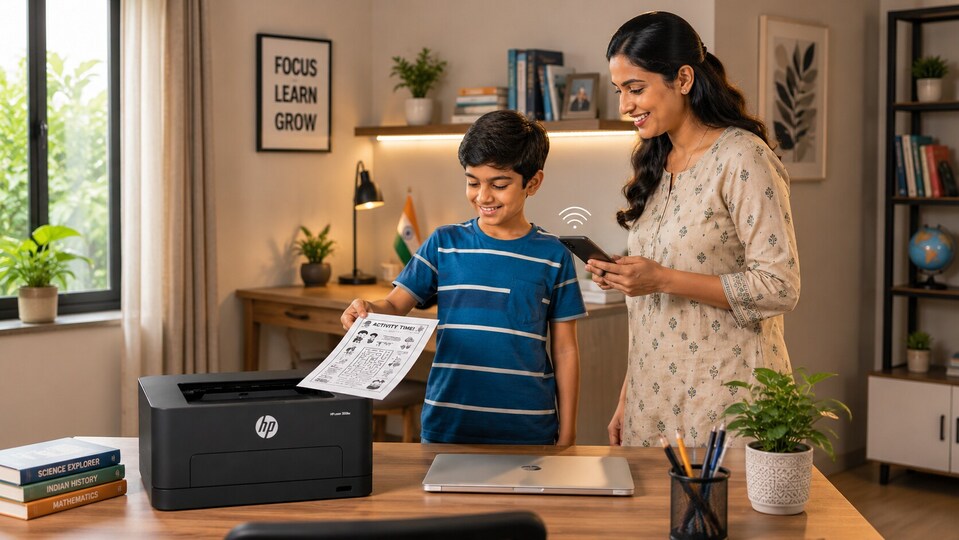

Printers are a useful device to have at hand. From printing your kids' assignment sheets to notes from the class that you missed last week or even a PDF version of the important presentation that is coming up next week, having a printer at home can not only save time and money but also reduce your stress and frequent visits to the market. But here's a catch. Just like other devices, not all printers are equally efficient. More importantly, not all printers reduce your stress by letting you print documents at your will. Some need a wired connection. Others need a subscription, which can add significantly to your monthly bills. But in 2026, trying to print a simple document shouldn't feel like a negotiation. Instead, it should be as simple as tapping a button or two. This is where wireless printers come in.
Benefits of using wireless printers
Multi-device connectivity: Wireless printers don't need a dedicated laptop or PC to print documents. You can connect them to your smartphone, tablet or laptop, wirelessly, to print documents without transferring files to a dedicated PC.
Flexible placement: Another benefit of using a wireless printer is that they can be placed anywhere with an electrical outlet or move them around at your will, which them versatile to use.
Reduced cable clutter: Wireless printer just require one cable -- the one connecting the printer with a power outlet. They don't need you to connect the source device to the printer, which reduces clutter and makes up for a cleaner workspace, even at home.
More efficient: Many wireless printer models come with multi-functional features that allow users to scan, print and copy documents and even set the resolution based on specific requirements, making them more efficient and even more versatile than the wired models.
We hope that with these details we would have answered any residual question that you had about buying a wireless printer. With that in mind, here's a list of the top mid-budget wireless printers that you can get for your home.
Best wireless printers that print from your phone for Indian homes
1. HP Smart Tank 589 All-in-One WiFi Colour Printer |Up to 4000 Black & 6000 Colour Prints I Print,Scan & Copy for Home/Office
This HP Smart Tank ink tank printer is designed for homes and small offices. It features a compact, clean design and a transparent front-facing ink tank that makes monitoring ink levels easy. It has an all-in-one design, which means it can handle print, scan, and copy tasks efficiently. On the connectivity front, it offers wireless printing via Wi-Fi, Bluetooth, and the HP Smart app, all of which can be used via Android phone and iPhone. These options give users more flexibility in terms of printing pictures and documents. It’s built for users who want convenience, low running costs, and dependable colour performance.
Specifications
Reasons to buy

Great overall product quality
Easy to use
Value for money
Reason to avoid

Average connectivity
Average performance
What are buyers saying on Amazon?
Buyers praise this printer's excellent quality, with good value for money and easy installation. They appreciate its user-friendly interface and find it convenient to use. However, its connectivity and performance have received mixed reviews.
Why should you choose this product?
Buyers should choose this printer for its overall product quality and ease of use.
2. Epson EcoTank L3250 A4 Wi-Fi All-in-One Ink Tank Printer Ink

Our Principles
Full Transparency
Every product review clearly lists the Pros and Cons, giving you a balanced view.
Brand Confidence
We focus on products from brands with a proven reputation and long-standing market trust.
This Epson printer is built for homes and small offices. It comes with a compact, space-saving design that fits easily on a desk, while the front-facing transparent ink tanks make refill monitoring easy. It comes with an all-in-one design, which means this printer can be used for printing, scanning, and copy tasks. It uses Epson’s Heat-Free technology and Micro Piezo printhead to deliver sharp text and vivid colours. These technologies also help improve colour consistency and accuracy. On the connectivity front, this printer gets Wi-Fi, Wi-Fi Direct, and the Epson Smart Panel app that allows seamless printing from smartphones. It is ideal for families, students, and home-office users.
Specifications
Reasons to buy
Great overall product quality
Easy to use
Value for money
Reason to avoid
Average connectivity
Average print quality
What are buyers saying on Amazon?
Buyers praise this printer to be of good quality, easy to use with simple ink refilling, and economical for home use. However, its connectivity and print quality have received mixed reviews.
Why should you choose this product?
Buyers should choose this printer for its overall product quality and ease of use.
3. Canon PIXMA MegaTank G3000 All in One WiFi Inktank Colour Printer with 2 Additional Black Ink Bottles for Home and Office
This wireless printer by Canon is a practical is a practical choice for homes and small offices that need low-cost high-quality printing. Its has a compact design that includes integrated front ink tanks for monitoring easy. It can be used for printing, scanning, and copying photos and documents, which it does with Canon’s hybrid ink system. It comes with built-in Wi-Fi for fuss-free wireless printing from laptops and smartphones via the Canon PRINT Inkjet/SELPHY app.
Specifications
Reasons to buy
Great product quality
Easy to use
Excellent printing quality
Value for money
Reason to avoid
Average connectivity
What are buyers saying on Amazon?
Buyers find the printer offers good value for money and is suitable for both home and small office use. The print quality is excellent, and customers appreciate its ease of use. However, its connectivity has received mixed reviews.
Why should you choose this product?
Buyers should choose this printer for its printing quality, ease of use and product quality.
This printer by Brother is a compact monochrome laser printer that is designed for home offices and professionals who need fast, reliable document printing. Its minimalist design and compact footprint make it ideal for smaller workspaces. Although it's a monochrome printer rather than a colour model, Brother’s laser engine ensures crisp text, sharp line clarity, and consistent output quality for business documents. It features built-in dual-band Wi-Fi, Wi-Fi Direct, USB, and automatic duplex printing for added convenience. It supports the Brother Mobile Connect app for seamless smartphone printing without extra subscriptions.
Specifications
Reasons to buy
Great product quality
Easy to use
Excellent printing quality
Great printing speed
Reason to avoid
Average connectivity
What are buyers saying on Amazon?
Buyers find the printer's print quality excellent and reliable, with fast printing speed and easy installation and use. However, its connectivity has received mixed reviews.
Why should you choose this product?
Buyers should choose this printer for its printing quality, printing speed, and product quality.
5. HP Laser MFP 1188fnw, Wireless, Print, Copy, Scan, Fax, 40-Sheet ADF, Hi-Speed USB 2.0, Ethernet, Up to 21 ppm, 150-sheet Input Tray, 100-sheet Output Tray, 1-Year Warranty, Black and White
This printer by HP is a compact monochrome laser all-in-one printer that is built for homes and small offices. It features an intuitive control panel and 40-sheet ADF improve productivity. It can print, scan, copy, and fax documents. It delivers crisp graphics using HP’s trusted laser engine. On the connectivity front, it has dual-band Wi-Fi, Wi-Fi Direct, USB, and mobile support via the HP Smart App, which in turn makes direct smartphone printing simple without needing paid apps or subscriptions.
Specifications
Reasons to buy
Easy to use
Good printing quality
Good connectivity
Reason to avoid
Average reliability
What are buyers saying on Amazon?
Buyers find the printer easy to use. However, its reliability has received mixed reviews.
Why should you choose this product?
Buyers should choose this printer for its ease of use and printing quality.
Top 3 features of wireless printers for Indian homes
| NAME | FUNCTIONS | MAXIMUM PRINTING SPEED | CONNECTIVITY |
|---|---|---|---|
| HP Smart Tank 589 All-in-One WiFi Colour Printer | Print, Copy, Scan | Up to 30 ppm (black), 24 ppm (colour) | Wi-Fi, Bluetooth, USB 2.0, Ethernet, Mobile Printing |
| Epson EcoTank L3250 A4 Wi-Fi All-in-One Ink Tank Printer Ink | Print, Copy, Scan | Up to 33 ppm (black), 15 ppm (colour) | Wi-Fi, Wi-Fi Direct, USB 2.0, Mobile Printing |
| Canon PIXMA MegaTank G3000 | Print, Copy, Scan | Up to 8.8 ipm (black), 5 ipm (colour) | Wi-Fi, USB 2.0, Mobile Printing |
| Brother HL-L2440DW Auto Duplex Laser Printer | Up to 30 ppm | Wi-Fi, Wi-Fi Direct, USB 2.0, Mobile Printing | |
| HP Laser MFP 1188fnw, Wireless Printer | Print, Copy, Scan, Fax, ADF | Speed: Up to 20 ppm (black) | Wi-Fi, Wi-Fi Direct, USB 2.0, Mobile Printing |
Similar articles for you
4K, OLED, HDR: What actually matters when buying a TV in 2026
Android tablet vs iPad in 2026: Which one handles AI, work, and gaming better for your money?
Need easy to carry laptop for college? Checkout these budget options from Asus, HP and more
The Research
I’ve used and tested hundreds of printer, which includes wired and wireless printers and inkjet, ink tank and laser printers. I’ve also been writing about consumer electronic devices and home appliances for over a decade.
To compile this guide, I’ve used hundreds of ink tank and laser printers across price segments and brands in India and combed through Reddit pages that talk about their printing technology and colour accuracy. Like all HT journalists, I review products with complete editorial independence and recommend products based on my learnings.
Disclaimer: At Hindustan Times, we help you stay up-to-date with the latest trends and products. Hindustan Times has an affiliate partnership, so we may get a part of the revenue when you make a purchase. We shall not be liable for any claim under applicable laws, including but not limited to the Consumer Protection Act, 2019, with respect to the products. The products listed in this article are in no particular order of priority.