
 E-Paper



WhatsApp brings 'favorites' for fast access to contacts and groups: How it works
WhatsApp enhances user experience with 'favorites' feature for managing top contacts and groups efficiently.

 Prefer HTon Google


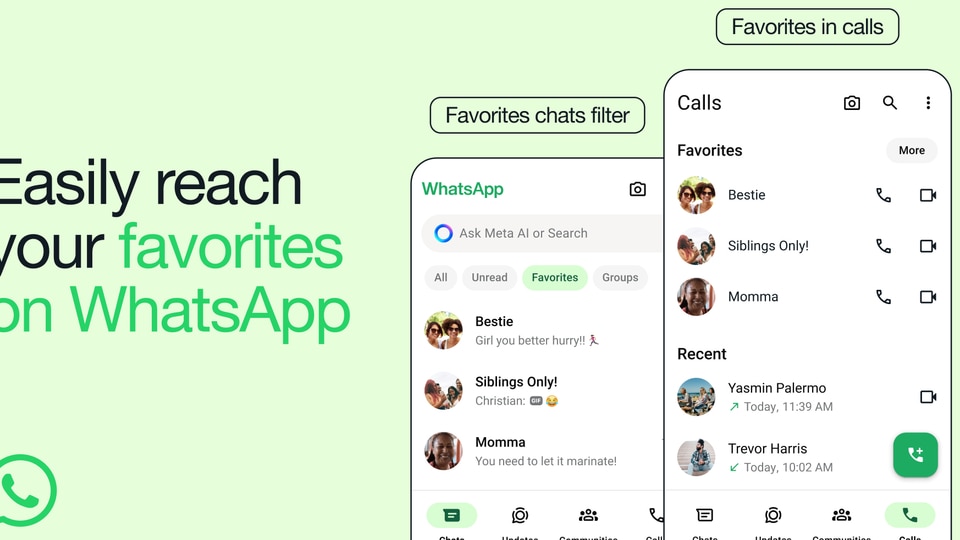
WhatsApp has introduced 'favorites' which allows users to quickly access their favourite contacts at the top of the calls tab. It can also act as a filter for text messages, WhatsApp said as it started rolling out the feature. The feature will be available to all users in the coming weeks and using it people can manage their favourites from the app setting and reorder them at any time, WhatsApp said.
Read more: Elon Musk to move SpaceX and X headquarters out of California to Texas: ‘This is the last straw’
WhatsApp said, "Focusing on your favorites just got a lot easier on WhatsApp. Starting today, you can quickly find the people and groups that matter most at the top of your calls tab and as a filter for your chats. Whether it’s your family group chat or your best friend, your ‘favorites’ will be the same across your chats and calls, so you can speed dial them from your calls tab too."
Read more: Muharram 2024: Are liquor stores closed today in Delhi and Maharashtra? Check full list of upcoming dry days
How to use the ‘favorites’ feature on WhatsApp?
To add a contact or a group to the favorites list, you can select the 'favorites' filter from the chat screen. You can then choose the desired contact or the group and it will become a favorites. You can also tap on the ‘Add Favorite’ option and select the specific contact or group from the calls tab in order to do the same.
Read more: Motilal Oswal Mutual Fund divests stake in Zomato for ₹646 crore
WhatsApp chat filers
The feature comes just months after WhatsApp rolled out chat filters which help users to find important messages faster without scrolling through their entire inbox. WhatsApp initially introduced three filters that appeared at the top of their chat list, namely, 'All', 'Unread', and 'Groups'. WhatsApp said that the "All" filter will be the default view which will show users all their messages in the inbox, the "Unread" filter shows messages that are either marked by the user as unread or haven't been opened yet and the "Groups" filter organises all the group chats.


