
 E-Paper



Want to generate your 3D image using Gemini's Nano Banana? Here's a step-by-step guide
Nano Banana 3D Image: People are obsessing over seeing themselves as a 3D figurine in an image, standing in front of a personal computer placed on a table.
Updated on: Sep 17, 2025, 12:04:17 IST

 Prefer HTon Google
Share via


Copy link

If you are an avid Instagram user, chances are your feed is full of users experimenting with the the Nano Banana tool on the Gemini app. Alongside the viral red saree ‘80s look trend and the polaroid with your favourite celebrities, another craze sweeping social media is the 3D model figurine feature.
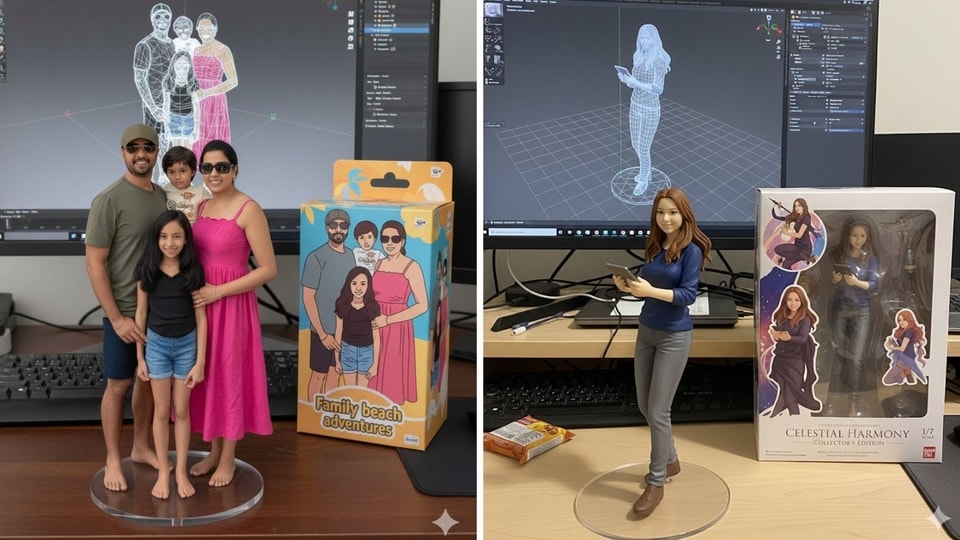
People are obsessing over seeing themselves turned into a 3D figurine, standing in front of a personal computer placed on a table. Curious to try the feature? Here's a step-by-step guide.
- Open Google Gemini, log in: The Neo Banana tool can be accessed through the Gemini app on your phone or by visiting the Google AI Studio website.
- Choose input method: There a broadly two ways you can begin: Either uploading your clear, high-quality photo or describing yourself or the character you want in a detailed text prompt. The most popularly used input method among users is using a clear image.
- A detailed prompt is key: Describing exactly what you need in your 3D model figurine is key to a good result. For example, details like dramatic studio lighting, original artwork, exact details on what should appear on the computer screen behind the model, etc, should ideally be described properly.
- An example: "Create a 1/7 scale 3D figurine of the image provided in an animated yet realistic style. Place the figurine on a computer desk next to a box similar to a collectible item's packaging. The cover on top of the package should also have the 3D figurine's 2D flat illustration on it". You can also mention the environment in greater detail as per your liking.
- Generate and review: After reviewing your prompt once, hit generate and the tool will process your request within seconds. You can review the generated image and refine the prompt if you want to modify it.
- Download and share: Download and share your 3D model image on social media to participate in the viral trend.


Get the latest India News, breaking headlines, and real-time updates from across the nation. Stay informed on politics, government policies, crime, weather, and CEC Gyanesh Kumar row Live.


