
 E-Paper



Best printers for small office use: Buying guide
When shopping for printers for small offices, it is important to check out the features and specifications very closely. This article includes our top 10 picks.

 Prefer HTon Google


A printer that could do multiple tasks and different jobs would be an excellent choice for any small business. But while shopping for printers, it is vital to check their speed, ink capacity, good colour reproduction and good scanner. However, with the number of options available in the market these days, choosing the right printer for yourself can be tricky. But fret not! This article has you covered.
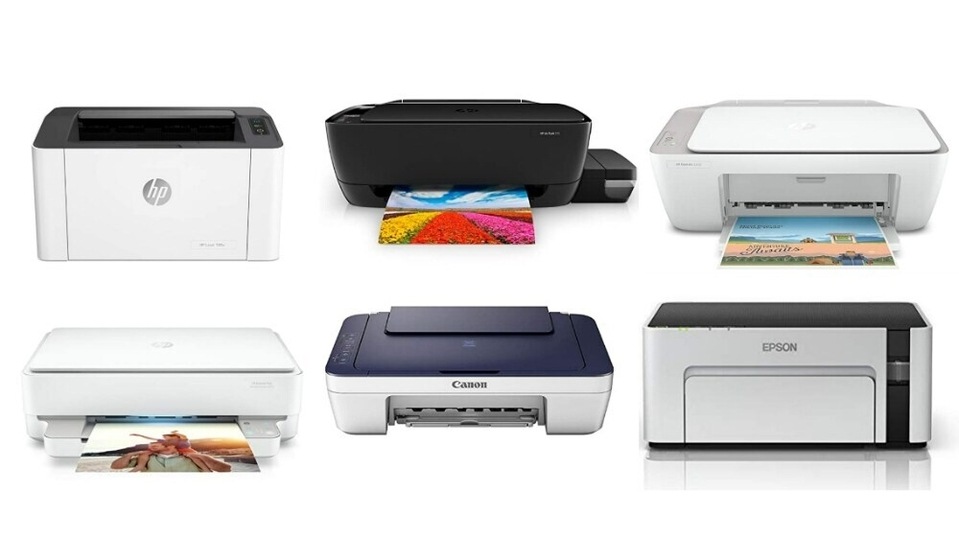
Here is a list of the best printers for small office use.
1. HP Ink Tank 419
Enjoy the ease of printing documents with the HP Ink Tank 419. It is an all-in-one printer suitable for printing, copying, and scanning. It has a transparent ink tank system that lets you see how much ink is left. It is compact and easy to use with USB connectivity and Wi-Fi direct.
Specifications
Product Dimensions: 31 x 52.5 x 15.8 cm; 4.67 Kilograms
Connectivity Type: Bluetooth and Wi-Fi
Brand: HP
Hardware Platform: Tablet, Smartphone
Printing Technology: Ink Tank
Maximum Printing Speed (Colour): 5 ppm
Maximum Printing Speed (Monochrome): 8 ppm
| Pros | Cons |
| Unique tank system | A bit pricey |
| Good performance | |
| Sturdy and durable design |
2. Epson M1120 EcoTank
The Epson M1120 is the printer where efficiency meets the economy. The integrated ink tank design simplified the process of ink filing. Moreover, with the pigment ink, you can enjoy laser-quality text that is smudge-proof and water-resistant. The printer comes with Wi-Fi direct connectivity, giving ease of printing.
Specifications
Product Dimensions: 37.5 x 26.5 x 16 cm; 3.45 Kilograms
Connectivity Type: Wi-Fi
Brand: Epson
Hardware Platform: Tablet, Smartphone
Included Components: Printer, CD, Power Cable and USB Cable
Maximum Printing Speed (Colour): 32 ppm
Maximum Printing Speed (Monochrome): 32 ppm
| Pros | Cons |
| Good printing performance | Only provides monochrome prints |
| Simplified ink-filling process | |
| Very lightweight and sturdy design | |
| Wi-Fi connectivity |
3. Canon PIXMA MG2577s
The Canon PIXMA MG2577s is an all-in-one printer. The compact and multifunctional design printer prints paper in sizes - A4, A5, B5, letter and legal. Plus, the compact design ensures that it fits anywhere, making it ideal for small office use. The printer provides high-quality printing at a low cost and supports all versions of Windows and iOS.
Specifications
Product Dimensions: 42.6 x 30.6 x 14.5 cm; 3.5 kilograms
Brand: Canon
Maximum Printing Speed (Colour): 4 ppm
Maximum Printing Speed (Monochrome): 8 ppm
Printing Technology: Inkjet
Connectivity: USB
Functionality: Multi-function
| Pros | Cons |
| Compact and lightweight | Software installation process could be smooth |
| Auto Power on and off | |
| Low-cost cartridges | |
| Print quality is excellent |
4. HP Deskjet 2331
The HP Deskjet 2331is a high-speed, affordable printer that matches your scan and copy needs. It is an all-in-one printer, meaning you can print, copy and scan documents. The printer has a compact and sleek design that gives it a beautiful look. Moreover, you could get sharp and vibrant graphics by using low-cost HP cartridges.
Specifications
Product Dimensions: 47.5 x 19.1 x 35.4 cm; 4.22 Kilograms
Brand: HP
Maximum Printing Speed (Colour): 5.5 ppm
Maximum Printing Speed (Monochrome): 7.5 ppm
Printing Technology: HP Thermal Inkjet
Connector Type: USB
Compatible Devices: PC
| Pros | Cons |
| Compact and sturdy design | If not used, ink might dry out |
| Gives vibrant and sharp printed text | Does not support mobile printing |
| Enables direct scan without PC | |
| All-in-one |
5. HP Deskjet Plus Ink Advantage 6075
The HP Deskjet Plus ensures that you print, scan and copy, and it connects easily to Wi-Fi with self-healing technology. Moreover, it has automatic two-sided printing that saves time and cost. Moreover, with borderless printing, you can get professional photos printed. The printer lets you use the HP smart app to send secure faxes via mobile phones. The best part is the voice-enabled functionality that gives you a hands-free printing experience.
Specifications
Product Dimensions: 43.3 x 36.1 x 13 cm; 5.2 Kilograms
Brand: HP
Maximum Printing Speed (Colour): 17ppm
Power Source: Corded Electric
Printing Technology: Inkjet
Connectivity Type: Wi-Fi
Special Feature: Wireless
| Pros | Cons |
| Automatic two-sided printing | Printing speed is a little slow |
| Voice-enabled printing functionality | |
| Dual-band Wi-Fi with self-healing technology | |
| Good printing quality |
6. HP Deskjet 2332
The HP Deskjet 2332 gives excellent quality printing at a great value. The all-in-one printer comes with a friendly user interface. Moreover, you could print quality photos and documents with HP ink cartridges. To get a seamless experience, you can also connect the printer with the HP smart app.
Specifications
Product Dimensions: 47.5 x 19.1 x 35.4 cm; 4.22 Kilograms
Brand: HP
Maximum Printing Speed (Colour): 5.5ppm
Maximum Printing Speed Monochrome: 7.5 ppm
Printing Technology: HP Thermal Inkjet
Connector Type: Wired
Resolution: 1200 x 1200 DPI
| Pros | Cons |
| Excellent quality | Scan quality could have been better |
| User-friendly interface | |
| All-in-one , Seamless set-up experience |
7. HP Deskjet Ink Advantage 4178
The HP Deskjet Ink advantage is a highly WiFi-enabled printer for your print, scan and copy needs. With this printer, you can enjoy effortless and intuitive printing with an LCD screen display. Moreover, it is enabled with dual-band Wi-Fi that provides seamless connectivity. You can print, copy and scan virtually anywhere you wish using your smartphone. It allows you to share documents with a third party with the HP smart app.
Specifications
Product Description: 47.5 x 24.2 x 40.5 cm; 4.81 Kilograms
Maximum Print Speed (Colour): 5.5 ppm
Maximum Print Speed (Monochrome): 8.5 ppm
Printing Technology: HP Thermal Inkjet
Compatible Devices: PC, smartphones and Tablets
Connector Type: Wi-Fi
Brand: HP
| Pros | Cons |
| Dual-band Wi-Fi with self-reset technology. | Printer interface could have been improved |
| LCD screen display for effortless printing | |
| Print and scan using the smartphone |
8. Canon PIXMA MG2577s
The Canon PIXMA MG2577s is an all in one low costing printer. The compact and lightweight printer easily fits into any space. The affordable ink cartridges make the printing experience budget-friendly. Moreover, the auto power ON detects the command from the printer with a USB connection and automatically switches off after some time.
Specifications
Product Dimensions: 42.6 x 30.6 x 14.5 cm; 3.5 Kilograms
Maximum Printing Speed (Colour): 4 ppm
Maximum Printing Speed (Monochrome): 8 ppm
Printing Technology: Inkjet
Connector Type: USB
Resolution: 4800 x 600 DPI
Brand: Canon
| Pros | Cons |
| Compact and lightweight | Print quality could be better |
| Auto Power on and off | |
| Low-cost cartridges |
9. HP Laserjet 108w
The HP laserjet gives a good print performance at a budgeted price. The printer is easily operated by using the HP smart app. It allows you to print, scan and copy using your phone and is easy to set up. The printer also features direct Wi-Fi that connects your smartphone and tablet with your printer.
Specifications
Product Dimensions: 38.4 x 28 x 26.1 cm; 8.71 Kilograms
Connectivity Type: Wi-Fi
Maximum Printing Speed (Monochrome): 21 ppm
Printing Technology: Laser
Brand: HP
Connectivity Technology: USB
Hardware Platform: Tablet and Smartphone
| Pros | Cons |
| Fast and versatile performance | A bit pricey |
| Easy print documents | |
| Print and scan with your smartphone |
10. HP Ink Tank 315
The HP Ink Tank 315 is engineered for high-volume printing and can print up to thousands of pages. The transparent ink tanks give you mess-free printing. It is mess-free and gives you the convenience of printing. The printer has advanced technology that lets you scan, copy and print from anywhere you want.
Specifications
Product Dimensions: 52.5 x 55.35 x 25.66 cm; 5.88 Kilograms
Maximum Print Speed (Colour): 15 ppm
Maximum Print Speed (Monochrome): 19 ppm
Printing Technology: Ink Tank
Maximum Resolution: 4800 Dots Per Inch
Brand: HP
Hardware Interface: USB 2.0
| Pros | Cons |
| Engineered with high-volume printing | Body design could have been better |
| All-in-one printer | |
| Mess-free printing |
Price of printers at a glance:
| Product | Price |
| HP Ink Tank 419 | Rs. 16,734 |
| Epson M1120 EcoTank | Rs. 16,999 |
| Canon PIXMA MG2577s | Rs. 3,825 |
| HP Deskjet 2331 | Rs. 4,332 |
| HP Deskjet Plus Ink Advantage 6075 | Rs. 13,212 |
| HP Deskjet 2332 | Rs. 4,332 |
| HP Deskjet Ink Advantage 4178 | Rs. 9,906 |
| Canon PIXMA MG2577s | Rs. 3,825 |
| HP Laserjet 108w | Rs. 14,367 |
| HP Ink Tank 315 | Rs. 13,016 |
Three best features for consumers:
| Product | Feature 1 | Feature 2 | Feature 3 |
| Maximum Print Speed (Colour) | Maximum Print Speed (Monochrome) | Printing Technology | |
| HP Ink Tank 419 | 5 ppm | 8 ppm | 19 ppm |
| Epson M1120 EcoTank | 32 ppm | 32 ppm | NA |
| Canon PIXMA MG2577s | 4 ppm | 8 ppm | Inkjet |
| HP Deskjet 2331 | 5.5 ppm | 7.5 ppm | HP Thermal Inkjet |
| HP Deskjet Plus Ink Advantage 6075 | 17 ppm | NA | Inkjet |
| HP Deskjet 2332 | 5.5 ppm | 7.5 ppm | HP Thermal Inkjet |
| HP Deskjet Ink Advantage 4178 | 5.5 ppm | 8.5 ppm | HP Thermal Inkjet |
| Canon PIXMA MG2577s | 4 ppm | 8 ppm | Inkjet |
| HP Laserjet 108w | NA | 21 ppm | Laser |
| HP Ink Tank 315 | 15 ppm | 19 ppm | Ink Tank |
Best value for money
The HP Deskjet Plus Ink is the best overall printer. The printer has features to print, scan and copy and connect with Wi-Fi safely. The automatic two-sided printing saves time and paper. Plus, with borderless printing, you could get prints like professionals.
Best overall
The HP Laserjet 108w is a laser printer that comes at an affordable price. The printer gives a fast and versatile performance. The HP smart app can also easily print and scan your mobile phone. The small and compact design ensures that you can easily fit it anywhere.
How to find the perfect printer for a small office?
Before buying a printer, you should always check for its features and your requirements. Moreover, you should determine the size that fits your space and knows your daily office needs. Also, it would be best to decide which features are essential and compare the long-term, upfront and maintenance costs.
So make a list of features that you want in your printer and choose the right printer from the list.
Best printers for small office use

At Hindustan Times, we help you stay up-to-date with the latest trends and products. Hindustan Times has an affiliate partnership, so we may get a part of the revenue when you make a purchase. We shall not be liable for any claim under applicable laws, including but not limited to the Consumer Protection Act, 2019, with respect to the products. The products listed in this article are in no particular order of priority.


