
 E-Paper



ChatGPT can ‘modify’ your car with new wheels, body kit and more: How to use this AI feature
Using ChatGPT to modify your car visually is a brilliant way to experiment with ideas before committing to real-world changes.

 Prefer HTon Google


If you’ve ever wondered what your car would look like with a fresh set of alloy wheels, a wide body kit, or a bold new paint job, you no longer need to imagine it—you can now see it. With the help of ChatGPT’s image capabilities, car enthusiasts can virtually modify their vehicles before making any real-world changes. Here’s a quick and easy step-by-step guide on how to use ChatGPT to transform your car's appearance using just a photo.
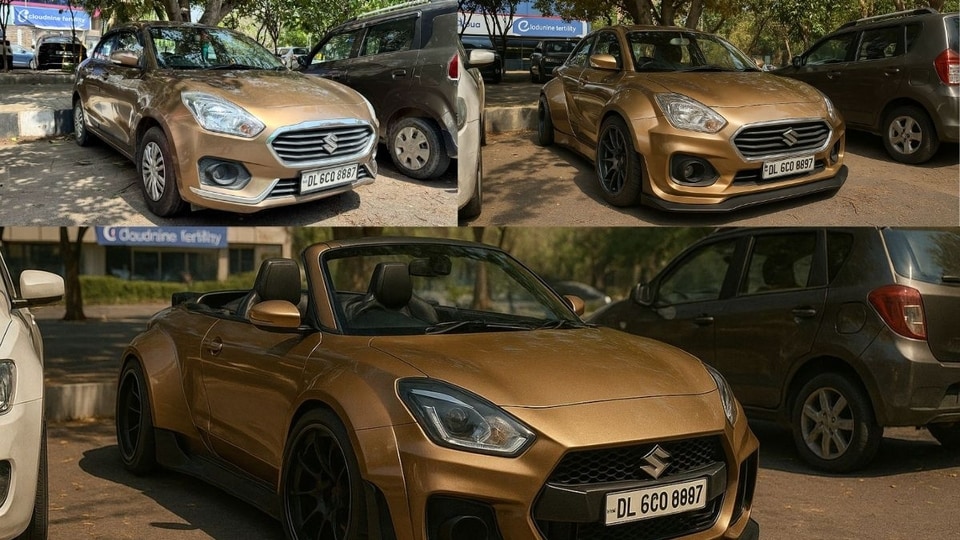

Step 1: Take a Clear Photo of Your Car
First things first, take a high-quality photo of your car. Ideally, choose a well-lit location and ensure your car is clean and fully visible in the frame. A side or three-quarter front view works best for visual modifications.
Step 2: Upload the Image to ChatGPT
Head over to ChatGPT. Simply drag and drop the photo of your car into the chat window or use the upload function. Once uploaded, you can start describing the changes you'd like to see.
Step 3: Describe Your Modifications
Now comes the fun part. Be as detailed or creative as you like. Here are some ideas to get you started:
- Add black multi-spoke alloy wheels.
- Apply a wide body kit with flared arches.
- Paint the car matte red.
- Add a rear spoiler and a front splitter.
- Tint the windows and lower the suspension.
ChatGPT will generate a modified image of your car based on your request, giving you a visual preview of your dream build.
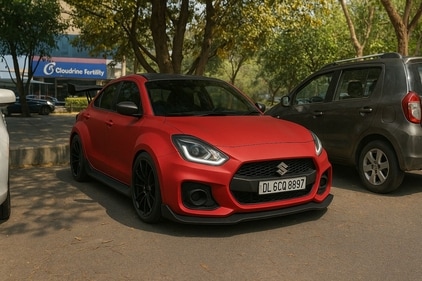
Step 4: Fine-Tune the Design
Not quite right the first time? No problem. You can ask ChatGPT to adjust specific elements—for instance, “Make the spoiler larger” or “Try a metallic blue colour instead.” This back-and-forth allows you to fine-tune your car’s look without spending a penny.
Step 5: Save and Share
Once you’re happy with your virtual modification, you can save the image and even share it on social media or with your custom shop for inspiration.
Using ChatGPT to modify your car visually is a brilliant way to experiment with ideas before committing to real-world changes. Whether you're planning a full custom build or just exploring cosmetic tweaks, it’s an easy and engaging way to bring your vision to life.


