
 E-Paper



How to use Apple Writing Tools on iPhone to rewrite, proofread, and more
Apple Writing Tools on the iPhone might be one of the most overlooked Apple Intelligence features. Here's how they work.










It's safe to say that the Writing Tools feature within Apple Intelligence is not the most attention-grabbing of the entire Apple Intelligence suite of AI features for iPhones and other Apple products, like the Mac. But it is certainly among the most useful. Yes, it's not as flashy as something like Genmoji or Image Playground. But when you do need to proofread, create different versions of your own text, and are just not happy with your wording, or if you need to make your text more concise or just pull out some important points, Apple Intelligence's Writing Tools features can come in handy on your iPhone. If you still haven't got around to using them on your iPhone, here is a guide as to what you can do and how you do it.
Also Read: PlayStation Days of Play Sale: Spider-Man 2, God of War Ragnarök, and more games get big price cuts
What can you do with Apple Intelligence Writing Tools and how it works?
Well, firstly, with Writing Tools, there are four key areas. Firstly, you can proofread your text. You can rewrite your text, and then you can summarise your text as well as organise it. And then you can also compose text with ChatGPT's integration.
So, what proofreading does is it goes through your text and finds if there are inconsistencies in it and corrects them for you. It could be grammar errors and more, or suggesting a better word. So you can simply just highlight your text, open Writing Tools and tap on proofread, and then it will transform the text for you. You will also see the highlighted words where Apple Intelligence came in and changed them. It will also give you an explanation if you tap on a specific word. It will do things like add missing punctuation, change words, and things like that, and correct the tense.
You can just tap on 'Use Original' if you're not happy with the changes that Apple made. By tapping on 'Rewrite', if you're not happy with how your text reads, you can just simply rewrite, and then Apple Intelligence will come into play and transform the entire text for you to make it read better. But again, this is something that you might not appreciate, so you can just simply tap on 'Original' to see how all the older text looked, or if you're not happy with that, just tap on 'Rewrite'. You can also transform your text language into a friendly tone or a professional tone, and you can also make it concise. You can also generate summaries of your text. You can convert it to key points, make a list out of it, and create a table.
And then, you can tap on the 'Compose' button, which sits at the bottom. This works using ChatGPT. Once you tap on compose, it will ask you to 'compose with ChatGPT'. Here, you can enter a text-based prompt, and ChatGPT will create the text for you, similar to any text-based prompt you enter in ChatGPT. So, if you want a birthday party invite that you have to send to your kid's friends, you can just simply type a prompt like, “make an invitation to a birthday party for my child whose name is Aman. It is going to be on this Sunday evening”.
How to trigger Writing Tools?
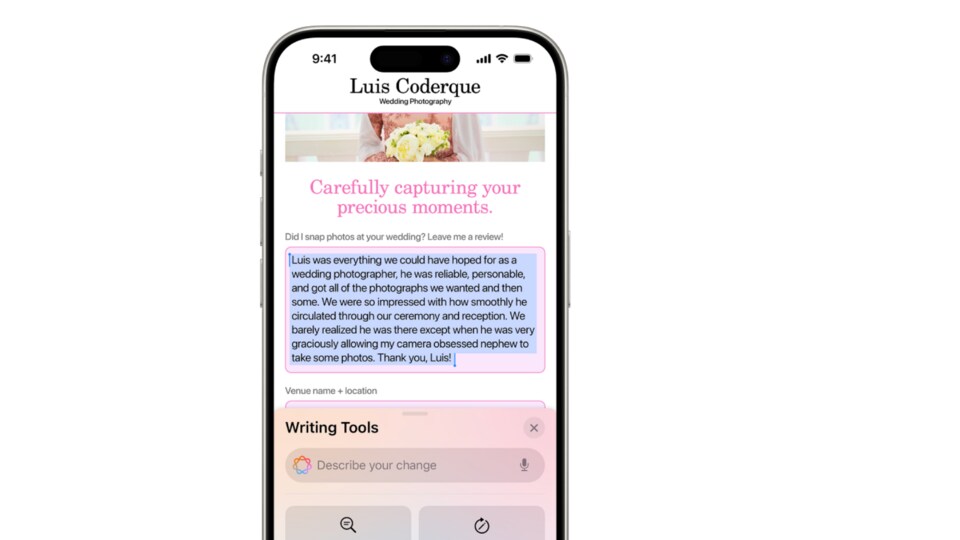
So, wondering how to invoke Writing Tools? What you should do is, while typing a text, just simply highlight the text and you will see a floating option called 'Writing Tools' alongside cut, copy, paste. If not, just tap on the arrow at the end, and then the tools should reveal themselves. Tap on Writing Tools. Then, here you will see various options like Proofread, Rewrite, converting text to a friendly tone, professional tone, making it concise, having summaries, key points, compose, and more.
MOBILE FINDER: iPhone 16 LATEST Price, Specs And More


