
 E-Paper



Logitech launches MX Keypad in India, offering programmable keys for coding tools and AI workflows, priced at ₹15,999
With programmable controls and dedicated workflow features, Logitech’s MX Keypad aims to reduce repetitive actions for developers, creators and other power users.

 Prefer HTon Google


You may be interested in

19% OFF
Logitech MX Keypad for Developers 9 LCD Keys with 3 Months of GitHub Copilot Pro+, App-Aware Profiles for VS Code, IntelliJ, Automation, USB-C, Windows, macOS - Graphite
 Logitech MX Keypad for Developers 9 LCD Keys with 3 Months of GitHub Copilot Pro+
- App-Aware Profiles for VS Code
- IntelliJ

₹12,995
₹15,999Check Details
23% OFF
Logitech MX Creative Console, Graphite Dialpad and Keypad, W128979712, Bluetooth, Graphitegray
- Logitech MX Creative Console
- Graphite Dialpad and Keypad
- W128979712
₹65,864
₹85,623Check Details
44% OFF

Logitech MX Master 3S Bluetooth Edition Wireless Mouse, No USB Receiver - Ultra-Fast Scrolling, Ergo, 8K DPI, Track on Glass, Quiet Clicks, Works with Apple Mac, Windows PC, Linux, Chrome - Graphite
- Logitech MX Master 3S Bluetooth Edition Wireless Mouse
- No USB Receiver - Ultra-Fast Scrolling
- Ergo
₹6,995
₹12,495Check Details
8% OFF

Logitech MX Keys Mini Minimalist Wireless Illuminated Keyboard with Free Adobe Subscription, Compact, Bluetooth, Backlit, USB-C, Metal Build-Graphite
- Logitech MX Keys Mini Minimalist Wireless Illuminated Keyboard with Free Adobe Subscription
- Compact
- Bluetooth
₹10,995
₹11,995Check Details
23% OFF

Logitech MX Creative Console Programmable Keypad, Pale Grey 9 Customisable LCD Keys, Rotary Controls, Graphic Design & Video Editing, Adobe, Zoom, Spotify Compatible, USB
- Logitech MX Creative Console Programmable Keypad
- Pale Grey 9 Customisable LCD Keys
- Rotary Controls
₹66,265
₹86,145Check Details
Logitech has launched the MX Keypad in India as a new accessory for developers who regularly work across coding tools and AI assistants. Rather than adding another software layer to the development process, the keypad provides physical controls that users can assign to different tasks. It is designed to sit alongside a regular keyboard, offering quicker access to frequently used commands and actions. With support for multiple development platforms, the MX Keypad offers a more flexible approach to customisable controls. But what exactly does Logitech’s new keypad offer, and how does it work with the tools developers already use? Read on to find out.
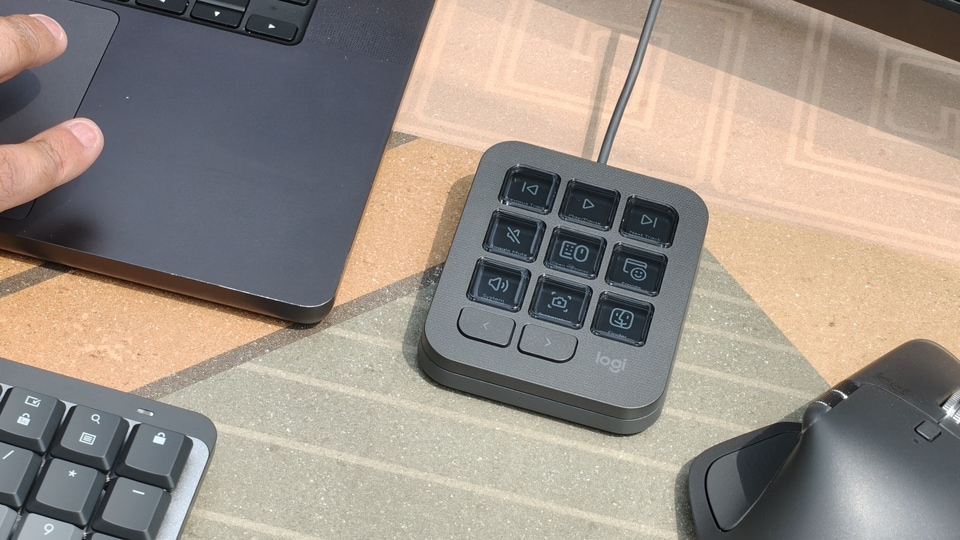

Logitech MX Keypad features and specifications
The MX Keypad features customisable physical controls you can assign to applications and AI agents. Users can configure individual keys to run prompt macros, refactor code, launch commands, or perform other actions within their development workflows.
Unlike conventional shortcut pads that are often tied to a single application, the MX Keypad is designed to work across multiple coding tools. It supports platforms such as GitHub Copilot, Claude Code, VS Code and IntelliJ IDEA, allowing developers to create shortcuts for the tools they use most frequently.
Logitech has also worked with GitHub to bring native integration for GitHub Copilot, VS Code and the GitHub Copilot app. This allows developers to trigger supported actions without repeatedly navigating menus or relying on conventional keyboard shortcuts. Each MX Keypad also includes three months of GitHub Copilot Pro+, which new and existing users can redeem through Logi Options+.
The keypad's functionality extends beyond these integrations via Logitech's Logi Actions SDK. It allows developers to create custom integrations for specific workflows, with compatible plugins available through the Logi Marketplace. Plugins for Claude Code and OpenAI Codex are already available, supporting features such as real-time agent status tracking and command-line control.
Logitech says the platform can eventually support integrations across more than 100 million compatible Logitech devices. The MX Keypad was also developed with input from the GitHub and Logitech MX Collective communities, giving developers greater flexibility to configure the device around their existing workflows.
On the sustainability front, the MX Keypad uses post-consumer recycled plastic in its construction. The Graphite variant contains 64 per cent recycled plastic, while its packaging uses paper sourced from FSC-certified forests and other controlled sources.
Logitech MX Keypad price and availability
The Logitech MX Keypad is priced at ₹15,999 in India. It is available in Graphite.


