
 E-Paper



Most Apple Watch users miss these 7 useful features that can save time every single day
From identifying songs and controlling your iPhone remotely to recognising important sounds, these hidden Apple Watch features can help you save time.


Our Picks
Our Picks
| Product | Rating | Price |
|---|---|---|
Apple Watch Ultra 3 GPS + Cellular 49mm Black Titanium Case with Black Alpine Loop - MediumView Details  | ||
 | ||
Apple Watch Series 10 [GPS + Cellular 46 mm] Smartwatch with Jet Black Aluminium Case with Ink Sport Loop. Fitness Tracker, ECG App, Always-On Retina Display, Carbon NeutralView Details | ₹59,900 | |
| ||
Unlock Personalized  100% Secure 100% Secure Flexible EMI Tenure Flexible EMI Tenure | ||
Apple Watch Series 10 [GPS + Cellular 42 mm] Smartwatch with Natural Titanium Case with Stone Grey Sport Band- S/M. Fitness Tracker, ECG App, Always-On Retina Display, Water ResistantView Details | ₹69,900 | |
| ||
Apple Watch Series 11 GPS 46mm Rose Gold Aluminium Case with Light Blush Sport Band - S/MView Details | ₹49,900 | |
| ||
Apple Watch SE 3 GPS + Cellular 44mm Midnight Aluminium Case with Midnight Sport Band - S/MView Details | ₹33,900 | |
| ||

Research-Backed Choices
Every product we recommend is chosen through a combination of Primary Research and Secondary Research.
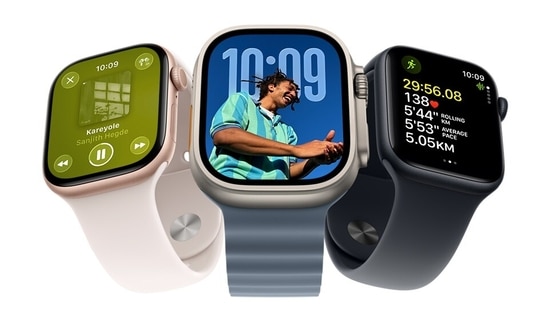

Apple Watch is packed with features that go far beyond fitness tracking and notifications. While most users rely on it for checking messages, recording workouts, or monitoring heart rate, several practical tools remain tucked away inside menus that many people rarely visit.
These lesser-known features can help with communication, photography, accessibility, music discovery, and even personal safety. Most of them are already available on supported Apple Watch models and only need a quick setup before they are ready to use.
Here are seven hidden Apple Watch features that are worth exploring. While these features are not new, they often remain overlooked because they are hidden inside menus or optional settings.
1. Turn your Apple Watch into a walkie-talkie
The Walkie-Talkie app offers a simple way to have quick voice conversations without placing a phone call. Users can send instant push-to-talk messages to another Apple Watch owner once the invitation is accepted.
The feature works over Wi-Fi or a cellular connection, making it useful for brief conversations with family or friends. If it is missing from the watch, it can usually be enabled through the Accessibility settings.
2. Silence notifications without pressing a button
Apple includes gesture-based controls that make handling alerts much easier.
One of them is Cover to Mute. Placing your palm over the watch display for a few seconds silences incoming calls or notifications, with a vibration confirming the action.
Compatible Apple Watch models also support Wrist Flick, a gesture that dismisses notifications with a quick movement of the wrist. It is a convenient option when your hands are occupied or you do not want to touch the display.
3. Capture iPhone photos from a distance
Apple Watch can double as a wireless camera remote for your iPhone. Opening the Camera Remote app lets users preview the camera viewfinder directly on the watch before taking a picture.
On supported models, the Double Tap gesture can trigger the shutter without touching the iPhone. It is especially useful for group photos, travel shots, or situations where the phone is mounted on a tripod.
4. Operate nearby Apple devices from your wrist
Another overlooked capability allows Apple Watch to control other Apple devices nearby.
Once enabled through the Accessibility Shortcuts menu in the Watch app, users can activate the feature with a triple press of the Digital Crown. From there, they can navigate through apps, launch the camera, adjust settings, and perform several actions on a paired iPhone.
The shortcut is available when other accessibility gesture controls are disabled.
5. Receive alerts for important sounds around you
Apple's Sound Recognition feature is designed to notify users when specific sounds are detected nearby.
Although it is configured on the paired iPhone under Accessibility settings, notifications appear on the Apple Watch. The system can identify sounds such as smoke alarms, doorbells, crying babies, barking dogs, running water, car horns, and several household appliances.
Users can also switch on Name Recognition, which sends an alert when someone nearby says their name.
6. Identify songs instantly
Apple integrated Shazam technology into its ecosystem after acquiring the music recognition service, allowing Apple Watch users to identify songs without installing another application.
A single tap starts listening to nearby audio and displays the song title within seconds. Users who access the feature regularly can pin Music Recognition to Smart Stack for quicker access instead of searching through apps every time.
7. Use the built-in flashlight in low light
Apple Watch may not include a dedicated LED flashlight, but it does offer a display-based flashlight that can come in handy.
The feature is available through the Control Center and provides three lighting modes. Users can choose a bright white screen for visibility, a flashing white light to attract attention, or a solid red light that is easier on the eyes at night.
Brightness can also be reduced with a tap, making it useful while moving around in dark rooms or looking for small items without disturbing others.
Apple Watches that are worth considering
1. Apple Watch Ultra 3 GPS + Cellular 49mm Black Titanium Case with Black Alpine Loop - Medium
Built for outdoor adventures and demanding workouts, the Apple Watch Ultra 3 combines a rugged titanium body with advanced fitness and safety features. It also supports several hidden Apple Watch features, including Walkie-Talkie, Camera Remote with Double Tap, Music Recognition, Sound Recognition alerts, and Control Nearby Devices, making it useful well beyond fitness tracking.
Specifications
Reasons to buy

Durable titanium design with long battery life for outdoor use
Advanced GPS, safety tools, and hidden productivity features
Reason to avoid

Premium price makes it expensive for casual users
Large 49mm case may feel bulky on smaller wrists
Why buy this Apple Watch?
If you want Apple's most capable smartwatch with rugged durability, long battery life, advanced fitness tracking, and useful hidden features for everyday convenience, the Ultra 3 is an excellent choice.
2. Apple Watch Series 10 [GPS + Cellular 46 mm] Smartwatch with Jet Black Aluminium Case with Ink Sport Loop. Fitness Tracker, ECG App, Always-On Retina Display, Carbon Neutral

Our Principles
Full Transparency
Every product review clearly lists the Pros and Cons, giving you a balanced view.
Brand Confidence
We focus on products from brands with a proven reputation and long-standing market trust.
The Apple Watch Series 10 is designed for everyday users who want a balance of health tracking, smart features, and connectivity. Along with ECG monitoring and cellular support, it includes hidden features like Walkie-Talkie, Camera Remote, Music Recognition, Sound Recognition, Cover to Mute, and Control Nearby Devices, making it a capable companion throughout the day.
Specifications
Reasons to buy
Bright, larger display with fast charging and cellular connectivity
Excellent mix of health tracking and hidden smart features
Reason to avoid
Battery life still requires daily charging
Premium pricing compared to many Wear OS smartwatches
Why buy this Apple Watch?
The Apple Watch Series 10 is ideal for users who want reliable health tracking, cellular connectivity, practical hidden features, and a premium smartwatch experience for everyday use.
3. Apple Watch Series 10 [GPS + Cellular 42 mm] Smartwatch with Natural Titanium Case with Stone Grey Sport Band- S/M. Fitness Tracker, ECG App, Always-On Retina Display, Water Resistant
The Apple Watch Series 10 in its titanium finish offers a premium build in a more compact 42mm size. It combines advanced health tracking with smart features like Walkie-Talkie, Camera Remote, Music Recognition, Sound Recognition, Cover to Mute, and Control Nearby Devices, making it a practical choice for everyday use and fitness.
Specifications
Reasons to buy
Lightweight titanium case offers a premium and durable design
Compact size with advanced health, fitness, and hidden smart features
Reason to avoid
Higher price than the aluminium Series 10 models
Battery life still needs daily charging for most users
Why buy this Apple Watch?
Choose the Apple Watch Series 10 Titanium if you want a lighter premium build, comprehensive health tracking, cellular connectivity, and useful hidden features packed into a comfortable 42mm smartwatch.
4. Apple Watch Series 11 GPS 46mm Rose Gold Aluminium Case with Light Blush Sport Band - S/M
The Apple Watch Series 11 builds on Apple's everyday smartwatch experience with better battery life, detailed sleep tracking, and advanced health monitoring. It also supports useful hidden features like Walkie-Talkie, Camera Remote, Music Recognition, Sound Recognition, Cover to Mute, and Control Nearby Devices, making it useful for both productivity and daily convenience.
Specifications
Reasons to buy
Improved battery life with fast charging and comprehensive health tracking
Large, bright display with several practical hidden Apple Watch features
Reason to avoid
No cellular connectivity on this model
Daily charging is still required with regular use
Why buy this Apple Watch?
The Apple Watch Series 11 is a great choice for users who want the latest health features, better battery life, and smart everyday tools without paying extra for cellular connectivity.
5. Apple Watch SE 3 GPS + Cellular 44mm Midnight Aluminium Case with Midnight Sport Band - S/M
The Apple Watch SE 3 offers many of Apple's latest smartwatch features at a more accessible price. It includes cellular connectivity, an Always-On display, sleep tracking, temperature sensing, and hidden features like Walkie-Talkie, Camera Remote, Music Recognition, Sound Recognition, and Cover to Mute, making it a well-rounded everyday smartwatch.
Specifications
Reasons to buy
Excellent value with cellular connectivity and practical smart features
Supports several hidden Apple Watch tools alongside fitness and health tracking
Reason to avoid
Battery life is shorter than Series 11 and Ultra 3
Lacks premium materials found on higher-end Apple Watch models
Why buy this Apple Watch?
The Apple Watch SE 3 is ideal if you want essential health tracking, cellular connectivity, and Apple's hidden smartwatch features without spending as much as the flagship models.
Top 3 features of the best Apple Watches
| Apple Watches | Display | Connectivity | Battery Life |
|---|---|---|---|
| Apple Watch Ultra 3 GPS + Cellular (49mm) | 49mm Always-On Retina display with sapphire crystal | GPS + Cellular, Bluetooth | Up to 42 hours (up to 72 hours in Low Power Mode) |
| Apple Watch Series 10 GPS + Cellular (46mm Aluminium) | 46mm Always-On Retina display | GPS + Cellular, Wi-Fi 4, Bluetooth 5.3 | Fast charging, up to 80% in around 30 minutes |
| Apple Watch Series 10 GPS + Cellular (42mm Titanium) | 42mm Always-On Retina display | GPS + Cellular, Wi-Fi 4, Bluetooth 5.3 | Fast charging, up to 80% in around 30 minutes |
| Apple Watch Series 11 GPS (46mm) | 46mm Always-On Retina display | GPS, Wi-Fi, Bluetooth | Up to 24 hours, fast charging (up to 8 hours of use in 15 minutes) |
| Apple Watch SE 3 GPS + Cellular (44mm) | 44mm Always-On Retina display | GPS + Cellular (5G), Bluetooth | Up to 18 hours, fast charging (up to 8 hours of use in 15 minutes) |
How long does an Apple Watch battery last?
Battery life varies by model and usage. The Apple Watch SE 3 offers up to 18 hours on a single charge, while the Series 11 can last up to 24 hours. If battery life is a priority, the Apple Watch Ultra 3 is the best option, delivering up to 42 hours of regular use and even longer in Low Power Mode.
Can I use an Apple Watch with an Android phone?
No. Apple Watch is designed to work only with iPhones and cannot be paired with Android smartphones. To set up and use one, you'll need a compatible iPhone running a supported version of iOS. If you use an Android device, a Wear OS smartwatch or another platform will be a better fit.
Similar stories for you
Noise ALT Watch 1 review: Great battery, premium feel, fair price
Think your smartwatch only tracks health? These feature packed smartwatches can do much more
The Research and Expertise
Our research focused on what actually matters when choosing an Apple Watch. We compared battery life, health and fitness capabilities, display size, build quality, and smart features across the latest lineup. We also examined hidden watchOS features that add value beyond activity tracking, helping you choose a model that suits your lifestyle instead of simply picking the most expensive one.
Disclaimer: At Hindustan Times, we help you stay up-to-date with the latest trends and products. Hindustan Times has an affiliate partnership, so we may get a part of the revenue when you make a purchase. We shall not be liable for any claim under applicable laws, including but not limited to the Consumer Protection Act, 2019, with respect to the products. The products listed in this article are in no particular order of priority.



