
 E-Paper



IGNOU term end exam 2017: Grade card released, here’s how to check
The Indira Gandhi National Open University (IGNOU) has declared term end results and grade cards for December 2017 examinations on its official website.


The Indira Gandhi National Open University (IGNOU) has declared term end results and grade cards for December 2017 examinations on its official website.
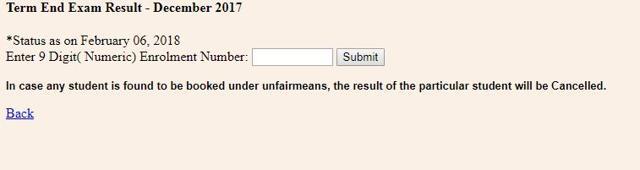
The University has also released the grade cards of courses for term end exams conducted in December 2017. The grade cards have been released separately in three groups: BCA/MCA/MP/MPB, BDP/BA/B.COM/B.Sc./ASSO Programmes and Other Programmes. There are separate urls to access the grade cards for these three groups.
Steps to check the IGNOU term end results:
1) Visit the official website of IGNOU
2) Click on link ‘IGNOU declares Term End Result and Grade Card of December 2017’ in red
3) Click here to view Term end December 2017 Examination Result
4) Enter nine digit enrolment number
4) Click on submit
5) Result will be displayed on the screen
6) Take a printout and save it on your computer
Steps to check grade cards of term end exams:
Click here to see grade cards for BCA/MCA/MP/MPB
Click here to see grade cards for BDP/BA/B.COM/B.Sc./ASSO Programmes
Click here to see grade cards for Other programmes
Note: Visit official website of IGNOU for latest news and updates.


