
 E-Paper



IIT JAM 2020: Registration process for aspirant from J-K begins at jam.iitk.ac.in, here’s how to apply
The registration process of IIT JAM 2020 exam for the aspirants from Jammu and Kashmir begins on Friday, November 22, 2019.


Indian Institute of Technology, Kanpur has released an official notification regarding the reopening of the registration process of IIT JAM 2020 entrance examination for the aspirants from Jammu and Kashmir on Thursday, November 21, 2019. Candidates from Jammu and Kashmir can now apply for IIT JAM exam 2020 online at, jam.iitk.ac.in on or before November 28, 2019.
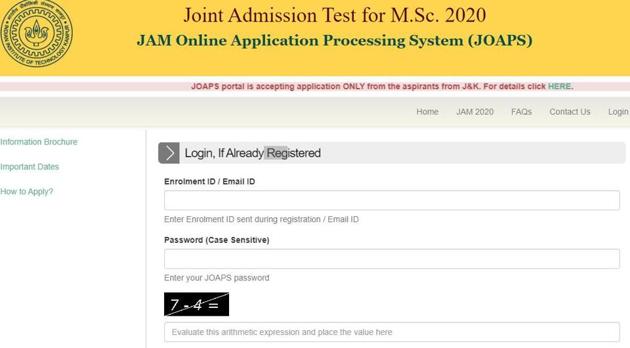
As per the notice, during the application process from September 5 to October 9, 2019, 346 candidates from Jammu and Kashmir had registered for JAM 2020.
“However, as per e-mail received from MHRD, a few aspirants from J&K might not have been able to register because of unavailability of net connectivity in J&K. Keeping this in view, the JAM committee decided to open the application process for J&K candidates for a week during 22nd November to 28th November 2019 so as to give them another chance of registration,” reads the notice.
The examination city for any new registration is fixed and cannot be changed. These are the following cities:
1.Jammu
2.New Delhi
3.Greater Noida
However, it must be noticed that candidates will have to provide documents that they belong to Jammu and Kashmir or else their registration will stand cancelled and no fees will be refunded in such case.
Here’s the direct link to apply.
How to apply:
1.Visit the official website
2.On the home page, click on the link that reads, ‘(November 21, 2019) Important Information For JAM 2020 Aspirants From J&K’
3.A new page will appear on the display screen
4.On the webpage click on the link that reads, ‘ JOAPS portal’
5.If you are a new user, click on the link for new registration and provide all the required information
6.Once your registration is completed, go back and key in your credentials and log in
7.The application form will appear on the display screen
8.Fill in all the requisite information and upload all supporting documents
9.Make payment
10.Download the application form and take its print out for future reference.


