
 E-Paper



Enhance multitasking on your laptop with the 6 best laptop screen extenders
Check out the best laptop screen extenders to boost multitasking and take your productivity to the next level, wherever you are.

 Prefer HTon Google


Our Picks
Best overall
Budget friendly
Value for money
FAQs
Our Picks
| Product | Rating | Price |
|---|---|---|
Best overall MagicRaven Laptop Screen Extender, 14" 1080P Portable Monitor, 250° Rotation Travel Display for 14-17'' Laptop with USB-C HDMI Port, Plug and Play for Windows/MacView Details | ₹17,998 | |
 | ||
Riitek 14" Fhd 1080P Portable Dual Monitor 2 Screen Extender For 15-17" Laptop With Kickstand|Usb-C,Mini Hdmi|Hdr|Compatible With Mac,Windows,Switch (Not Compatible With M1 & M2 Chip),LCD,Pack of 1View Details | ₹27,999 | |
| ||
Budget friendly Riitek 15 Inch Triple Portable Monitor FHD 1080P HDR IPS Laptop Monitor Screen Extender, for 15"-17" Laptops & Switch/Xbox/Phone, Support Windows/MAC System, Type-C/HDMI Port (Not Compatible with M1 & M2 Chip)View Details | ₹38,999 | |
| ||
Value for money RIITEK 14" Quad Monitor Laptop Screen Extender - Portable FHD 1080P IPS Monitor with 1 Cable Connection Compatible with Window (10,11) / Mac (M1 M2 M3) for 13.6" -17.3" LaptopView Details | ₹52,999 | |
| ||
Riitek 14” Full HD IPS 1080P Portable Monitor Screen Extender with USB A, Type-C, HDMI Cable, Carry Bag for 14”-17” Laptop, Mac, Switch, Xbox One, PS5 (Screen Size - 14 Inch, Grey)View Details | ₹16,999 | |
| ||

Research-Backed Choices
Every product we recommend is chosen through a combination of Primary Research and Secondary Research.
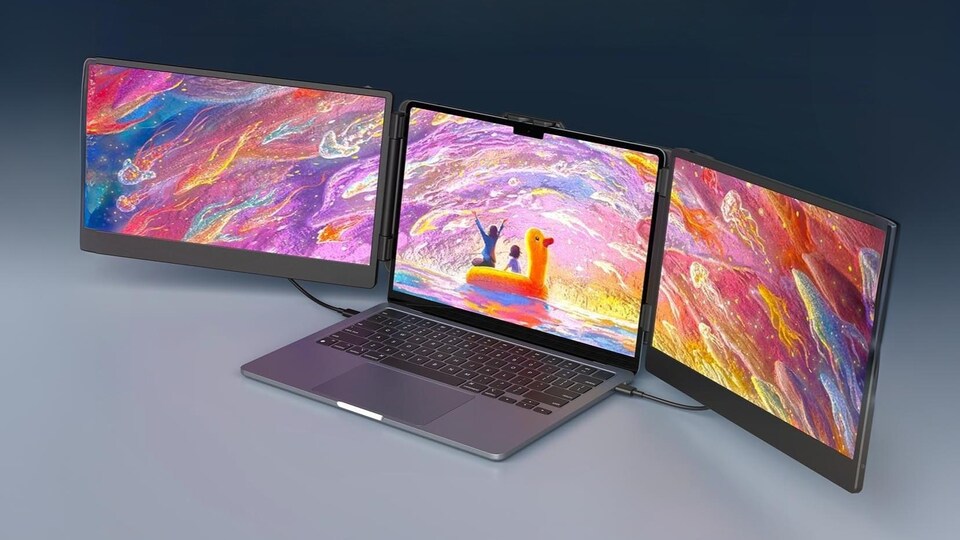

If you're always on the move and juggling multiple tasks, a laptop screen extender might just be the game-changer you need. These handy devices let you expand your screen space instantly, making it easier to manage work, meetings, and entertainment—all at once.
Whether you're working remotely, travelling, or just want a more efficient setup at home, a screen extender helps you stay productive without the bulk of extra monitors. In this list, we’ve picked out the 6 best laptop screen extenders that are reliable, portable, and perfect for multitasking on the go.
BEST OVERALL
1. MagicRaven Laptop Screen Extender, 14" 1080P Portable Monitor, 250° Rotation Travel Display for 14-17'' Laptop with USB-C HDMI Port, Plug and Play for Windows/Mac
The MagicRaven 14" Laptop Screen Extender is a lightweight, portable monitor designed for 14-17" laptops. It attaches directly to your laptop, saving desk space and making it easy to carry for travel, work, or leisure. The 1080p IPS panel offers a wide 178° viewing angle, vibrant colors, and reduced eye strain with low blue light technology.
This extender features plug-and-play connectivity via USB-C or HDMI, eliminating the need for drivers. Its 250° rotation allows for flexible screen sharing and viewing angles. Ideal for remote workers, students, and travelers, it boosts productivity by enabling multitasking on the go.
Specifications
Reasons to buy

Lightweight and easy to carry
Wide rotation for flexible viewing
Reason to avoid

Limited to laptops with USB-C DP Alt Mode or HDMI
No built-in speakers
What are buyers saying on Amazon?
Buyers love its lightweight, compact design and easy setup. Picture quality is decent, though colours may seem dull and buttons a bit fiddly.
Why choose this product?
A budget-friendly portable monitor ideal for travel or compact office use, with good connectivity and solid value despite minor colour and angle issues.
2. Riitek 14" Fhd 1080P Portable Dual Monitor 2 Screen Extender For 15-17" Laptop With Kickstand|Usb-C,Mini Hdmi|Hdr|Compatible With Mac,Windows,Switch (Not Compatible With M1 & M2 Chip),LCD,Pack of 1

Our Principles
Full Transparency
Every product review clearly lists the Pros and Cons, giving you a balanced view.
Brand Confidence
We focus on products from brands with a proven reputation and long-standing market trust.
The Riitek 14" FHD Portable Dual Monitor is designed for 15-17" laptops, offering a dual-screen setup with a kickstand for stability. Its 1080p IPS display ensures vibrant visuals, 178° viewing angle, and reduced eye strain with low blue light mode. The glossy screen enhances color richness and clarity.
Plug-and-play connectivity is available via USB-C or Mini HDMI, supporting Windows, Mac (except M1/M2), and Nintendo Switch. The monitor is ideal for multitaskers, professionals, and gamers who need extra screen space on the go.
Specifications
Reasons to buy
Dual-screen setup increases productivity
Low blue light reduces eye fatigue
Reason to avoid
Not compatible with Mac M1/M2 chips
Glossy screen may reflect light
What are buyers saying on Amazon?
Buyers like the vibrant display and portability, praising its ease of use. However, response time, connectivity, and price get mixed feedback.
Why choose this product?
Ideal for multitasking and travel with a bright screen and slim build, though slower response and connection setup may affect some users.
BUDGET FRIENDLY
3. Riitek 15 Inch Triple Portable Monitor FHD 1080P HDR IPS Laptop Monitor Screen Extender, for 15"-17" Laptops & Switch/Xbox/Phone, Support Windows/MAC System, Type-C/HDMI Port (Not Compatible with M1 & M2 Chip)
The Riitek 15" Triple Portable Monitor is the first of its size, offering a large, immersive triple-screen experience for 15-17" laptops. Its 1080p HDR IPS display delivers rich colors and clear images, making it perfect for multitasking, gaming, and professional work. The screens can rotate for sharing or vertical use.
It supports Windows, Mac (except M1/M2), and gaming consoles via Type-C or HDMI. The package includes all necessary cables and a power adapter, making setup straightforward. Its versatility suits a range of industries and users.
Specifications
Reasons to buy
Large triple-screen setup for maximum productivity
Multiple rotation options for flexible use
Reason to avoid
Not compatible with Mac M1/M2/Surface/Chromebook
Bulky compared to single extenders
What are buyers saying on Amazon?
Buyers praise the vibrant display and portability, noting it's great for multitasking. Some report slow response times and mixed feelings about connectivity and price.
Why choose this product?
Great for on-the-go work with vibrant visuals and easy setup, but slower response and tricky connectivity may not suit all users.
VALUE FOR MONEY
4. RIITEK 14" Quad Monitor Laptop Screen Extender - Portable FHD 1080P IPS Monitor with 1 Cable Connection Compatible with Window (10,11) / Mac (M1 M2 M3) for 13.6" -17.3" Laptop
The RIITEK 14" Quad Monitor Extender transforms your laptop into a four-screen workstation, ideal for heavy multitaskers and professionals. It features three additional 14" FHD screens with vibrant IPS panels and adjustable brightness for comfortable viewing. Its auto-sensitive design allows for easy angle adjustment and stable setup.
Compatible with Windows and Mac (including M1/M2/M3), it connects via a single cable (USB-C or USB-A) and supports reverse charging. The package includes all necessary accessories, making it a comprehensive solution for advanced multitasking.
Specifications
Reasons to buy
Quad-screen setup for ultimate multitasking
Compatible with latest Mac and Windows laptops
Reason to avoid
Heavy and less portable
Expensive compared to dual/triple extenders
What are buyers saying on Amazon?
Buyers find the screen quality impressive and setup simple. It's great for multitasking, though some feel it’s slightly overpriced.
Why choose this product?
A handy second screen for multitaskers with good visuals and easy use, but may not appeal to budget-conscious buyers.
5. Riitek 14” Full HD IPS 1080P Portable Monitor Screen Extender with USB A, Type-C, HDMI Cable, Carry Bag for 14”-17” Laptop, Mac, Switch, Xbox One, PS5 (Screen Size - 14 Inch, Grey)
The Riitek 14" Full HD IPS Portable Monitor offers a dual-screen setup for 14-17" laptops, supporting Windows, Mac, Linux, and gaming consoles. Its 1080p IPS display provides a 210° rotation for flexible multitasking, gaming, or entertainment. Built-in speakers and adjustable screen settings enhance the user experience.
Plug-and-play functionality ensures easy setup, while the included carry bag and cables make it travel-friendly. This monitor is ideal for users seeking a simple, universal extender for productivity and entertainment.
Specifications
Reasons to buy
Universal compatibility across devices
Built-in speakers and adjustable settings
Reason to avoid
Glossy screen prone to reflections
Limited to dual-screen expansion
What are buyers saying on Amazon?
Buyers appreciate the clear screen and easy setup, calling it useful for multitasking. Some feel it’s slightly overpriced for the features offered.
Why choose this product?
Great for users who need extra screen space and simple setup, though the cost may seem a bit high to some buyers.
6. Millennium TECHNOLOGY 14.0" Tri-Screen Portable Foldable Dual Monitor with Double Wire | Triple Monitor Compatible with Windows & MAC OS | Laptop Screen Extender (14.0 Inch)
The Millennium TECHNOLOGY 14" Tri-Screen Portable Monitor provides a foldable dual-screen setup for laptops, supporting both Windows and Mac (including M1/M2/M3). Its 1080p anti-glare IPS screens reduce eye strain and deliver vivid visuals, making it suitable for professionals, students, and remote workers.
Connectivity is flexible, with options for USB-C, USB-A, and HDMI. Lightweight and portable, it enables seamless multitasking and is ideal for those who need extra screens in various environments. The anti-glare surface enhances usability under different lighting conditions.
Specifications
Reasons to buy
Foldable, lightweight, and portable
Anti-glare screen for comfortable use
Reason to avoid
Limited to dual-screen extension
No built-in speakers
What are buyers saying on Amazon?
Buyers appreciate the monitor's quality, but many report problems with its functionality, affecting the overall experience.
Why choose this product?
It offers good build and display quality, but recurring functionality issues may make it less reliable for long-term use.
Factors to consider when buying a laptop screen extender
- Compatibility: Ensure the extender supports your laptop’s operating system, screen size, and ports (USB-C, HDMI, etc.).
- Display Quality: Look for a high-resolution screen (Full HD or better) with good colour accuracy and brightness.
- Portability: Choose a lightweight, compact design that's easy to carry, especially if you travel often.
- Ease of Setup: A plug-and-play extender saves time—avoid models that need complex drivers or software.
- Durability: Opt for sturdy build quality and a reliable hinge or stand mechanism for long-term use and stability.
Is a laptop screen extender worth it for remote work?
Yes, a screen extender can significantly boost productivity for remote work. It allows you to manage multiple tasks, documents, or meetings at once without switching tabs constantly, creating a more efficient and organised workflow wherever you are.
Can screen extenders be used with any laptop?
Most extenders are compatible with a wide range of laptops, but it’s essential to check for port availability (USB-C, HDMI) and operating system support. Some models may require specific drivers or software, so always review the product specifications before purchasing.
Do screen extenders affect laptop performance?
Generally, no. A screen extender uses minimal system resources. However, if your laptop is older or has limited graphics capability, it might struggle with high-resolution or dual-screen output. Choosing an extender with its own power source can also reduce the load on your laptop.
Top 3 features of best laptop screen extenders
| Laptop screen extenders | Screen Size | Resolution | Ports |
|---|---|---|---|
| MagicRaven Laptop Screen Extender | 14" | 1920x1080 (FHD) | 2x USB-C, 1x Mini-HDMI |
| Riitek 14" FHD Portable Dual Monitor | 14" | 1920x1080 (FHD) | USB-C, Mini HDMI |
| Riitek 15" Triple Portable Monitor | 15" | 1920x1080 (FHD) | Type-C, HDMI |
| RIITEK 14" Quad Monitor Extender | 14" (x3) | 1920x1080 (FHD) | USB-C, USB-A |
| Riitek 14” Full HD IPS Portable Monitor | 14" | 1920x1080 (FHD) | 2x USB-C, 1x HDMI |
| Millennium TECHNOLOGY 14" Tri-Screen Portable | 14" (each) | 1920x1080 (FHD) | 2x Type-C, USB-A, HDMI |
Similar articles for you
Best laptops for business: Top 10 options from Lenovo, Dell and more that mean serious work
Disclaimer: At Hindustan Times, we help you stay up-to-date with the latest trends and products. Hindustan Times has an affiliate partnership, so we may get a part of the revenue when you make a purchase. We shall not be liable for any claim under applicable laws, including but not limited to the Consumer Protection Act, 2019, with respect to the products. The products listed in this article are in no particular order of priority.



